
InventoryHUD+
Adds your main inventory, potion effects and your equipments to your HUD. And few other features.
About this Mod
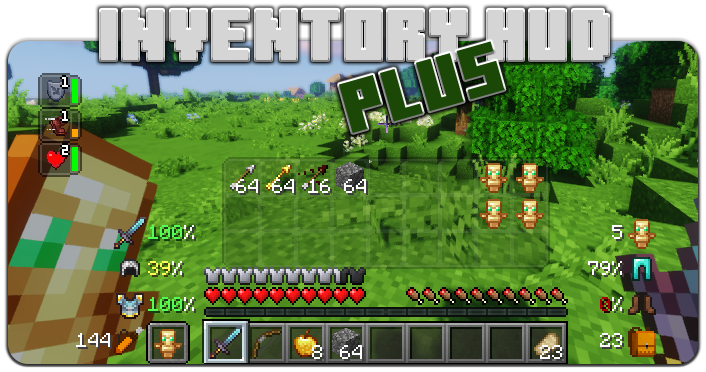

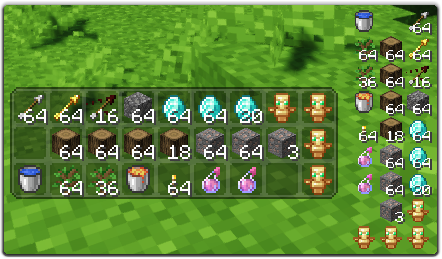
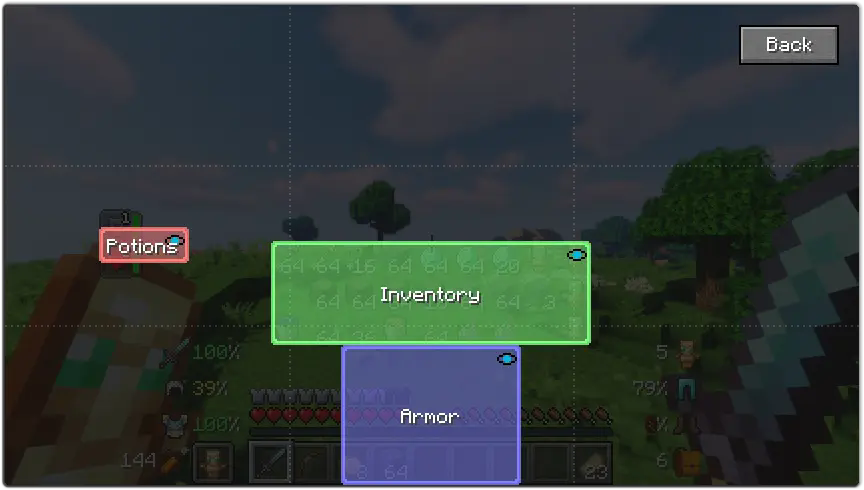
This mod contains a few features, first of all - Inventory HUD, it shows your inventory while you are playing, you can switch between mods (mini/normal and horizontal/vertical), also you can change background transparency and toggle animation on/off
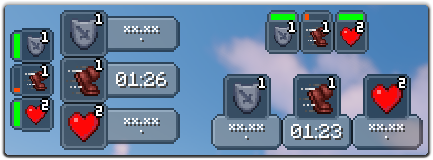
Next feature is PotionHUD, it shows your potion effects with timer or duration bar if you are using mini mode, you can change gap between effects and background transparency in config, and you can enable horizontal mode as well
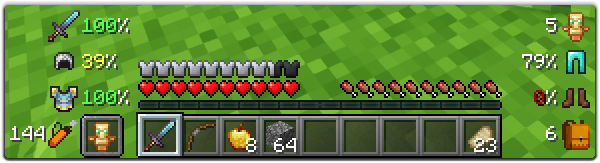
And last but not least feature is ArmorHUD, it shows durability of your armor and equipment, also shows how many free slots do you have in your inventory and how many arrows do you have. This HUD is fully customizable, you can change scale, type of damage indicator or turn on/off each part of your equipment
You can change a lot of options in config ("Mod" button in Main Menu, then "Config"), also you can change the position for each HUD by simply dragging and dropping them. To open ingame config screen you can use keybind ("O" by default)
If you want to help me to make this mod better, you can translate it to your language and send json file to me.
You can find original lang file here: en_us.json
Supported languages
- Chinese Simplified (Mainland China) (zh_cn) (thanks to Satxm)
- Chinese Traditional (Taiwan) (zh_tw) (thanks to yichifauzi)
- Czech (cs_cz) (thanks to Janys159)
- English (en_us)
- French (fr_fr) (thanks to Peperehobbits01)
- German (de_de) (thanks to arrowlevel)
- Hungarian (hu_hu) (thanks to Kalmix88)
- Italian (it_it) (thanks to cranos96)
- Japanese (ja_jp) (thanks to co_91)
- Korean (ko_kr) (thanks to gueso-gato1355)
- Portuguese - Brasil (pt_br) (thanks to VitorLeonardo)
- Russian (ru_ru)
- Spanish (es_es) (thanks to Zeedif)
- Turkish (tr_tr) (thanks to MefeBey)
- Ukrainian (uk_ua) (thanks to Elvis_Danger)
Available Versions
How to Install InventoryHUD+ on Your Client
Install the Mod Loader Locally
Install fabric for your local Minecraft version.
Download the Matching File
Choose the InventoryHUD+ file for fabric and Minecraft 26.3.
Install Mod
Place the .jar file in your local .minecraft/mods folder and restart Minecraft. No server-side installation is required.
Compatibility
Mod Loaders
Minecraft Versions
26.3, 26.2, 26.1.2 (+23 more)
Server-side
✗ UnsupportedRecommended RAM
4 GB(min. 3 GB)Frequently Asked Questions
Does InventoryHUD+ need to be installed on the Minecraft server?
No. Modrinth marks InventoryHUD+ as unsupported on the server side. Install it only in your local Minecraft mods folder. Your server can remain unchanged unless the mod page lists an additional dependency.
Which version and loader does InventoryHUD+ require?
Use a file for fabric, forge, neoforge and your exact Minecraft version. Supported versions include 26.3, 26.2, 26.1.2. Files for different loaders are not interchangeable.
InventoryHUD+ is not working – what should I check?
First check the Minecraft version, loader version and required dependencies. Put the .jar file in your local .minecraft/mods folder and remove older duplicates. Because this mod is client-side, adding server RAM will not fix it.
Similar Mods




Minecraft Server for Your Group
InventoryHUD+ stays on your client. Host a compatible world for your group.