
Junkyard Utils
Adds miscellaneous items that fit into Create and Create: Aeronautics
Screenshots
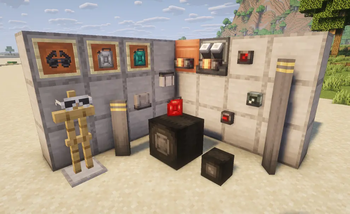

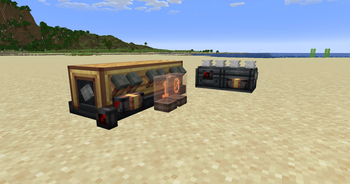
Über diese Mod
Junkyard Utils adds numerous items that assist with making effective machinery and vehicles!
- Jerrycan: Similar to a bucket, but can transfer fluid to any container (such as directly to engine blocks) and with higher precision.
- Redstone Dial: A compact dial, designed for use with Drive By Wire, that displays analog redstone level similarly to Nixie Tubes
- Prismarine Dial: Glowy redstone dial
- Fluid Meter: A side-mounted, compact, and fluid-focused comparator that reads fluid levels of containers
- Headlight: Slim, vehicle-oriented light source with configurable positioning designed for cosmetics
- Roller Wheel: Standalone wheel block with low friction. Raises friction when powered by redstone, allowing for compact landing gear with brakes. (Requires Sable)
- Large Propeller Blade: Compact blade that behaves like a windmill sail with configurable position, designed for less chunky propellers. (Requires Sable)
- Aviator Specs and Dark Aviator Specs: Minimalist goggles that don't clog your screen and look cool too!
Contact us and report bugs at our Discord Server!
Details:
- The Jerrycan fills itself with a normal right-click. It will empty into the targeted block by shift-right-clicking. It will also display its fill level and fluid above the hotbar when wearing goggles.
- Block positions can be adjusted by wrenching them.
- The propeller blade does not automatically glue itself like windmill sails.
This mod is fully compatible with Sable and VS2.
Mod by Xodus4
Feel free to use in any modpack!
Made with hybrid MCreator
Verfügbare Versionen
Junkyard Utils auf dem Server installieren
Server bestellen
Bestelle einen Minecraft Java Server mit mindestens 3 GB RAM (4 GB empfohlen).
neoforge Loader setzen
Wähle im Panel unter "Egg" den neoforge-Loader und die passende Minecraft-Version (1.21.1).
Mod installieren
Öffne den Mod-Browser im Dashboard und suche nach "Junkyard Utils". Klicke "Installieren" – fertig! Alternativ: Lade die .jar via SFTP in den /mods Ordner.
Kompatibilität
Mod-Loader
Minecraft-Versionen
1.21.1
Server-seitig
✓ ErforderlichEmpfohlener RAM
4 GB(min. 3 GB)Häufige Fragen
Junkyard Utils Server crasht beim Start – was tun?
Häufigste Ursache: falsche neoforge-Version oder zu wenig RAM. Prüfe im Server-Log (latest.log), ob ein "OutOfMemoryError" oder "Mixin"-Fehler auftritt. Bei Mado Hosting: Stelle sicher, dass mindestens 3 GB RAM zugewiesen sind und der Loader zur Mod-Version passt (1.21.1). Über das Panel kannst du den Loader mit einem Klick wechseln.
Ist Junkyard Utils mit neoforge kompatibel?
Junkyard Utils unterstützt offiziell neoforge für Minecraft 1.21.1. Im Mado Dashboard werden inkompatible Loader-Kombinationen automatisch erkannt.
Server laggt mit Junkyard Utils – wie optimiere ich die Performance?
Empfohlener RAM: 4 GB (+1 GB pro 8 Spieler). Prüfe mit /spark profiler, ob Junkyard Utils den meisten Tick-Time verbraucht. Häufige Fixes: Server-View-Distance auf 8-10 reduzieren, bei Forge "performant" oder "starlight" als Zusatz-Mod installieren. Bei Mado Hosting läuft dein Server auf NVMe-SSDs mit dedizierten CPU-Kernen für minimale Latenz.
Ähnliche Mods



![[TaCZ] Timeless and Classics Zero](https://cdn.modrinth.com/data/SzzJttH8/fd27766d2bb8390d284696b1dbd358f87e081439_96.webp)


Modded Server mieten
Installiere Junkyard Utils mit nur einem Klick auf deinem Server.