
Modrinth · NeoForge
Junkyard Utils on your Minecraft server
Junkyard Utils runs on Minecraft servers with NeoForge. Order your server, set the loader in the panel and install the mod with one click in the mod browser.
Adds miscellaneous items that fit into Create and Create: Aeronautics
- Downloads
- 10.6K
- Author
- Xodus4
- Loader
- NeoForge
- Minecraft
- 1.21.1
- Updated
- –
Screenshots
What Junkyard Utils looks like
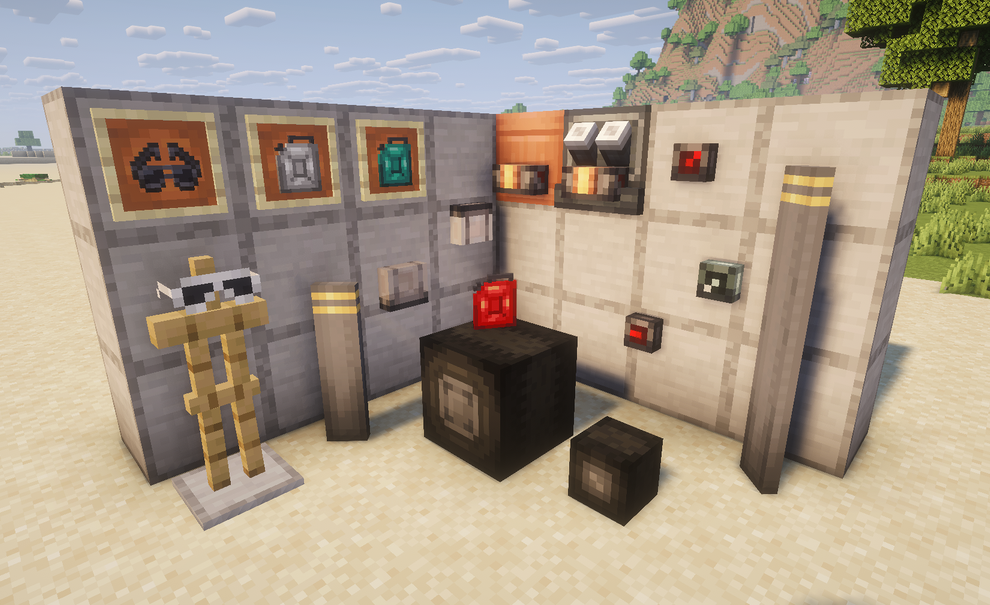


Images: Junkyard Utils on Modrinth, published by the project team.
Setup
Install Junkyard Utils on your server
The server and players need the same loader and Minecraft version. Back up the world before adding or updating mods.
- 01
Configure
4 GB of RAM is preselected. You choose the term and add-ons and pay by credit card or PayPal.
- 02
Set the loader
In the panel, set the server software to NeoForge and choose the matching Minecraft version, for example 1.21.1.
- 03
Install the mod
Search the mod browser for “Junkyard Utils” and install the release for your loader. Alternatively, upload the .jar to the mods folder via SFTP. Required dependencies are listed on the project page.
- 04
Connect
Every player installs the same Junkyard Utils release locally and connects using the server address from the panel.
- On the server
- Required
- On the client
- Required
- Loader
- NeoForge
- Minecraft
- 1.21.1
- License
- MIT License
The panel
Install mods, find errors.
Real screenshots from the Mado panel. Both come with every Minecraft server.
Mod browser
Modrinth and CurseForge, right in the panel.
The browser filters by your Minecraft version. Install mods with one click, without uploading .jar files.

AI crash analysis
When a mod crashes, the analyzer reads the log.
Mods often fail on a wrong loader version, Java version or missing dependency. The analyzer names a likely cause and suggests a fix.

Releases
Published releases
Pick the file that matches your server’s loader and Minecraft version. The server and players need the same release.
Junkyard Utils · ModrinthOriginal description by the project author
Junkyard Utils adds numerous items that assist with making effective machinery and vehicles!
- Jerrycan: Similar to a bucket, but can transfer fluid to any container (such as directly to engine blocks) and with higher precision.
- Redstone Dial: A compact dial, designed for use with Drive By Wire, that displays analog redstone level similarly to Nixie Tubes
- Prismarine Dial: Glowy redstone dial
- Fluid Meter: A side-mounted, compact, and fluid-focused comparator that reads fluid levels of containers
- Headlight: Slim, vehicle-oriented light source with configurable positioning designed for cosmetics
- Roller Wheel: Standalone wheel block with low friction. Raises friction when powered by redstone, allowing for compact landing gear with brakes. (Requires Sable)
- Large Propeller Blade: Compact blade that behaves like a windmill sail with configurable position, designed for less chunky propellers. (Requires Sable)
- Aviator Specs and Dark Aviator Specs: Minimalist goggles that don't clog your screen and look cool too!
Contact us and report bugs at our Discord Server!
Details:
- The Jerrycan fills itself with a normal right-click. It will empty into the targeted block by shift-right-clicking. It will also display its fill level and fluid above the hotbar when wearing goggles.
- Block positions can be adjusted by wrenching them.
- The propeller blade does not automatically glue itself like windmill sails.
This mod is fully compatible with Sable and VS2.
Mod by Xodus4
Feel free to use in any modpack!
Made with hybrid MCreator
Junkyard Utils server crashes on startup – what to do?
Common causes: the loader or Minecraft version does not match the mod file, a dependency is missing, or RAM is too low. Check the log (latest.log) for “OutOfMemoryError”, “Mixin” or missing mods. At Mado, the AI crash analysis reads the log and suggests a cause. You can change the loader and version in the panel.
Which loader does Junkyard Utils run on?
According to Modrinth, Junkyard Utils supports NeoForge for Minecraft 1.21.1.
How much RAM does a server with Junkyard Utils need?
As guidance, 3–4 GB for a server with this mod. This is an estimate, not a measured minimum. More mods, many players and long view distances need more. The spark profiler shows whether a mod is costing tick time.
Similar mods
Popular mods in the same category
 Server-ready

VeinMiner
by Miraculixx
Mine the whole vein on mining a single ore/block. Make the tedious mining experience to something satisfying and fun! FTB Ultimine alternative
 Client only

VeinMiner Hotkey
by Miraculixx
Veinminer Addon - Use a hotkey to veinmine with a dynamic crosshair & block highlighting
 Server-ready

Curios API
by TheIllusiveC4
A flexible and expandable accessory/equipment API for users and developers.
 Server-ready

[TaCZ] Timeless and Classics Zero
by craneblock6666
The most Immersive and Customizable modern FPS experience in Minecraft - A complete Remaster of the TaC gun mod by the original team.
Ready for your server with Junkyard Utils?
4 GB of RAM from €8.00 per month. 35% off your first month with MADO35.