
Just Enough Effect Descriptions (JEED)
JEI plugin that displays information on all status effects
Screenshots
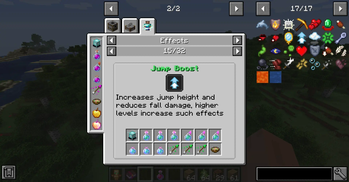
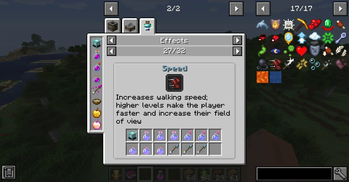
Über diese Mod
Just Enough Effect Descriptions




📖About 📖
Just Enough Effect Descriptions (JEED) is a JEI plugin that provides useful information regarding status effects.
The mod adds a new Effects recipe category accessed either by clicking any of the newly added status effect icons on the JEI item screen or by clicking an active effect from its box on the inventory screen.
Here you'll be able to view information regarding such status effect such as items that can provide it or its description as well as which mod it's from or its effect color.


🧪 Customization 🧪
The mod automatically adds all registered status effect to its page, however modded effects won't had a description.
Modders can easily add such descriptions to their effect by adding the string "effect.[mod_id].[effect_name].description" to their language file.
Since the mod can only automatically detect food items as effect providing ones, mod developers can also easily add support to their custom effect or effect providing items by adding some recipes into their mod.
To do so one can simply use one of the two newly added recipes categories:
- "jeed:effect_provider", which allows one to specify an item that can provide an effect in the following format:
{
  "type": "jeed:effect_provider",
  "effect":{
    "id": "minecraft:haste"
  },
  "providers": [
    {
      "item": "minecraft:beacon"
    }
  ]
}
- "jeed:potion_provider", which allows one to specify an item that can contain any registered potion like tipped arrows for example:
{
  "type": "jeed:potion_provider",
  "providers": [
    {
      "item": "minecraft:splash_potion"
    },
    {
      "item": "minecraft:tipped_arrow"
    }
  ]
}
If you would like to help me provide build in description support for many modded effect be sure to contact me on my discord!
❤️Support Me❤️
Modding is taking a lot of my time, so if you like what I do, and you would like to support me, you can do so here. If you do, you'll receive a custom Globe and or Statue just for you! This also applies if you purchase a server from Akliz using "supplementaries" code.

Need a server? Check out Akliz, they have top brand servers just for modded minecraft. They really have a cozy community with great support and the servers wonderfully
Use code "supplementaries" to get 20% off and also support me in the process!

🦉 Our Mods🦉








Verfügbare Versionen
Just Enough Effect Descriptions (JEED) auf deinem Client installieren
Mod-Loader lokal installieren
Installiere fabric für deine lokale Minecraft-Version.
Passende Datei herunterladen
Wähle die Just Enough Effect Descriptions (JEED)-Datei für fabric und Minecraft 26.1.2.
Mod installieren
Lege die .jar-Datei in deinem lokalen .minecraft/mods-Ordner ab und starte Minecraft neu. Eine Installation auf dem Server ist nicht nötig.
Kompatibilität
Mod-Loader
Minecraft-Versionen
26.1.2, 26.1.1, 26.1 (+15 weitere)
Server-seitig
✗ Nicht unterstütztEmpfohlener RAM
4 GB(min. 3 GB)Häufige Fragen
Muss Just Enough Effect Descriptions (JEED) auf dem Minecraft Server installiert werden?
Nein. Modrinth kennzeichnet Just Enough Effect Descriptions (JEED) serverseitig als nicht unterstützt. Installiere die Mod nur im lokalen Minecraft-Mods-Ordner. Dein Server kann unverändert bleiben, sofern die Mod-Seite keine zusätzliche Abhängigkeit nennt.
Welche Version und welchen Loader braucht Just Enough Effect Descriptions (JEED)?
Nutze eine Datei für fabric, forge, neoforge und exakt deine Minecraft-Version. Unterstützte Versionen sind unter anderem 26.1.2, 26.1.1, 26.1. Loader-Dateien sind nicht untereinander austauschbar.
Just Enough Effect Descriptions (JEED) funktioniert nicht – was kann ich prüfen?
Prüfe zuerst Minecraft-Version, Loader-Version und erforderliche Abhängigkeiten. Lege die .jar-Datei im lokalen .minecraft/mods-Ordner ab und entferne ältere Duplikate. Da die Mod clientseitig ist, löst mehr Server-RAM dieses Problem nicht.
Ähnliche Mods




![[ETF] Entity Texture Features](https://cdn.modrinth.com/data/BVzZfTc1/af683d206d50b05258d865b0d6e4aa2f2cee12f2_96.webp)

Minecraft Server für deine Gruppe
Just Enough Effect Descriptions (JEED) bleibt auf deinem Client. Hoste dazu eine kompatible Welt für deine Mitspieler.