
Just Enough Effect Descriptions (JEED)
JEI plugin that displays information on all status effects
Screenshots
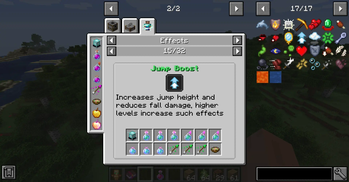
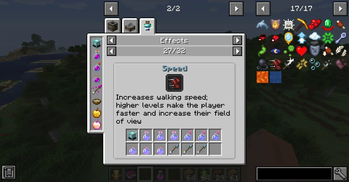
About this Mod
Just Enough Effect Descriptions




📖About 📖
Just Enough Effect Descriptions (JEED) is a JEI plugin that provides useful information regarding status effects.
The mod adds a new Effects recipe category accessed either by clicking any of the newly added status effect icons on the JEI item screen or by clicking an active effect from its box on the inventory screen.
Here you'll be able to view information regarding such status effect such as items that can provide it or its description as well as which mod it's from or its effect color.


🧪 Customization 🧪
The mod automatically adds all registered status effect to its page, however modded effects won't had a description.
Modders can easily add such descriptions to their effect by adding the string "effect.[mod_id].[effect_name].description" to their language file.
Since the mod can only automatically detect food items as effect providing ones, mod developers can also easily add support to their custom effect or effect providing items by adding some recipes into their mod.
To do so one can simply use one of the two newly added recipes categories:
- "jeed:effect_provider", which allows one to specify an item that can provide an effect in the following format:
{
  "type": "jeed:effect_provider",
  "effect":{
    "id": "minecraft:haste"
  },
  "providers": [
    {
      "item": "minecraft:beacon"
    }
  ]
}
- "jeed:potion_provider", which allows one to specify an item that can contain any registered potion like tipped arrows for example:
{
  "type": "jeed:potion_provider",
  "providers": [
    {
      "item": "minecraft:splash_potion"
    },
    {
      "item": "minecraft:tipped_arrow"
    }
  ]
}
If you would like to help me provide build in description support for many modded effect be sure to contact me on my discord!
❤️Support Me❤️
Modding is taking a lot of my time, so if you like what I do, and you would like to support me, you can do so here. If you do, you'll receive a custom Globe and or Statue just for you! This also applies if you purchase a server from Akliz using "supplementaries" code.

Need a server? Check out Akliz, they have top brand servers just for modded minecraft. They really have a cozy community with great support and the servers wonderfully
Use code "supplementaries" to get 20% off and also support me in the process!

🦉 Our Mods🦉









Available Versions
How to Install Just Enough Effect Descriptions (JEED) on Your Client
Install the Mod Loader Locally
Install fabric for your local Minecraft version.
Download the Matching File
Choose the Just Enough Effect Descriptions (JEED) file for fabric and Minecraft 26.1.2.
Install Mod
Place the .jar file in your local .minecraft/mods folder and restart Minecraft. No server-side installation is required.
Compatibility
Mod Loaders
Minecraft Versions
26.1.2, 26.1.1, 26.1 (+15 more)
Server-side
✗ UnsupportedRecommended RAM
4 GB(min. 3 GB)Frequently Asked Questions
Does Just Enough Effect Descriptions (JEED) need to be installed on the Minecraft server?
No. Modrinth marks Just Enough Effect Descriptions (JEED) as unsupported on the server side. Install it only in your local Minecraft mods folder. Your server can remain unchanged unless the mod page lists an additional dependency.
Which version and loader does Just Enough Effect Descriptions (JEED) require?
Use a file for fabric, forge, neoforge and your exact Minecraft version. Supported versions include 26.1.2, 26.1.1, 26.1. Files for different loaders are not interchangeable.
Just Enough Effect Descriptions (JEED) is not working – what should I check?
First check the Minecraft version, loader version and required dependencies. Put the .jar file in your local .minecraft/mods folder and remove older duplicates. Because this mod is client-side, adding server RAM will not fix it.
Similar Mods




![[ETF] Entity Texture Features](https://cdn.modrinth.com/data/BVzZfTc1/af683d206d50b05258d865b0d6e4aa2f2cee12f2_96.webp)

Minecraft Server for Your Group
Just Enough Effect Descriptions (JEED) stays on your client. Host a compatible world for your group.