![[Let's Do] Hearth & Timber](https://cdn.modrinth.com/data/paO4gjmE/62eb2185a7edf39a5e23ea24d8c0a208b223a0d6_96.webp)
[Let's Do] Hearth & Timber
Craft timber houses with beams, frames and sturdy wooden details that make every home feel hand-built and storied.
Screenshots
Über diese Mod

Terrific Trims & Serious Supports
The mod inspired by the desire to detail buildings
"You lay the foundation, we do the rest"
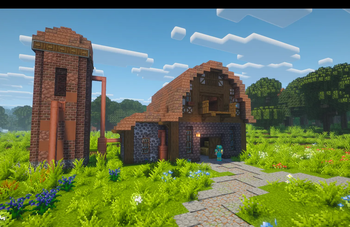
Hearth & Timber adds a variety of simple yet intricate ways to add extra details to your already beautiful builds. Pull up the support beams, add the railings, trim your windows. That's personal flair right there.
Make your builds exactly how you want. Listen to your heart.
Hearth & Timber is Furniture's brother within the Let's Do collection and serves to detail the exterior and structural aesthetic of the interior while Furniture does the decor. Team work makes the dream work.
Structural Integrity
- A variety of supports to make your structures look up to code
- Some railings to fit on your balconies
- Use an axe or a pickaxe to switch between stages
If it falls, it was a design choice.
Framing and Trimming
- A variety of frames that give that medieval frame effect, as well as frames that allow for new shapes and the creation of vertical slabs
- Trims to give your windows and doors a modular finishing touch with the ability to create a windowsill as well by adding a flowerpot to the trim attached to your window
- Framework, a weaker yet easier to craft version of scaffolding for vertical advantages
It would seem that I've been... framed.
Decorative Elements
- New wooden windows and panes
- Sliding doors in three different sizes, adaptable by right-clicking them with any vanilla plank as well as an iron ingot
- Thatch with four different controllable stages
- Plaster, available in all 16 colors
- A diverse assortment of wooden, terracotta, and patchwork shingles
- A small variety of new stonetypes
Hoist the supports.
Install the railings.
Still fall off that cliff you didn't quite see.
Dedicated to MissLilitu
The Let’s Do Collection

Support & Community
Let’s Do grows through its community.
Verfügbare Versionen
[Let's Do] Hearth & Timber auf dem Server installieren
Server bestellen
Bestelle einen Minecraft Java Server mit mindestens 3 GB RAM (4 GB empfohlen).
fabric Loader setzen
Wähle im Panel unter "Egg" den fabric-Loader und die passende Minecraft-Version (1.21.1).
Mod installieren
Öffne den Mod-Browser im Dashboard und suche nach "[Let's Do] Hearth & Timber". Klicke "Installieren" – fertig! Alternativ: Lade die .jar via SFTP in den /mods Ordner.
Kompatibilität
Mod-Loader
Minecraft-Versionen
1.21.1
Server-seitig
✓ ErforderlichEmpfohlener RAM
4 GB(min. 3 GB)Häufige Fragen
[Let's Do] Hearth & Timber Server crasht beim Start – was tun?
Häufigste Ursache: falsche fabric-Version oder zu wenig RAM. Prüfe im Server-Log (latest.log), ob ein "OutOfMemoryError" oder "Mixin"-Fehler auftritt. Bei Mado Hosting: Stelle sicher, dass mindestens 3 GB RAM zugewiesen sind und der Loader zur Mod-Version passt (1.21.1). Über das Panel kannst du den Loader mit einem Klick wechseln.
Ist [Let's Do] Hearth & Timber mit fabric und neoforge kompatibel?
[Let's Do] Hearth & Timber unterstützt offiziell fabric, neoforge für Minecraft 1.21.1. Im Mado Dashboard werden inkompatible Loader-Kombinationen automatisch erkannt.
Server laggt mit [Let's Do] Hearth & Timber – wie optimiere ich die Performance?
Empfohlener RAM: 4 GB (+1 GB pro 8 Spieler). Prüfe mit /spark profiler, ob [Let's Do] Hearth & Timber den meisten Tick-Time verbraucht. Häufige Fixes: Server-View-Distance auf 8-10 reduzieren, bei Forge "performant" oder "starlight" als Zusatz-Mod installieren. Bei Mado Hosting läuft dein Server auf NVMe-SSDs mit dedizierten CPU-Kernen für minimale Latenz.
Ähnliche Mods

![[ETF] Entity Texture Features](https://cdn.modrinth.com/data/BVzZfTc1/af683d206d50b05258d865b0d6e4aa2f2cee12f2_96.webp)
![[EMF] Entity Model Features](https://cdn.modrinth.com/data/4I1XuqiY/6e5bbd0d06b1741bfdab6c0cfab6de8fdaf0064c_96.webp)



Modded Server mieten
Installiere [Let's Do] Hearth & Timber mit nur einem Klick auf deinem Server.