
Lock & Block Security
Adds fun and creative security features to protect your stuff
Screenshots
Über diese Mod



Description:
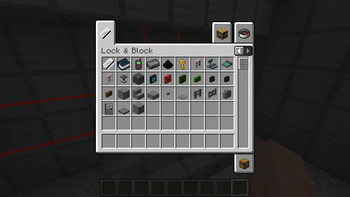
Lock & Block introduces fun and creative security features to protect your Minecraft world!
Features:
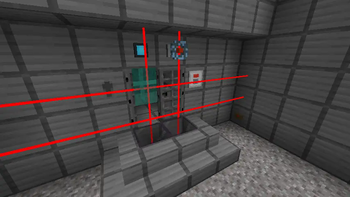
- Keycards & readers: Program keycard readers to only accept your keycard to access your secret stuff
- Keypads: Set a secret code to emit redstone; open doors or do whatever you need to secure
- Tesla Coil: Protect areas by zapping anyone nearby when powered by redstone
- Force fields: Create an unbreakable wall that you can disable and enable at will
- Mines: Protect you stuff with explosives, using laser trip mines, land mines, and proximity mines
- Player Sensor: Detect when a player is near and trigger a redstone contraption
- Detonator Mine: Use a detonator to remotely detonate land mines
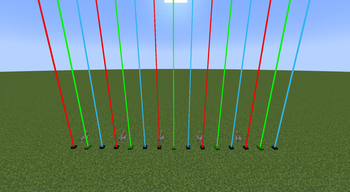
- Laser Sensor: Detect when players or entities touch a laser with a redstone signal
- Redstone Laser: Protect an area with painful lasers
- Reinforced Iron: Reinforced iron blocks are much harder to break than iron
- Keys and locks Lock reinforced iron door with keys, and activate redstone with keys
Requirements:
Downloads
Contributing and Feedback:
- Feel free to submit issues or feature requests on GitHub.
- Contributions are welcome! Fork the repository and submit a pull request with your changes.
Planned Possible Features:
- Some kind of security cameras
Please note that these features are planned possibilities and not guaranteed. As a solo developer, I'll do my best to
implement them, but development priorities may change.
Support:
For any questions or support, you can reach out to us on GitHub. Your
feedback is highly valued!
Verfügbare Versionen
Lock & Block Security auf dem Server installieren
Server bestellen
Bestelle einen Minecraft Java Server mit mindestens 3 GB RAM (4 GB empfohlen).
fabric Loader setzen
Wähle im Panel unter "Egg" den fabric-Loader und die passende Minecraft-Version (1.21.1).
Mod installieren
Öffne den Mod-Browser im Dashboard und suche nach "Lock & Block Security". Klicke "Installieren" – fertig! Alternativ: Lade die .jar via SFTP in den /mods Ordner.
Kompatibilität
Mod-Loader
Minecraft-Versionen
1.21.1, 1.20.1
Server-seitig
✓ ErforderlichEmpfohlener RAM
4 GB(min. 3 GB)Häufige Fragen
Lock & Block Security Server crasht beim Start – was tun?
Häufigste Ursache: falsche fabric-Version oder zu wenig RAM. Prüfe im Server-Log (latest.log), ob ein "OutOfMemoryError" oder "Mixin"-Fehler auftritt. Bei Mado Hosting: Stelle sicher, dass mindestens 3 GB RAM zugewiesen sind und der Loader zur Mod-Version passt (1.21.1). Über das Panel kannst du den Loader mit einem Klick wechseln.
Ist Lock & Block Security mit fabric kompatibel?
Lock & Block Security unterstützt offiziell fabric für Minecraft 1.21.1, 1.20.1. Im Mado Dashboard werden inkompatible Loader-Kombinationen automatisch erkannt.
Server laggt mit Lock & Block Security – wie optimiere ich die Performance?
Empfohlener RAM: 4 GB (+1 GB pro 8 Spieler). Prüfe mit /spark profiler, ob Lock & Block Security den meisten Tick-Time verbraucht. Häufige Fixes: Server-View-Distance auf 8-10 reduzieren, bei Forge "performant" oder "starlight" als Zusatz-Mod installieren. Bei Mado Hosting läuft dein Server auf NVMe-SSDs mit dedizierten CPU-Kernen für minimale Latenz.
Ähnliche Mods

![[ETF] Entity Texture Features](https://cdn.modrinth.com/data/BVzZfTc1/af683d206d50b05258d865b0d6e4aa2f2cee12f2_96.webp)
![[EMF] Entity Model Features](https://cdn.modrinth.com/data/4I1XuqiY/6e5bbd0d06b1741bfdab6c0cfab6de8fdaf0064c_96.webp)



Modded Server mieten
Installiere Lock & Block Security mit nur einem Klick auf deinem Server.