
Magic Brooms
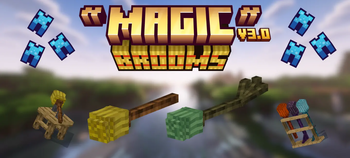
Magic Brooms adds fully rideable broomsticks to Minecraft, each with unique flight traits, magical abilities and polished VFX. Craft them step by step, create spell scrolls, install powerful upgrades, and display your collection on functional broom racks.
Screenshots
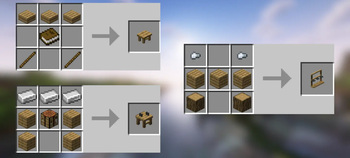
Über diese Mod
Magic Brooms
Magic Brooms adds 14 fully rideable broomsticks to Minecraft, built around real flight, magical abilities and survival progression.
Flying feels like riding an actual broom rather than using Creative Mode. Brooms have momentum, controlled ascent and descent, smooth steering, banking animations and visual feedback that follows every movement.
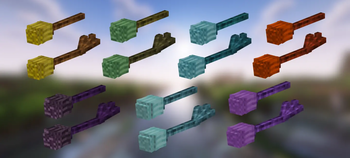
There are seven broom families, each with a standard and upgraded version:
Magic, Fire, Ice, Lightning, Ender, Grove and Tide.
The six magical families have their own scroll ability, particles, sounds and gameplay style. Cast rings of fire, summon lightning, create frost storms, blink through the air, protect allies with nature magic or launch enemies with a tidal wave.
Build Them Yourself
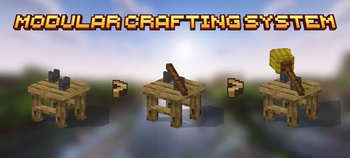
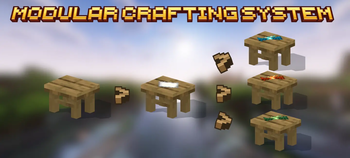
Brooms are assembled physically on the Broom Assembly Bench.
Add wood, attach the hay, infuse it with a magical catalyst and optionally install an upgrade. Every step appears directly on the bench, and the finished broom floats toward you when completed.
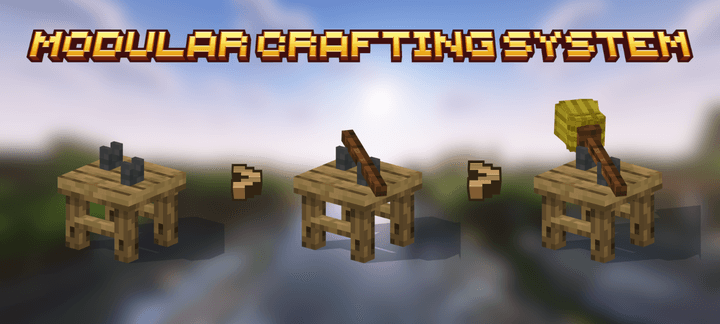
SHOWCASE
🌟 Support Our Creative Journey!
Help us continue delivering exceptional content! Every contribution fuels development, enhances resources, and drives innovation. If our work enriches your Minecraft experience, consider supporting our growth. Your generosity means everything! 💖
[Donate Now]
🌐 Exclusive Early Access
Discover all our addons and be the first to experience new updates on our official website! Latest versions debut here before anywhere else.
[Visit Official Website]
❄️🦊 Join Iced Fox Studios! 🦊❄️
Unlock Minecraft's full potential with our hub for mods, tools, and exclusive rewards:
Verfügbare Versionen
Magic Brooms auf dem Server installieren
Server bestellen
Bestelle einen Minecraft Java Server mit mindestens 3 GB RAM (4 GB empfohlen).
fabric Loader setzen
Wähle im Panel unter "Egg" den fabric-Loader und die passende Minecraft-Version (26.2).
Mod installieren
Öffne den Mod-Browser im Dashboard und suche nach "Magic Brooms". Klicke "Installieren" – fertig! Alternativ: Lade die .jar via SFTP in den /mods Ordner.
Kompatibilität
Mod-Loader
Minecraft-Versionen
26.2, 1.21.11, 1.21.1 (+9 weitere)
Server-seitig
✓ ErforderlichEmpfohlener RAM
4 GB(min. 3 GB)Häufige Fragen
Magic Brooms Server crasht beim Start – was tun?
Häufigste Ursache: falsche fabric-Version oder zu wenig RAM. Prüfe im Server-Log (latest.log), ob ein "OutOfMemoryError" oder "Mixin"-Fehler auftritt. Bei Mado Hosting: Stelle sicher, dass mindestens 3 GB RAM zugewiesen sind und der Loader zur Mod-Version passt (26.2). Über das Panel kannst du den Loader mit einem Klick wechseln.
Ist Magic Brooms mit fabric und forge und neoforge kompatibel?
Magic Brooms unterstützt offiziell fabric, forge, neoforge für Minecraft 26.2, 1.21.11, 1.21.1. Achtung: Forge- und Fabric-Mods sind NICHT untereinander kompatibel – wähle einen Loader und bleibe dabei. Im Mado Dashboard werden inkompatible Loader-Kombinationen automatisch erkannt.
Server laggt mit Magic Brooms – wie optimiere ich die Performance?
Empfohlener RAM: 4 GB (+1 GB pro 8 Spieler). Prüfe mit /spark profiler, ob Magic Brooms den meisten Tick-Time verbraucht. Häufige Fixes: Server-View-Distance auf 8-10 reduzieren, bei Forge "performant" oder "starlight" als Zusatz-Mod installieren. Bei Mado Hosting läuft dein Server auf NVMe-SSDs mit dedizierten CPU-Kernen für minimale Latenz.
Ähnliche Mods




Modded Server mieten
Installiere Magic Brooms mit nur einem Klick auf deinem Server.