
Magic Brooms
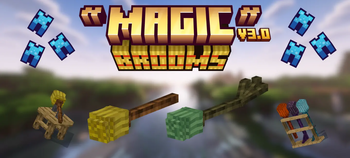
Magic Brooms adds fully rideable broomsticks to Minecraft, each with unique flight traits, magical abilities and polished VFX. Craft them step by step, create spell scrolls, install powerful upgrades, and display your collection on functional broom racks.
Screenshots
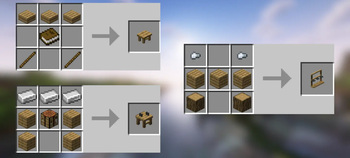
About this Mod
Magic Brooms
Magic Brooms adds 14 fully rideable broomsticks to Minecraft, built around real flight, magical abilities and survival progression.
Flying feels like riding an actual broom rather than using Creative Mode. Brooms have momentum, controlled ascent and descent, smooth steering, banking animations and visual feedback that follows every movement.
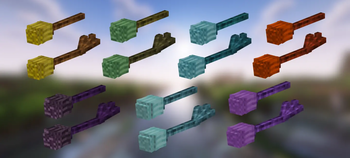
There are seven broom families, each with a standard and upgraded version:
Magic, Fire, Ice, Lightning, Ender, Grove and Tide.
The six magical families have their own scroll ability, particles, sounds and gameplay style. Cast rings of fire, summon lightning, create frost storms, blink through the air, protect allies with nature magic or launch enemies with a tidal wave.
Build Them Yourself
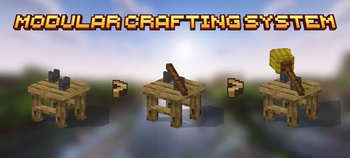
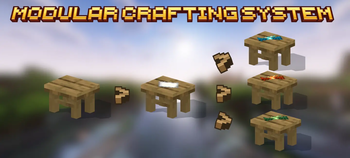
Brooms are assembled physically on the Broom Assembly Bench.
Add wood, attach the hay, infuse it with a magical catalyst and optionally install an upgrade. Every step appears directly on the bench, and the finished broom floats toward you when completed.
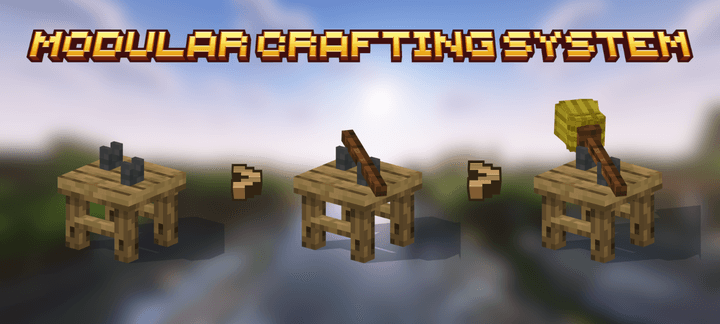
SHOWCASE
🌟 Support Our Creative Journey!
Help us continue delivering exceptional content! Every contribution fuels development, enhances resources, and drives innovation. If our work enriches your Minecraft experience, consider supporting our growth. Your generosity means everything! 💖
[Donate Now]
🌐 Exclusive Early Access
Discover all our addons and be the first to experience new updates on our official website! Latest versions debut here before anywhere else.
[Visit Official Website]
❄️🦊 Join Iced Fox Studios! 🦊❄️
Unlock Minecraft's full potential with our hub for mods, tools, and exclusive rewards:
Available Versions
How to Install Magic Brooms on Your Server
Order Server
Order a Minecraft Java server with at least 3 GB RAM (4 GB recommended).
Set fabric Loader
In the panel under "Egg", select the fabric loader and matching Minecraft version (26.2).
Install Mod
Open the mod browser in the dashboard and search for "Magic Brooms". Click "Install" – done! Alternatively, upload the .jar via SFTP to the /mods folder.
Compatibility
Mod Loaders
Minecraft Versions
26.2, 1.21.11, 1.21.1 (+9 more)
Server-side
✓ RequiredRecommended RAM
4 GB(min. 3 GB)Frequently Asked Questions
Magic Brooms server crashes on startup – what to do?
Most common cause: wrong fabric version or insufficient RAM. Check the server log (latest.log) for "OutOfMemoryError" or "Mixin" errors. With Mado Hosting: ensure at least 3 GB RAM is allocated and the loader matches the mod version (26.2). You can switch loaders with one click in the panel.
Is Magic Brooms compatible with fabric and forge and neoforge?
Magic Brooms officially supports fabric, forge, neoforge for Minecraft 26.2, 1.21.11, 1.21.1. Note: Forge and Fabric mods are NOT cross-compatible – pick one loader and stick with it. The Mado dashboard automatically detects incompatible loader combinations.
Server lagging with Magic Brooms – how to optimize performance?
Recommended RAM: 4 GB (per 8 players). Use /spark profiler to check if Magic Brooms consumes the most tick time. Common fixes: reduce server view-distance to 8-10, install "performant" or "starlight" as supplementary mods on Forge. With Mado Hosting, your server runs on NVMe SSDs with dedicated CPU cores for minimal latency.
Similar Mods




Rent Modded Server
Install Magic Brooms with just one click on your server.