
Modrinth · Fabric, Forge, NeoForge
Map Distance Fix auf deinem Minecraft Server
Map Distance Fix läuft auf Minecraft Servern mit Fabric oder Forge oder NeoForge. Bestell deinen Server, stell den Loader im Panel ein und installiere die Mod mit einem Klick im Mod-Browser.
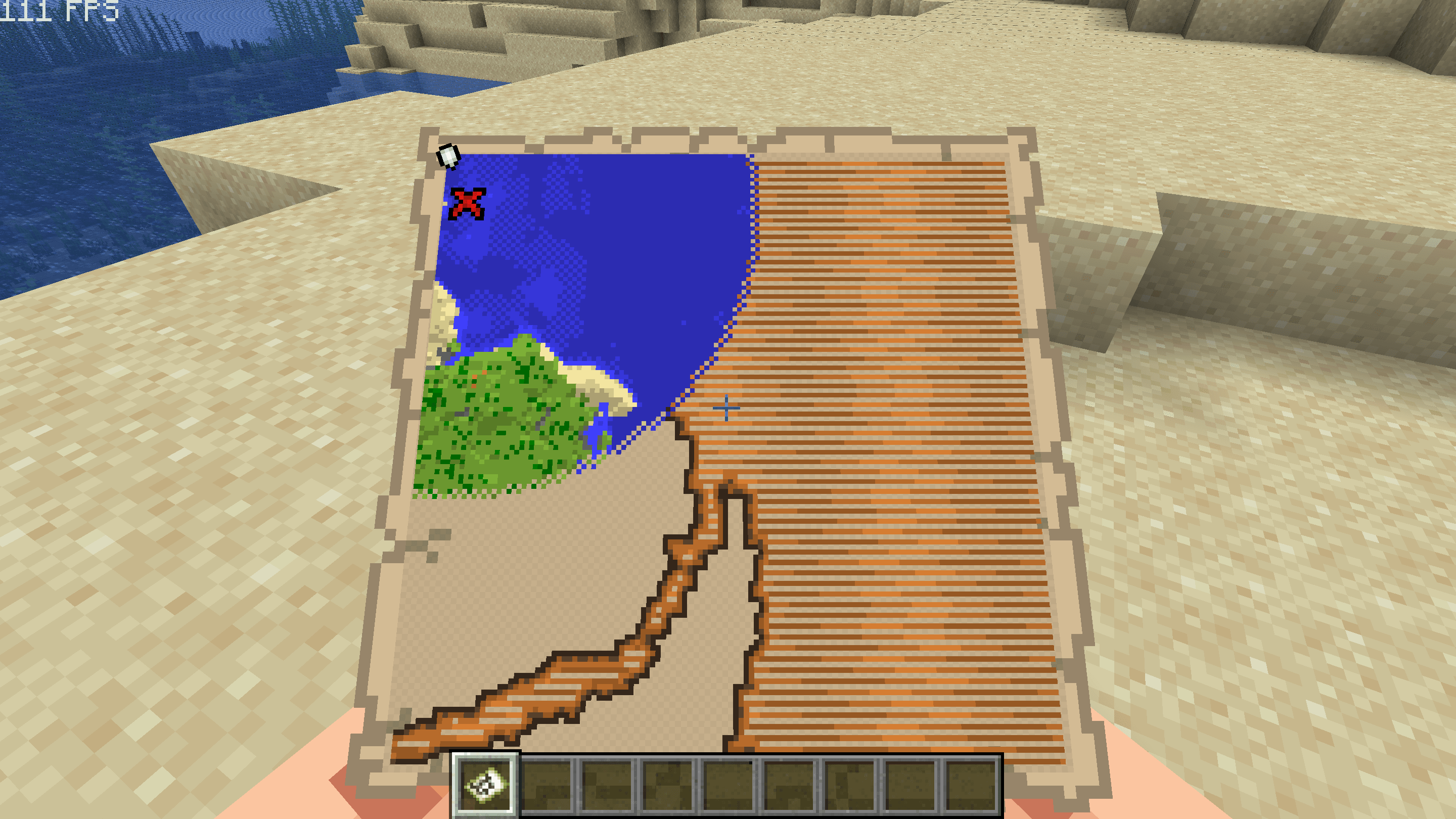
A simple mod that shows a player indicator instead of a white dot when outside map boundaries.
- Downloads
- 1.2M
- Autor
- MrErenK
- Loader
- Fabric, Forge, NeoForge
- Minecraft
- 1.17 – 26.2
- Aktualisiert
- –
Screenshots
So sieht Map Distance Fix aus

Bilder: Map Distance Fix auf Modrinth, vom Projektteam veröffentlicht.
Einrichtung
Map Distance Fix auf dem Server installieren
Server und Spieler brauchen denselben Loader und dieselbe Minecraft-Version. Sichere die Welt, bevor du Mods hinzufügst oder aktualisierst.
- 01
Konfigurieren
4 GB RAM sind vorausgewählt. Laufzeit und Add-ons wählst du selbst, bezahlt wird per Kreditkarte oder PayPal.
- 02
Loader einstellen
Stell im Panel die Serversoftware auf Fabric oder Forge oder NeoForge und wähl die passende Minecraft-Version, zum Beispiel 26.2.
- 03
Mod installieren
Such im Mod-Browser nach „Map Distance Fix“ und installiere die Version für deinen Loader. Alternativ lädst du die .jar per SFTP in den Ordner mods. Erforderliche Abhängigkeiten stehen auf der Projektseite.
- 04
Verbinden
Alle Spieler installieren Map Distance Fix in derselben Version lokal und verbinden sich über die Serveradresse aus dem Panel.
- Auf dem Server
- Optional
- Auf dem Client
- Erforderlich
- Loader
- Fabric, Forge, NeoForge
- Minecraft
- 26.2, 26.1.2, 26.1.1 +30 weitere
- Lizenz
- MIT License
Das Panel
Mods installieren, Fehler finden.
Echte Screenshots aus dem Mado Panel. Beides ist bei jedem Minecraft Server enthalten.
Mod-Browser
Modrinth und CurseForge direkt im Panel.
Der Browser filtert nach deiner Minecraft-Version. Mods installierst du mit einem Klick, ohne .jar-Dateien hochzuladen.

KI-Crash-Analyse
Wenn ein Mod crasht, liest die Analyse das Log.
Mods scheitern oft an einer falschen Loader-Version, Java-Version oder fehlenden Abhängigkeit. Die Analyse nennt eine wahrscheinliche Ursache und einen Lösungsvorschlag.

Versionen
Veröffentlichte Versionen
Nimm die Datei, die zu Loader und Minecraft-Version deines Servers passt. Server und Spieler brauchen dieselbe Version.
Map Distance Fix · Modrinth- Map Distance Fix 1.0.8+mc1.20.5-1.21.827. August 2025Minecraft 1.20.5, 1.20.6, 1.21, 1.21.1, 1.21.2, 1.21.3, 1.21.4, 1.21.5, 1.21.6, 1.21.7, 1.21.8 · Fabric
- Map Distance Fix 1.0.6+mc1.20.5-1.21.811. August 2025Minecraft 1.20.5, 1.20.6, 1.21, 1.21.1, 1.21.2, 1.21.3, 1.21.4, 1.21.5, 1.21.6, 1.21.7, 1.21.8 · Fabric
- Map Distance Fix 1.0.3+mc1.21-1.21.71. Juli 2025Minecraft 1.21, 1.21.1, 1.21.2, 1.21.3, 1.21.4, 1.21.5, 1.21.6, 1.21.7 · Fabric
Originalbeschreibung des Projektautors
MapDistanceFix
A very simple Minecraft mod that fixes map player indicators to always show the player's position and direction, even when outside map boundaries, making it much easier to navigate treasure maps and other map items.
Thanks everyone for 1 million downloads!!
Why This Mod?
In vanilla Minecraft, when you're far from a map's boundaries, the player indicator either disappears entirely or shows as a generic "player_off_map" and "player_off_limits" decorations without directional information. This mod fixes that by:
- Converting off-map player decorations to regular player decorations
- Maintaining correct rotation to show which direction you're facing
- Ensuring the player is always visible for better navigation
Features
- Always Visible Player: Ensures the player icon is always visible on maps, even when far outside the map boundaries
- Correct Direction: Shows the player's actual facing direction instead of a generic off-map indicator
- Distance Display: Shows the distance from the player to the map center or to the nearest structure, helping you navigate to your destination
- Configurable: Customize distance display settings via a JSON config file or in-game GUI using cloth config
- In-Game Commands: Reload config and check status without restarting the game
- Server-Side Only: No client modifications required if the mod is installed on the server
Optional Dependencies
- Cloth Config - Enables in-game configuration GUI
- Mod Menu - Provides access to the config screen from the mod list
Both mods are optional. Without them, you can still configure the mod by editing the JSON config file directly or via in-game commands
Configuration
The mod creates a configuration file at config/mapdistancefix.json with the following options:
| Option | Default | Description |
|---|---|---|
showDistance |
true |
Enable or disable distance display |
showDistanceWhenOffMap |
true |
Show distance when the player is outside the map boundaries |
showDistanceInsideBoundaries |
false |
Show distance even when the player is inside the map boundaries |
showStructureDistances |
true |
Show the distance to the nearest structure in the map |
distanceFormat |
%dm |
Format string for distance (use %d for the distance value) |
useShortUnits |
true |
Use short format like "1.2k" for large distances |
shortUnitThreshold |
1000 |
Distance threshold (in blocks) for switching to short units |
In-Game Configuration
If you have Cloth Config and Mod Menu installed, you can access the configuration screen by:
- Opening the game menu
- Clicking "Mods" (added by Mod Menu)
- Finding "Map Distance Fix" in the list
- Clicking the configuration button
or if you don't have these mods, you can use commands:
Commands
/mapdistancefix config <config> set/reset/getor/mdf config <config> set/reset/get- Change configs in-game/mapdistancefix statusor/mdf status- Display current configuration settings/mapdistancefix reloador/mdf reload- Reload the configuration file if modified (no need to run if using /mdf config command)
Compatibility
- JAVA Compatibilty: Java 21 is required for Minecraft versions above 1.20.5, Java 17 is required for Minecraft versions above 1.19.3 till 1.20.1.
- Server Compatibility: Does not work on vanilla servers. But if the mod is installed on the server, its not required to install on the client.
- Other Mods: Should be compatible with most other mods that don't heavily modify maps.
Troubleshooting
Common Issues
Config screen not appearing
- Make sure you have both Cloth Config and Mod Menu (for fabric) installed
- Check that the versions are compatible with your Minecraft version
Distance text looks weird with shaders
- This is a known issue with some shader packs. The distance text background may appear transparent or glitchy.
- If this bothers you, disable the distance display by setting
showDistancetofalsein the config file or through the in-game config screen (if Cloth Config is installed).
Getting Help
If you encounter issues:
- Check the latest logs for error messages
- Verify that Fabric API is correctly installed
- Try with minimal mods to isolate conflicts
- Report issues on the GitHub Issues page
Contributing
Contributions are welcome! Here's how you can help:
Pull Requests
- Follow existing code style and conventions
- Add appropriate comments and documentation
- Test thoroughly before submitting
- Update README if adding new features
Bug Reports
- Use the GitHub Issues page
- Include Minecraft version, mod version, and log files
- Describe steps to reproduce the issue
License
This project is licensed under the MIT License.
Feel free to use this mod in your modpacks without asking for permission. But please do not redistribute the jar files anywhere else!
Acknowledgments
- mappings.dev for the huge help with finding proper functions
- Fabric Team for the excellent modding framework
- Minecraft Community for inspiration and feedback
- Contributors who help improve this mod
Made with ❤️ by MrErenK for the Minecraft community
For questions, suggestions, or support, feel free to open an issue on GitHub!
Have a question, modpack integration inquiry, version request or quick feedback? Reach out on Discord: @mrerenk
Map Distance Fix Server crasht beim Start – was tun?
Häufige Ursachen: Loader- oder Minecraft-Version passen nicht zur Mod-Datei, eine Abhängigkeit fehlt oder der RAM reicht nicht. Such im Log (latest.log) nach „OutOfMemoryError“, „Mixin“ oder fehlenden Mods. Bei Mado wertet die KI-Crash-Analyse das Log aus und schlägt eine Ursache vor. Loader und Version änderst du im Panel.
Mit welchem Loader läuft Map Distance Fix?
Laut Modrinth unterstützt Map Distance Fix Fabric, Forge, NeoForge für Minecraft 26.2, 26.1.2, 26.1.1. Forge- und Fabric-Dateien sind nicht untereinander austauschbar: Wähl einen Loader für Server und Clients.
Wie viel RAM braucht ein Server mit Map Distance Fix?
Als Orientierung 3–4 GB für einen Server mit dieser Mod. Das ist eine Schätzung, keine gemessene Mindestanforderung. Weitere Mods, viele Spieler und große Sichtweiten brauchen mehr. Ob eine Mod die Tick-Zeit belastet, siehst du mit dem spark-Profiler.
Ähnliche Mods
Beliebte Mods aus derselben Kategorie
 Nur Client

Sodium Extra
von FlashyReese
A Sodium addon that adds features that shouldn't be in Sodium.
 Server-fähig
VeinMiner
von Miraculixx
Mine the whole vein on mining a single ore/block. Make the tedious mining experience to something satisfying and fun! FTB Ultimine alternative
 Nur Client

Remove Reloading Screen
von dima_dencep
Makes resource packs load in the background, allowing you to do other things while waiting!
 Server-fähig

Sinytra Connector
von Su5eD
Lets you play Fabric mods on NeoForge
Bereit für deinen Server mit Map Distance Fix?
4 GB RAM ab 8,00 € im Monat. 35 % auf den 1. Monat mit MADO35.