
Minecraft Backrooms Found Footage
A mod that aims to turn Minecraft into a Found Footage Game.
Screenshots
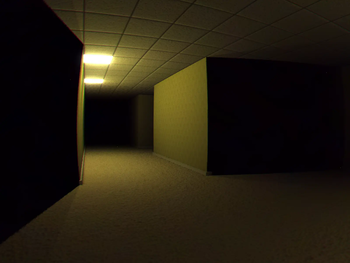
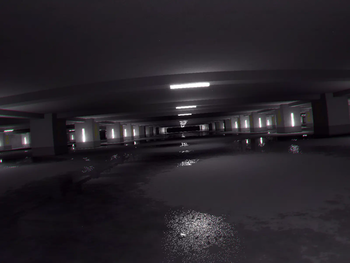
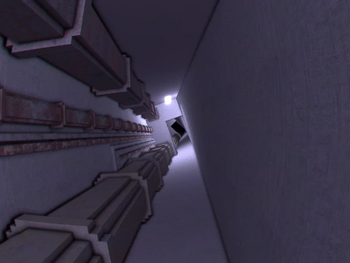
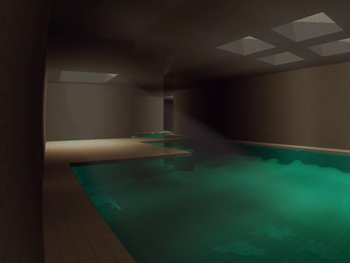

Über diese Mod



Minecraft Found Footage is a mod that aims to bring the feeling and aesthetic of "Found Footage" videos to Minecraft
This mod adds in custom shaders and camera effects using Veil and is not compatible with sodium or iris
The mod also has issues with integrated graphics and DOES NOT WORK with MacOS (we tried)
Use Mod menu to access the config
Suffocating yourself in any way for long enough will eventually cause you to noclip into the backrooms, where you have to travel through all 5 levels to escape:
- Level 0 ---------------------- The backrooms we all know and love
- Level 1 ---------------------- The Habitable Zone
- Level 2 ---------------------- Pipe Dreams
- Level 324 ------------------- The Forgotten Station
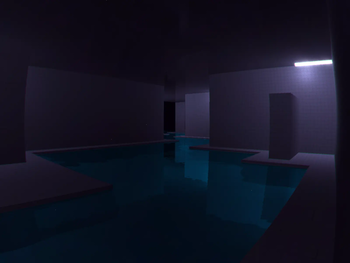
- The Poolrooms -------------- The Poolrooms O.o
- The Infinite Grass Field ----- This one's different
For better descriptions of each level, Read the wiki
The mod also adds four commands just in case:
- /skinwalker
: Just in case the skinwalker refuses to spawn naturally, you can do this to have the skinwalker take the skin of your target. Don't tell anyone :D - /release
: Releases the target from the skinwalker if the target has had their skin stolen - /backroomsevent
: Manually triggers an event - /gimmemyinventoryback
: Restores the saved inventory of the specified targets from before they entered the Backrooms - /level
: Manually teleport yourself to a certain level.
Please report any bugs you may find to the GitHub Page
If the mod does NOT work, make sure you're following all of the steps below:
- Download Simple Voice Chat and Geckolib. You do not need to download veil. It's already included
- Do not use sodium or iris. This mod uses Veil which, in 1.20.1, is incompatible with either
- Do not use Fabulous! graphics. Only Fast or Fancy
- Do not remove Veil's deferred resource pack
Notes
- The skinwalker does not spawn naturally in singleplayer. I really didn't see a point
- There are a few bugs with devices that use integrated graphics and Mac OS
Verfügbare Versionen
Minecraft Backrooms Found Footage auf dem Server installieren
Server bestellen
Bestelle einen Minecraft Java Server mit mindestens 4 GB RAM (6 GB empfohlen).
fabric Loader setzen
Wähle im Panel unter "Egg" den fabric-Loader und die passende Minecraft-Version (1.20.1).
Mod installieren
Öffne den Mod-Browser im Dashboard und suche nach "Minecraft Backrooms Found Footage". Klicke "Installieren" – fertig! Alternativ: Lade die .jar via SFTP in den /mods Ordner.
Kompatibilität
Mod-Loader
Minecraft-Versionen
1.20.1
Server-seitig
✓ ErforderlichEmpfohlener RAM
6 GB(min. 4 GB)Häufige Fragen
Minecraft Backrooms Found Footage Server crasht beim Start – was tun?
Häufigste Ursache: falsche fabric-Version oder zu wenig RAM. Prüfe im Server-Log (latest.log), ob ein "OutOfMemoryError" oder "Mixin"-Fehler auftritt. Bei Mado Hosting: Stelle sicher, dass mindestens 4 GB RAM zugewiesen sind und der Loader zur Mod-Version passt (1.20.1). Über das Panel kannst du den Loader mit einem Klick wechseln.
Ist Minecraft Backrooms Found Footage mit fabric kompatibel?
Minecraft Backrooms Found Footage unterstützt offiziell fabric für Minecraft 1.20.1. Im Mado Dashboard werden inkompatible Loader-Kombinationen automatisch erkannt.
Server laggt mit Minecraft Backrooms Found Footage – wie optimiere ich die Performance?
Empfohlener RAM: 6 GB (+1 GB pro 5 Spieler). Prüfe mit /spark profiler, ob Minecraft Backrooms Found Footage den meisten Tick-Time verbraucht. Häufige Fixes: Server-View-Distance auf 8-10 reduzieren, bei Forge "performant" oder "starlight" als Zusatz-Mod installieren. Bei Mado Hosting läuft dein Server auf NVMe-SSDs mit dedizierten CPU-Kernen für minimale Latenz.
Ähnliche Mods




Modded Server mieten
Installiere Minecraft Backrooms Found Footage mit nur einem Klick auf deinem Server.
Details
- Lizenz
- GNU Lesser General Public License v3.0 only
- Server-seitig
- Erforderlich