
Mobtimizations - Entity Performance Fixes
Optimizes a lot of tasks that Entity AI wastefully performs, minimal effect on gameplay.
Screenshots
Über diese Mod
Server optimization mod focused on entities, reducing their impact on your server while keeping change in gameplay to a minimum.
Features:
- Reduces the rate of expensive mob wander pathfinding, even more so if far from players.
- Reduces how often the expensive enemy targeting tasks are run.
- For monsters, disables the expensive 3x3x3 hazard scanning that is constantly running every tick while path following, your pets are safe.
- Disables the frequent pathfinds done while already following a path.
- Reduces the expensive searching done to find a turtle egg to crush, for zombies/husks, by default fully disabling it.
- Optimizes the expensive zombie village raid task that scans around a lot for villagers, by default cuts the chance to 1/3.
- Wander pathfinding and enemy targetting are further reduced when the mob is not near a player.
- Each feature can be configured on/off, and some further with chance to cancel an attempt.
Demonstration:
With each test I had lots of extra mobs spawned - On my 20 core i5-13600K I kept 1000 monsters spawned to stress the server.
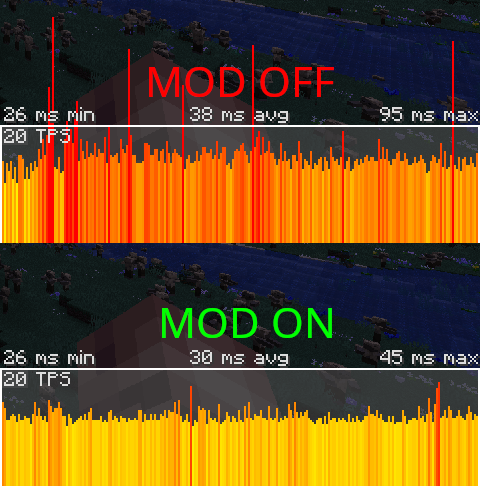
All the mods 7 - MC 1.18 modpack:
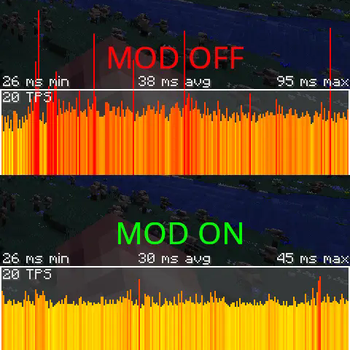
Mod off: 38ms avg - 95ms max
Mod on: 30ms avg (server load cut by 22%) - 45ms max (peak server load cut by over 50%!)
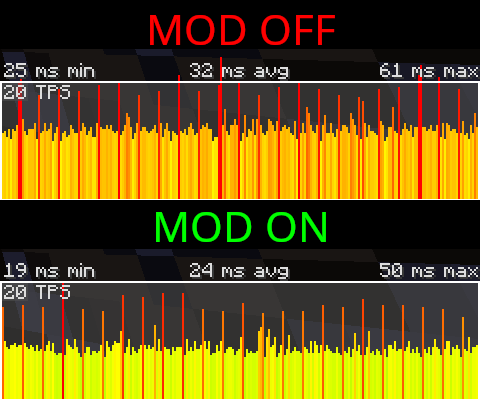
Deceasedcraft - MC 1.18 modpack:
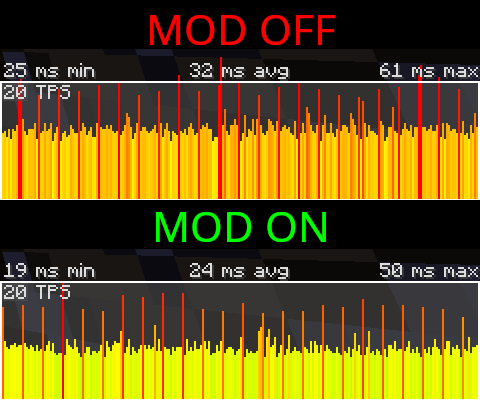
Mod off: 32ms avg - 61ms max
Mod on: 24ms avg (server load cut by 25%) - 50ms max (peak server load cut by 20%)
Requires CoroUtil to run: CoroUtil
Verfügbare Versionen
Mobtimizations - Entity Performance Fixes auf dem Server installieren
Server bestellen
Bestelle einen Minecraft Java Server mit mindestens 3 GB RAM (4 GB empfohlen).
fabric Loader setzen
Wähle im Panel unter "Egg" den fabric-Loader und die passende Minecraft-Version (1.20.1).
Mod installieren
Öffne den Mod-Browser im Dashboard und suche nach "Mobtimizations - Entity Performance Fixes". Klicke "Installieren" – fertig! Alternativ: Lade die .jar via SFTP in den /mods Ordner.
Kompatibilität
Mod-Loader
Minecraft-Versionen
1.20.1, 1.19.2, 1.18.2
Server-seitig
✓ ErforderlichEmpfohlener RAM
4 GB(min. 3 GB)Häufige Fragen
Mobtimizations - Entity Performance Fixes Server crasht beim Start – was tun?
Häufigste Ursache: falsche fabric-Version oder zu wenig RAM. Prüfe im Server-Log (latest.log), ob ein "OutOfMemoryError" oder "Mixin"-Fehler auftritt. Bei Mado Hosting: Stelle sicher, dass mindestens 3 GB RAM zugewiesen sind und der Loader zur Mod-Version passt (1.20.1). Über das Panel kannst du den Loader mit einem Klick wechseln.
Ist Mobtimizations - Entity Performance Fixes mit fabric und forge und neoforge kompatibel?
Mobtimizations - Entity Performance Fixes unterstützt offiziell fabric, forge, neoforge für Minecraft 1.20.1, 1.19.2, 1.18.2. Achtung: Forge- und Fabric-Mods sind NICHT untereinander kompatibel – wähle einen Loader und bleibe dabei. Im Mado Dashboard werden inkompatible Loader-Kombinationen automatisch erkannt.
Server laggt mit Mobtimizations - Entity Performance Fixes – wie optimiere ich die Performance?
Empfohlener RAM: 4 GB (+1 GB pro 8 Spieler). Prüfe mit /spark profiler, ob Mobtimizations - Entity Performance Fixes den meisten Tick-Time verbraucht. Häufige Fixes: Server-View-Distance auf 8-10 reduzieren, bei Forge "performant" oder "starlight" als Zusatz-Mod installieren. Bei Mado Hosting läuft dein Server auf NVMe-SSDs mit dedizierten CPU-Kernen für minimale Latenz.
Ähnliche Mods
![[EMF] Entity Model Features](https://cdn.modrinth.com/data/4I1XuqiY/6e5bbd0d06b1741bfdab6c0cfab6de8fdaf0064c_96.webp)


Modded Server mieten
Installiere Mobtimizations - Entity Performance Fixes mit nur einem Klick auf deinem Server.