
More Chests
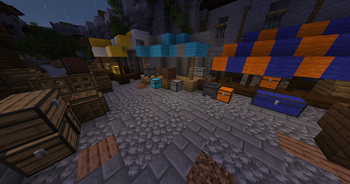
Add more chests to the game with bigger inventory sizes, so you can store even more items.
Screenshots
Über diese Mod
More Chests
This mod adds more chests to the game with bigger inventory sizes, so you can store even more items. No longer will you have to worry about running out of space for all of your valuable resources and materials. With this mod, you'll be able to keep everything organized and easily accessible. Plus, the additional chests look great and add a fun new element to the game. Try it out today and see for yourself just how much easier it can make your Minecraft experience.
To upgrade your chests in world, simply sneak-click on the chest with the required ingredients in hand.
What's new in 2.0.0?
Double Chests!
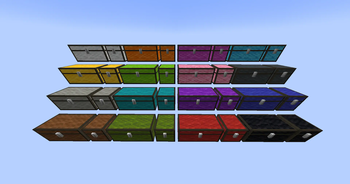
Double Chests are now available for all plank, wool, and copper chest types.
Wool Chests!
Wool Chests and Wool Double Chests are now available for all wool colors.
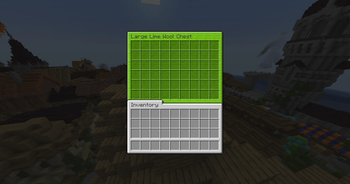
Wool Chests feature a custom GUI based on the wool color, and can be dyed.

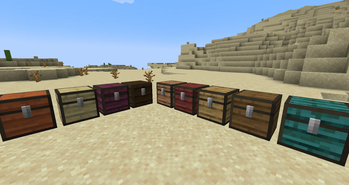
New Plank Chests!
- Cherry Chest
- Bamboo Chest

Dark Mode Resource Pack

A dark mode resource pack is available for download on Modrinth or Curseforge
Upgrade Ingredients:
Upgrade your chests in the world by sneaking and clicking on the chest with the necessary ingredients in hand.
Wool Chest    ➤  Copper Chest     = 8 Copper Ingots
Wool Chest    ➤  Iron Chest       = 8 Iron Ingots
Wooden Chest  ➤  Copper Chest     = 8 Copper Ingots
Wooden Chest  ➤  Iron Chest       = 8 Iron Ingots
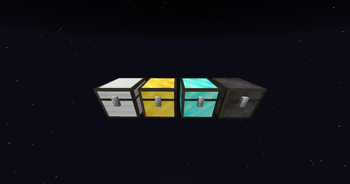
Copper Chest  ➤  Gold Chest       = 8 Gold Ingots
Iron Chest    ➤  Gold Chest       = 8 Gold Ingots
Gold Chest    ➤  Diamond Chest    = 8 Diamonds
Diamond Chest ➤  Netherite Chest  = 1 Netherite Ingot
Metal Chests have higher inventory storage sizes:
- Copper Chest (4 x 9) 36 Slots
- Iron Chest (6 x 9) 54 Slots
- Gold Chest (6 x 12) 72 Slots
- Diamond Chest (9 x 12) 108 Slots
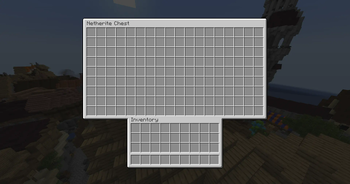
- Netherite Chest (9 x 18) 162 Slots




Verfügbare Versionen
More Chests auf dem Server installieren
Server bestellen
Bestelle einen Minecraft Java Server mit mindestens 3 GB RAM (4 GB empfohlen).
fabric Loader setzen
Wähle im Panel unter "Egg" den fabric-Loader und die passende Minecraft-Version (1.21.1).
Mod installieren
Öffne den Mod-Browser im Dashboard und suche nach "More Chests". Klicke "Installieren" – fertig! Alternativ: Lade die .jar via SFTP in den /mods Ordner.
Kompatibilität
Mod-Loader
Minecraft-Versionen
1.21.1, 1.21, 1.20.4 (+6 weitere)
Server-seitig
✓ ErforderlichEmpfohlener RAM
4 GB(min. 3 GB)Häufige Fragen
More Chests Server crasht beim Start – was tun?
Häufigste Ursache: falsche fabric-Version oder zu wenig RAM. Prüfe im Server-Log (latest.log), ob ein "OutOfMemoryError" oder "Mixin"-Fehler auftritt. Bei Mado Hosting: Stelle sicher, dass mindestens 3 GB RAM zugewiesen sind und der Loader zur Mod-Version passt (1.21.1). Über das Panel kannst du den Loader mit einem Klick wechseln.
Ist More Chests mit fabric und forge und quilt kompatibel?
More Chests unterstützt offiziell fabric, forge, quilt für Minecraft 1.21.1, 1.21, 1.20.4. Achtung: Forge- und Fabric-Mods sind NICHT untereinander kompatibel – wähle einen Loader und bleibe dabei. Im Mado Dashboard werden inkompatible Loader-Kombinationen automatisch erkannt.
Server laggt mit More Chests – wie optimiere ich die Performance?
Empfohlener RAM: 4 GB (+1 GB pro 8 Spieler). Prüfe mit /spark profiler, ob More Chests den meisten Tick-Time verbraucht. Häufige Fixes: Server-View-Distance auf 8-10 reduzieren, bei Forge "performant" oder "starlight" als Zusatz-Mod installieren. Bei Mado Hosting läuft dein Server auf NVMe-SSDs mit dedizierten CPU-Kernen für minimale Latenz.
Ähnliche Mods


Modded Server mieten
Installiere More Chests mit nur einem Klick auf deinem Server.
Details
- Lizenz
- GNU Lesser General Public License v3.0 only
- Server-seitig
- Erforderlich