Multi Key Bindings
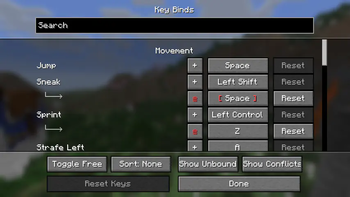
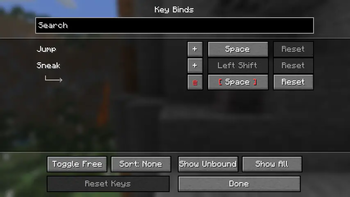
Allows players to create multiple keybindings for the same action/function.
Screenshots

Über diese Mod
Multi Key Bindings
Github • Modrinth • CurseForge
Allows players to create multiple keybindings for the same action/function and add modifiers to their binds.
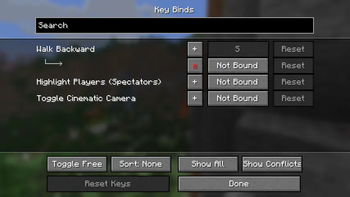
This mod adds extra functionality to the native key binds screen. Simply click the "+" button next to any key binding and a new binding for the selected action should appear.
This mod also adds support for modifier keys (left/right) shift, control, and alt, as well as the ability to bind keys to flipping the sticky toggle mode of toggle actions (auto jump, sticky sneak, sticky sprint, etc).

Versions and Compatibility
Created for Minecraft versions 1.20+
As of MKB version 1.3.0, there is support for key bind modifiers (e.g. Shift+K).
As of MKB version 1.1.0, this is now compatible with Controlling, so you can search and sort all your key bindings in the same screen.
Note that there are niche limitations: e.g. if you set action "Open Inventory" to a mouse button, pressing that mouse button cannot close the inventory as a key would. Similarly, if binding a key to "Pick Block", you will not be able to drag to duplicate a block the way you would be able to with a mouse bind.
Verfügbare Versionen
Multi Key Bindings auf deinem Client installieren
Mod-Loader lokal installieren
Installiere fabric für deine lokale Minecraft-Version.
Passende Datei herunterladen
Wähle die Multi Key Bindings-Datei für fabric und Minecraft 26.3.
Mod installieren
Lege die .jar-Datei in deinem lokalen .minecraft/mods-Ordner ab und starte Minecraft neu. Eine Installation auf dem Server ist nicht nötig.
Kompatibilität
Mod-Loader
Minecraft-Versionen
26.3, 26.2, 26.1.2 (+21 weitere)
Server-seitig
✗ Nicht unterstütztEmpfohlener RAM
4 GB(min. 3 GB)Häufige Fragen
Muss Multi Key Bindings auf dem Minecraft Server installiert werden?
Nein. Modrinth kennzeichnet Multi Key Bindings serverseitig als nicht unterstützt. Installiere die Mod nur im lokalen Minecraft-Mods-Ordner. Dein Server kann unverändert bleiben, sofern die Mod-Seite keine zusätzliche Abhängigkeit nennt.
Welche Version und welchen Loader braucht Multi Key Bindings?
Nutze eine Datei für fabric und exakt deine Minecraft-Version. Unterstützte Versionen sind unter anderem 26.3, 26.2, 26.1.2. Loader-Dateien sind nicht untereinander austauschbar.
Multi Key Bindings funktioniert nicht – was kann ich prüfen?
Prüfe zuerst Minecraft-Version, Loader-Version und erforderliche Abhängigkeiten. Lege die .jar-Datei im lokalen .minecraft/mods-Ordner ab und entferne ältere Duplikate. Da die Mod clientseitig ist, löst mehr Server-RAM dieses Problem nicht.
Ähnliche Mods






Minecraft Server für deine Gruppe
Multi Key Bindings bleibt auf deinem Client. Hoste dazu eine kompatible Welt für deine Mitspieler.