Multi Key Bindings
Allows players to create multiple keybindings for the same action/function.
Screenshots

About this Mod
Multi Key Bindings
Github • Modrinth • CurseForge
Allows players to create multiple keybindings for the same action/function and add modifiers to their binds.
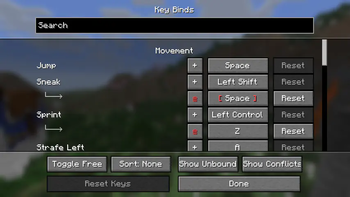
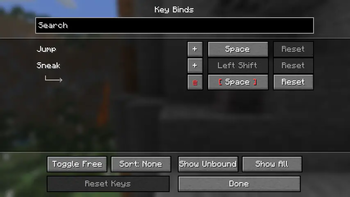
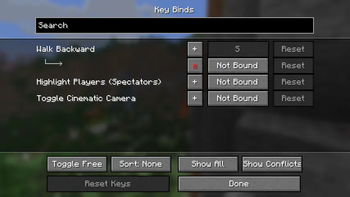
This mod adds extra functionality to the native key binds screen. Simply click the "+" button next to any key binding and a new binding for the selected action should appear.
This mod also adds support for modifier keys (left/right) shift, control, and alt, as well as the ability to bind keys to flipping the sticky toggle mode of toggle actions (auto jump, sticky sneak, sticky sprint, etc).

Versions and Compatibility
Created for Minecraft versions 1.20+
As of MKB version 1.3.0, there is support for key bind modifiers (e.g. Shift+K).
As of MKB version 1.1.0, this is now compatible with Controlling, so you can search and sort all your key bindings in the same screen.
Note that there are niche limitations: e.g. if you set action "Open Inventory" to a mouse button, pressing that mouse button cannot close the inventory as a key would. Similarly, if binding a key to "Pick Block", you will not be able to drag to duplicate a block the way you would be able to with a mouse bind.
Available Versions
How to Install Multi Key Bindings on Your Client
Install the Mod Loader Locally
Install fabric for your local Minecraft version.
Download the Matching File
Choose the Multi Key Bindings file for fabric and Minecraft 26.3.
Install Mod
Place the .jar file in your local .minecraft/mods folder and restart Minecraft. No server-side installation is required.
Compatibility
Mod Loaders
Minecraft Versions
26.3, 26.2, 26.1.2 (+21 more)
Server-side
✗ UnsupportedRecommended RAM
4 GB(min. 3 GB)Frequently Asked Questions
Does Multi Key Bindings need to be installed on the Minecraft server?
No. Modrinth marks Multi Key Bindings as unsupported on the server side. Install it only in your local Minecraft mods folder. Your server can remain unchanged unless the mod page lists an additional dependency.
Which version and loader does Multi Key Bindings require?
Use a file for fabric and your exact Minecraft version. Supported versions include 26.3, 26.2, 26.1.2. Files for different loaders are not interchangeable.
Multi Key Bindings is not working – what should I check?
First check the Minecraft version, loader version and required dependencies. Put the .jar file in your local .minecraft/mods folder and remove older duplicates. Because this mod is client-side, adding server RAM will not fix it.
Similar Mods






Minecraft Server for Your Group
Multi Key Bindings stays on your client. Host a compatible world for your group.