
Modrinth · Fabric, Forge, NeoForge
Natural Temperature auf deinem Minecraft Server
Natural Temperature läuft auf Minecraft Servern mit Fabric oder Forge oder NeoForge. Bestell deinen Server, stell den Loader im Panel ein und installiere die Mod mit einem Klick im Mod-Browser.
Natural Temperature is a mod that overhauls the way biomes are placed in the world, creating a layout that more closely resembles Earth’s climate zones with cold biomes in the north and warm biomes in the south.
- Downloads
- 97.1K
- Autor
- Caesius_Leo
- Loader
- Fabric, Forge, NeoForge
- Minecraft
- 1.20.1 – 26.3
- Aktualisiert
- –
Screenshots
So sieht Natural Temperature aus
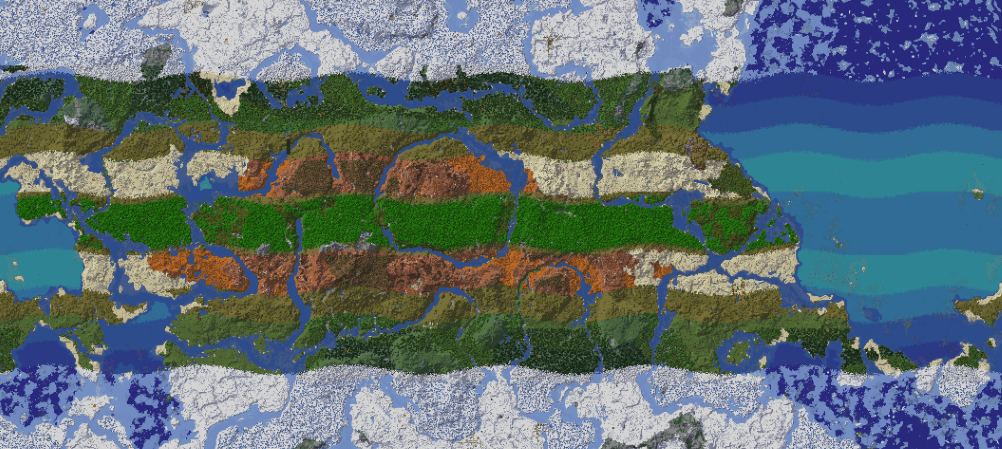
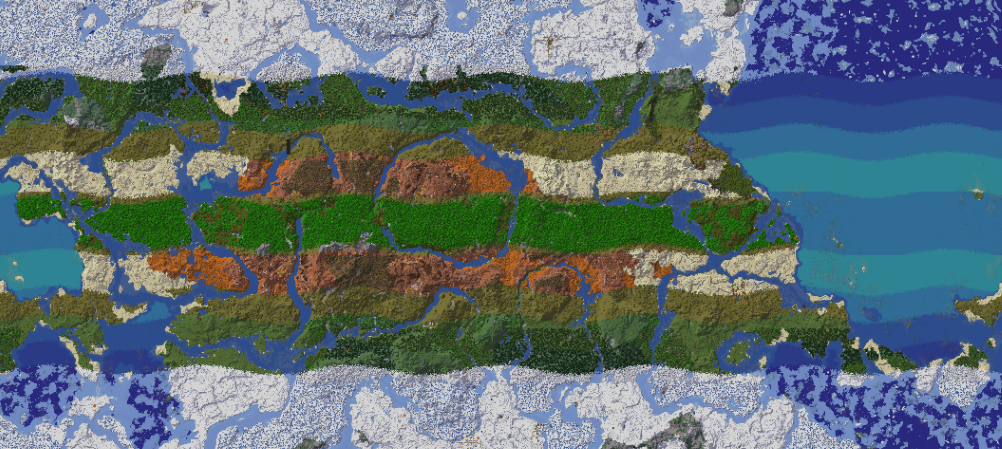 LegacyZero World Generation
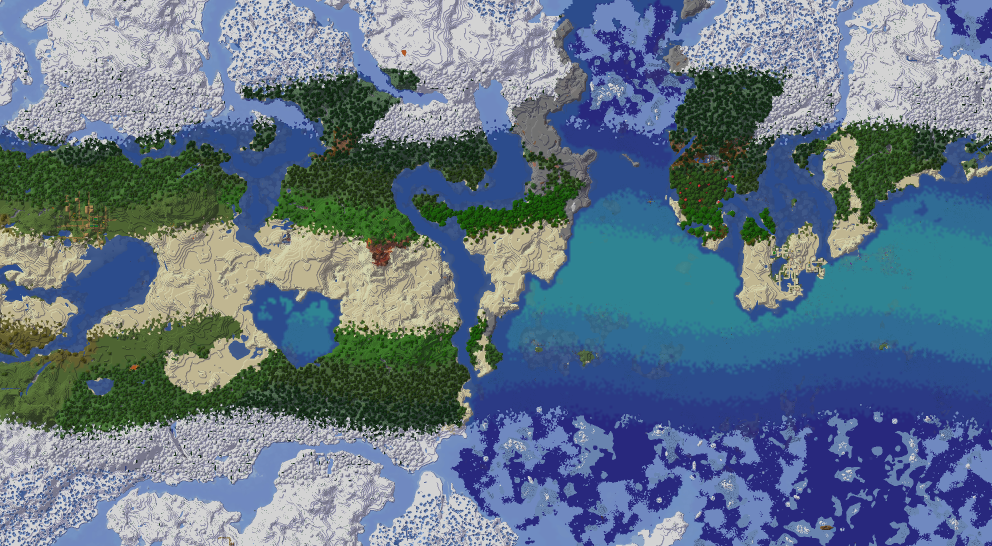 Simplified World Generation
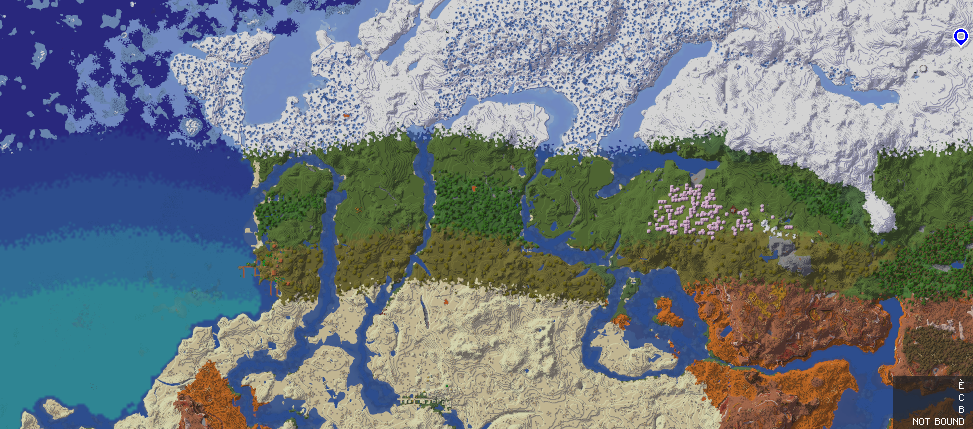 Linear World Generation
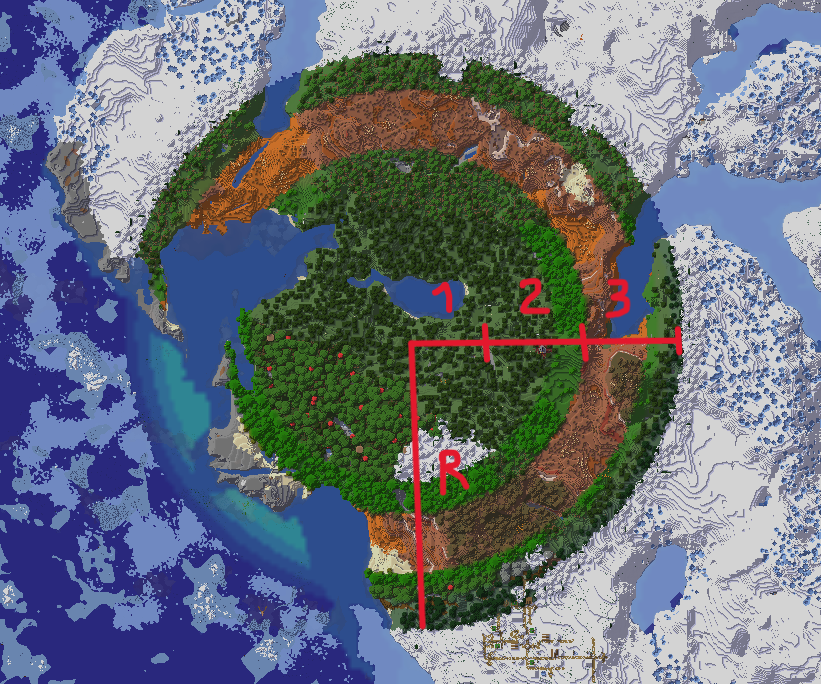 Custom Circular World Generation
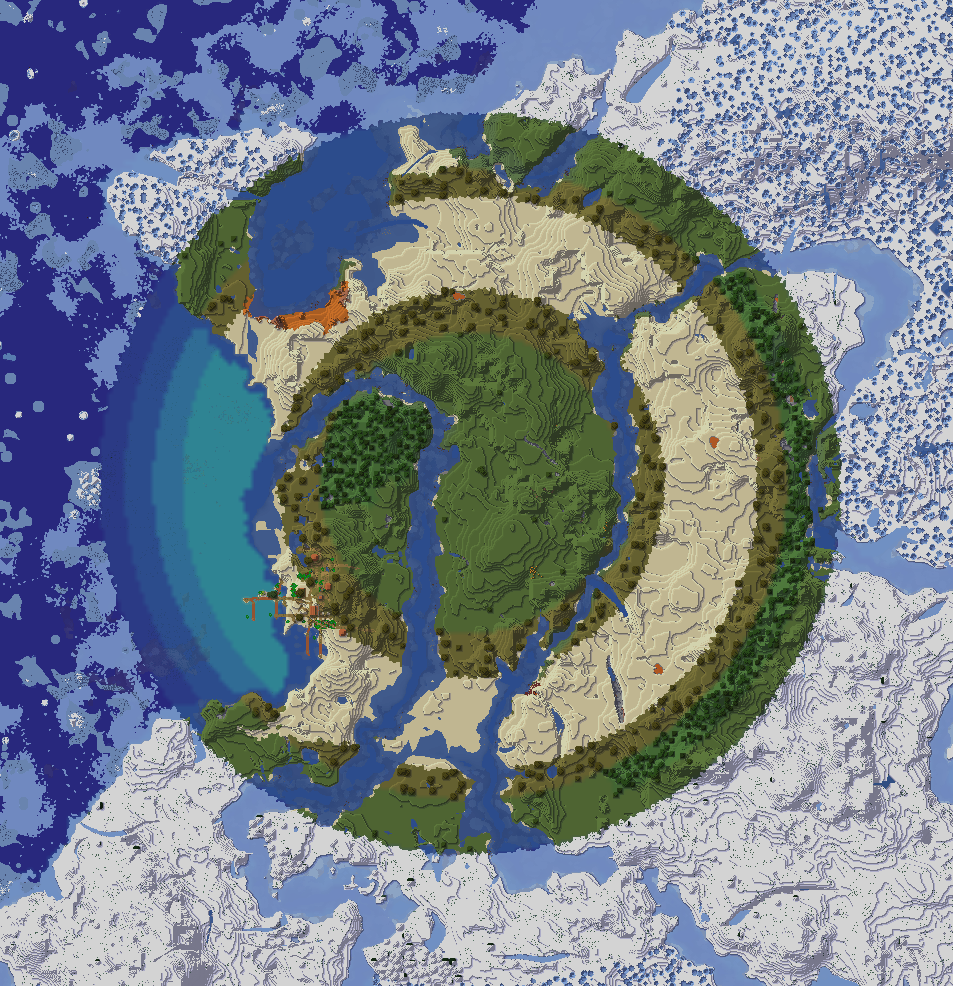 Circular World Generation
Bilder: Natural Temperature auf Modrinth, vom Projektteam veröffentlicht.
Einrichtung
Natural Temperature auf dem Server installieren
Server und Spieler brauchen denselben Loader und dieselbe Minecraft-Version. Sichere die Welt, bevor du Mods hinzufügst oder aktualisierst.
- 01
Konfigurieren
6 GB RAM sind vorausgewählt. Laufzeit und Add-ons wählst du selbst, bezahlt wird per Kreditkarte oder PayPal.
- 02
Loader einstellen
Stell im Panel die Serversoftware auf Fabric oder Forge oder NeoForge und wähl die passende Minecraft-Version, zum Beispiel 26.3.
- 03
Mod installieren
Such im Mod-Browser nach „Natural Temperature“ und installiere die Version für deinen Loader. Alternativ lädst du die .jar per SFTP in den Ordner mods. Erforderliche Abhängigkeiten stehen auf der Projektseite.
- 04
Verbinden
Natural Temperature ist auf dem Client nicht nötig. Spieler verbinden sich über die Serveradresse aus dem Panel.
- Auf dem Server
- Erforderlich
- Auf dem Client
- Nicht nötig
- Loader
- Fabric, Forge, NeoForge
- Minecraft
- 26.3, 26.2, 26.1.2 +19 weitere
- Lizenz
- LicenseRef-Custom-License-Limited-Rights-Granted
Das Panel
Mods installieren, Fehler finden.
Echte Screenshots aus dem Mado Panel. Beides ist bei jedem Minecraft Server enthalten.
Mod-Browser
Modrinth und CurseForge direkt im Panel.
Der Browser filtert nach deiner Minecraft-Version. Mods installierst du mit einem Klick, ohne .jar-Dateien hochzuladen.

KI-Crash-Analyse
Wenn ein Mod crasht, liest die Analyse das Log.
Mods scheitern oft an einer falschen Loader-Version, Java-Version oder fehlenden Abhängigkeit. Die Analyse nennt eine wahrscheinliche Ursache und einen Lösungsvorschlag.

Versionen
Veröffentlichte Versionen
Nimm die Datei, die zu Loader und Minecraft-Version deines Servers passt. Server und Spieler brauchen dieselbe Version.
Natural Temperature · Modrinth- Natural Temperature 1.0.11 NEOFORGE MC 1.21.6-1027. Oktober 2025Minecraft 1.21.10, 1.21.6, 1.21.7, 1.21.8, 1.21.9 · NeoForge
- Natural Temperature 1.0.11 NEOFORGE MC 1.21.1-527. Oktober 2025Minecraft 1.21.1, 1.21.2, 1.21.3, 1.21.4, 1.21.5 · NeoForge
- Natural Temperature 1.0.11 FORGE/NF MC 1.20.127. Oktober 2025Minecraft 1.20.1 · Forge, NeoForge
- Natural Temperature 1.0.11 FABRIC MC 1.20.127. Oktober 2025Minecraft 1.20.1, 1.20.2, 1.20.3, 1.20.4, 1.20.5, 1.20.6 · Fabric
- Natural Temperature 1.0.11 FABRIC MC 1.21.X27. Oktober 2025Minecraft 1.21.1, 1.21.10, 1.21.2, 1.21.3, 1.21.4, 1.21.5, 1.21.6, 1.21.7, 1.21.8, 1.21.9 · Fabric
Originalbeschreibung des Projektautors

Natural Temperature
Natural Temperature turns Minecraft's random patchwork of biomes into a world with real climate zones. It replaces the vanilla biome placement with an organic, believable, immersive and configurable latitude based system:
- Ice at the poles
- Taigas and tundra in the cold north
- Temperate forests and plains in the middle
- Deserts and badlands near the tropics
- Jungles and savannas around the equator
Travel north or south and you will see the biomes change based on the latitude.

This creates coherent worlds, and as the biomes follow climate logic instead of random noise, exploring feels like travelling across the planet.
The new distribution, especially combined with other world generation mods, creates regions and beautiful environments perfect for finding the right spot for your project, building realistic cities, roleplaying with nations or planning a whole map around the climate.
All of this gives rise to some interesting survival situations since you will have to deal with harsh climates. Add some weather, thirst and season mods, and you find yourself battling the forces of nature, planning your journeys and managing your crops based on your position.
NT offers wide compatibility with other world generation mods or mods that add biomes; these are placed automatically according to their own generation parameters.
Configurability is very high. There are 13 generation modes, adjustable world size, band widths, temperature and humidity of every zone, and a full in game config screen to set up everything.
This project only changes where existing biomes are placed. It doesn't add new blocks or new biomes, so the terrain generation speed is comparable to vanilla.
Quick start
- Install the mod for your loader (Fabric, Forge or NeoForge).
- Click the NT button in the main menu to open the settings screen, or edit the config file in the config folder.
- Pick a generation mode (see below), adjust the options you like and create a new world.
Settings are universal, not per world. If you change them and open an old world, newly generated chunks will follow the new parameters. Already generated chunks stay as they are. This will likely change in the future.

Suggested mods
Natural Temperature doesn't provide a preview of the generation, so it's advisable to use one of the following mods to help you. Note: I am not affiliated with the authors of these mods, they only work well with natural temperature .
Generation modes
The mode decides the shape of the climatic pattern: straight bands, concentric rings, squares, and so on. Change it with the "generation_mode" setting.
| Mode | Name | Shape | Customizable |
|---|---|---|---|
| 0 | LegacyZero | Legacy, 6 bands | Specific settings |
| 1 | Simplified | 5 bands, desert at the equator | Limited |
| 2 | Linear | Cold in the north, warm in the south | Limited |
| 3 | Custom Circular | 4 concentric rings | Yes |
| 4 | Circular | Preset of mode 3 | Limited |
| 5 | Custom Banded | 6 bands with adjustable temperature, humidity and width, automatic transitions | Yes |
| 6 | Banded | Preset of mode 5 | Limited |
| 7 | Custom Circular 6 | 6 concentric rings | Yes |
| 8 | Circular 6 | Preset of mode 7 | Limited |
| 9 | Custom Square | 6 concentric squares | Yes |
| 10 | Square | Preset of mode 9 | Limited |
| 11 | Custom Discrete | 12 bands with adjustable temperature, humidity, width and range; no automatic transitions | Total |
| 12 | Discrete | Preset of mode 11, Earth like | Limited |
Modes in depth (Wiki WIP)
Discrete Modes (11-12)

Discrete modes are composed of 12 climatic bands. Mode 12 is a preset, mode 11 is the one that can be configured.
Mode 12 configuration:
| Zone | Climate |
|---|---|
| 1 | Tropical |
| 2 | Tropical Dry |
| 3 | Semiarid |
| 4 | Arid |
| 5 | Very Arid |
| 6 | Desertic |
| 7 | Temperate Warm |
| 8 | Temperate Cold |
| 9 | Cold |
| 10 | Taiga |
| 11 | Tundra |
| 12 | Artic |
Compatibility
| Loaders | Fabric, Forge, NeoForge |
| Minecraft | Fabric: 1.20.1–26.3 ; NeoForge: 1.20.1–1.21.1 |
| Environment | Singleplayer and server side. Players on a server do not need to install it. |
- World generation mods (e.g. Tectonic, Lithosphere): compatible, results may vary.
- Biome mods: compatible with the vast majority.
- Total conversion mods: probably not compatible, it depends on the mod.
Hooks that other mods can reference: Hooks
Credits
Special thanks to ImpulsiveLass for her work on recalculating the exact values to use in the banded modes.
Support
You can join the Discord or open an issue on GitHub if you need help or you find a bug.
Natural Temperature Server crasht beim Start – was tun?
Häufige Ursachen: Loader- oder Minecraft-Version passen nicht zur Mod-Datei, eine Abhängigkeit fehlt oder der RAM reicht nicht. Such im Log (latest.log) nach „OutOfMemoryError“, „Mixin“ oder fehlenden Mods. Bei Mado wertet die KI-Crash-Analyse das Log aus und schlägt eine Ursache vor. Loader und Version änderst du im Panel.
Mit welchem Loader läuft Natural Temperature?
Laut Modrinth unterstützt Natural Temperature Fabric, Forge, NeoForge für Minecraft 26.3, 26.2, 26.1.2. Forge- und Fabric-Dateien sind nicht untereinander austauschbar: Wähl einen Loader für Server und Clients.
Wie viel RAM braucht ein Server mit Natural Temperature?
Als Orientierung 4–6 GB für einen Server mit dieser Mod. Das ist eine Schätzung, keine gemessene Mindestanforderung. Weitere Mods, viele Spieler und große Sichtweiten brauchen mehr. Ob eine Mod die Tick-Zeit belastet, siehst du mit dem spark-Profiler.
Ähnliche Mods
Beliebte Mods aus derselben Kategorie
 Server-fähig

Xaero's Minimap
von thexaero
Displays a map of the nearby world terrain, players, mobs, entities in the corner of your screen. Lets you create waypoints which help you find the locations you've marked.
 Server-fähig

Xaero's World Map
von thexaero
Adds a full screen world map which shows you what you have explored in the world. Works great together with Xaero's Minimap.
 Nur Client

Not Enough Animations
von tr7zw
Bringing first-person animations to the third-person
 Nur Client

3D Skin Layers
von tr7zw
Render the player skin layer in 3d!
Bereit für deinen Server mit Natural Temperature?
6 GB RAM ab 12,00 € im Monat. 35 % auf den 1. Monat mit MADO35.