
Mutant More
The new and improved Mutant More mod!
Screenshots
Über diese Mod


About
Mutant More allows you to transform regular mobs into powerful new mutant forms! These mutants are very dangerous and won’t be easy to defeat, but if you do manage to slay them, you’ll be rewarded with an array of useful new items!
Mutant More was heavily inspired by the Mutant Creatures and Mutant Beasts mods, and it’s highly recommended that you use their successor Mutant Monsters alongside Mutant More!
Mutant More is currently in early access, so it still has some visual bugs, missing sounds, unpolished features, etc. It should, however, still be enjoyable and as safe to add to your worlds as any other mod.
How to play
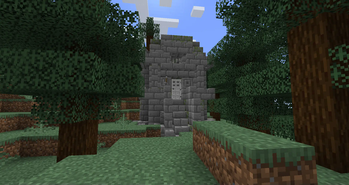
Find a Derelict Laboratory. The Derelict Laboratory is a new structure that you’ll have to find if you want to learn the secrets of mutation, you can do this by wandering around aimlessly in a forest and hoping you’ll be lucky enough to stumble upon the entrance to this elusive new structure, or get some help from a Wandering Trader, who can sell you a map to the nearest Derelict Laboratory… for a hefty price, of course.
Brew mutation potions. You can use the potion ingredients found inside the Derelict Laboratory to brew the new Formula Y and Compound Z potions, make sure to remember these recipes, because you’ll be using them a lot!
Mutate a mob! Not all mobs can be mutated, so it might take a bit of trial and error to find out which ones to mutate, but you can tell which mobs can be mutated and which can’t by watching the particles of a mutating mob: Red particles mean that the mob can’t mutate, blue particles mean that the mob can mutate but the conditions to mutate (such as being in a certain biome) aren’t met, dark purple particles mean that the mob can mutate but you didn’t get lucky (if that happens, just keep trying or brew mutation potions with a higher mutation chance), and anything else means that the mob is mutating successfully! But if you don’t want to go through all of that trial and error, just have a look at the list of mutants in the next section.
Complete all of the advancements. Mutant More adds lots of advancements, can you complete them all?
List of Mutants
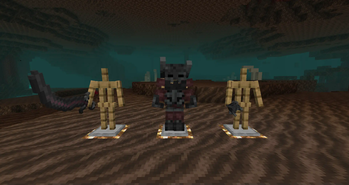
Mutant Wither Skeleton: An agile master of melee combat. Keep your eyes on this mutant at all times, because you never know when it might unleash an unexpected attack! Created by mutating a Wither Skeleton.
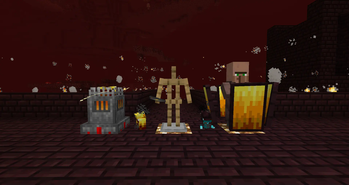
Mutant Blaze: A tanky ranged attacker. This mutant has several layers of defence that you’ll have to break through if you want to defeat it! Created by mutating a Blaze.
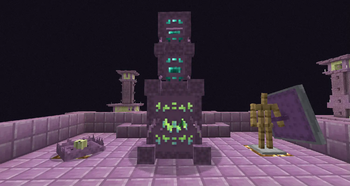
Mutant Shulker: An unpredictable creature. This mutant has lots of tricks up its non-existent sleeve, so make sure that you’re prepared for the fight! Created by mutating a Shulker.
Mutant Husk: A bulky monster capable of churning up the ground into quicksand. Keep an eye on where you’re walking when fighting this mutant, or you might get stuck in the path of a powerful attack! Created by mutating a Husk.
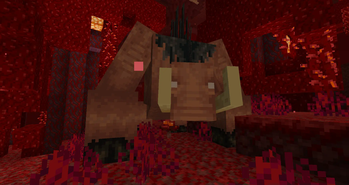
Mutant Hoglin: A rampaging beast. Make sure not to attack this mutant too rapidly, or it’ll become enraged! Created by mutating a Hoglin.
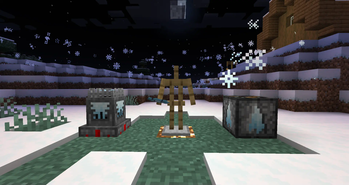
Mutant Frozen Zombie: A slow but powerful ranged attacker. Make sure not to get frozen solid by its attacks, or it’ll try to smash you to pieces! Created by mutating a Zombie in cold biomes, or mutating a Frozen Zombie if Dungeons Mobs is installed.
Mutant Jungle Zombie: A relentless monster. Watch out for its vine arm, or you might get grabbed! Created by mutating a Zombie in jungle biomes, or mutating a Jungle Zombie if Dungeons Mobs is installed.
Credits
Thanks to OBLIQUE for suggesting most of the Mutant Blaze and Mutant Husk’s abilities.
Thanks to tdstress for giving me permission to use the textures from the brilliant resource pack Mutant Beasts: The Retexturing.
Certain sounds are modified versions of sounds from Minecraft, Minecraft Dungeons, the Mutant Creatures mod, Angry Birds and Half Life 2.
Verfügbare Versionen
Mutant More auf dem Server installieren
Server bestellen
Bestelle einen Minecraft Java Server mit mindestens 3 GB RAM (4 GB empfohlen).
forge Loader setzen
Wähle im Panel unter "Egg" den forge-Loader und die passende Minecraft-Version (1.20.6).
Mod installieren
Öffne den Mod-Browser im Dashboard und suche nach "Mutant More". Klicke "Installieren" – fertig! Alternativ: Lade die .jar via SFTP in den /mods Ordner.
Kompatibilität
Mod-Loader
Minecraft-Versionen
1.20.6, 1.20.5, 1.20.4 (+4 weitere)
Server-seitig
✓ ErforderlichEmpfohlener RAM
4 GB(min. 3 GB)Häufige Fragen
Mutant More Server crasht beim Start – was tun?
Häufigste Ursache: falsche forge-Version oder zu wenig RAM. Prüfe im Server-Log (latest.log), ob ein "OutOfMemoryError" oder "Mixin"-Fehler auftritt. Bei Mado Hosting: Stelle sicher, dass mindestens 3 GB RAM zugewiesen sind und der Loader zur Mod-Version passt (1.20.6). Über das Panel kannst du den Loader mit einem Klick wechseln.
Ist Mutant More mit forge kompatibel?
Mutant More unterstützt offiziell forge für Minecraft 1.20.6, 1.20.5, 1.20.4. Im Mado Dashboard werden inkompatible Loader-Kombinationen automatisch erkannt.
Server laggt mit Mutant More – wie optimiere ich die Performance?
Empfohlener RAM: 4 GB (+1 GB pro 8 Spieler). Prüfe mit /spark profiler, ob Mutant More den meisten Tick-Time verbraucht. Häufige Fixes: Server-View-Distance auf 8-10 reduzieren, bei Forge "performant" oder "starlight" als Zusatz-Mod installieren. Bei Mado Hosting läuft dein Server auf NVMe-SSDs mit dedizierten CPU-Kernen für minimale Latenz.
Ähnliche Mods



![[TaCZ] Timeless and Classics Zero](https://cdn.modrinth.com/data/SzzJttH8/fd27766d2bb8390d284696b1dbd358f87e081439_96.webp)


Modded Server mieten
Installiere Mutant More mit nur einem Klick auf deinem Server.