
NhatJS's Furniture Mod
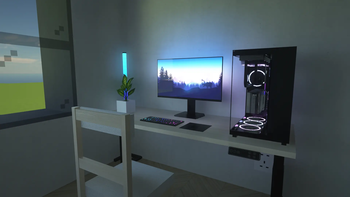
Adds stylish furniture, cool electronics, and more to level up your modern Minecraft builds!
Screenshots
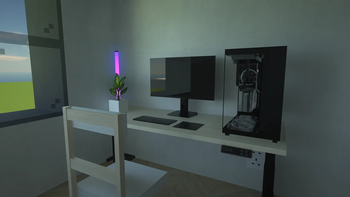
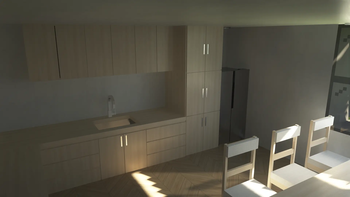
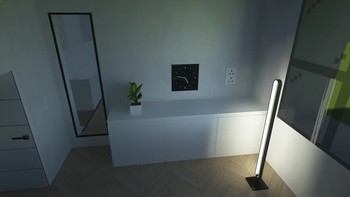
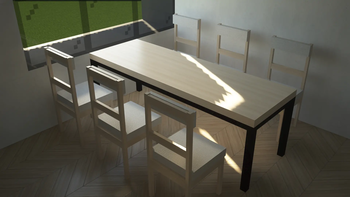
Über diese Mod
Welcome to NhatJS's Furniture Mod, this is my first mod I have ever built. In this mod, I am going to bring you everything about furnitures, electronics, and more features to explore. You can use many objects or items to build your own decorations based on your imaginations. Please join Discord server to share bugs you want me to fix, or feel free to have several ideas!
1.0.6+ Recommendation:
- NeoForge/Fabric/Quilt users: Iris Shaders, Sodium
- Forge: Optifine
1.0.0 to 1.0.5 Recommendation:
- NeoForge/Fabric/Quilt users: Iris Shaders, Sodium, (required) Fusion (Connected Textures)
- Forge: Optifine
0.0.6 or lower Recommendation:
- Forge users: Optifine
- NeoForge users: Iris Shaders, Sodium, (required) Forgified Fabric API, (required) Sinytra Connector, (required) Continuity
- Fabric users: Iris Shaders, Sodium, (required) Continuity
- Note for Fabric: this mod contains Special Model Loader which is are in that .jar file to load OBJ models, so PLEASE go support them or their GitHub!
I highly recommended to use my mod with these required instructions above because some furnitures contain emissive or bright textures.
Optional (but Recommended):
- Use NhatJS's Furniture RP Textures to have full experiences with more furnitures through the resource pack! (Note: this is beta version, so some features are still limited!)
- Want to know how to craft your furnitures? Use Just Enough Items (JEI) or Roughly Enough Items (REI) depending on modloaders and mod versions!
Screenshots: in "Gallery" tab (including title + description)
FAQ: Updated April 10th, 2026
1. Can the mod be run as server-side?
For 1.0.5 or below, it's impossible to play as server-side due to this mod contains emissive textures! For 1.0.6 or later, you can play it as server-side. (Note: this answer is uncertain!)
2. Why am I rewriting my mod in 1.0.0 as The Rewritten Update?
I want this mod to be used as survival-friendly but also balances between realism and... very Minecraft functions, and of course, avoiding OBJ models help the mod easily being used without worrying about file sizes.
3. Is it required to use shaders for realistic experience?
It's kinda optional. As you love vanilla feel than realism, you don't need to :)
4. Is it required to use Fusion (Connected Textures) for emissive textures?
Yes, it's fully required! Until 1.0.6 version, you can use my mod without Fusion required.
5. Why don't we use Fusion (Connected Textures) for my 1.0.6 mod?
All emissive textures (expecially for electronics, lights...) are fully using render layers, so they work work without requiring Fusion (especially users who... want to use my mod for server-side)
Video:
Verfügbare Versionen
NhatJS's Furniture Mod auf deinem Client installieren
Mod-Loader lokal installieren
Installiere fabric für deine lokale Minecraft-Version.
Passende Datei herunterladen
Wähle die NhatJS's Furniture Mod-Datei für fabric und Minecraft 1.21.11.
Mod installieren
Lege die .jar-Datei in deinem lokalen .minecraft/mods-Ordner ab und starte Minecraft neu. Eine Installation auf dem Server ist nicht nötig.
Kompatibilität
Mod-Loader
Minecraft-Versionen
1.21.11, 1.21.10, 1.21.9 (+10 weitere)
Server-seitig
✗ Nicht unterstütztEmpfohlener RAM
4 GB(min. 3 GB)Häufige Fragen
Muss NhatJS's Furniture Mod auf dem Minecraft Server installiert werden?
Nein. Modrinth kennzeichnet NhatJS's Furniture Mod serverseitig als nicht unterstützt. Installiere die Mod nur im lokalen Minecraft-Mods-Ordner. Dein Server kann unverändert bleiben, sofern die Mod-Seite keine zusätzliche Abhängigkeit nennt.
Welche Version und welchen Loader braucht NhatJS's Furniture Mod?
Nutze eine Datei für fabric, forge, neoforge, quilt und exakt deine Minecraft-Version. Unterstützte Versionen sind unter anderem 1.21.11, 1.21.10, 1.21.9. Loader-Dateien sind nicht untereinander austauschbar.
NhatJS's Furniture Mod funktioniert nicht – was kann ich prüfen?
Prüfe zuerst Minecraft-Version, Loader-Version und erforderliche Abhängigkeiten. Lege die .jar-Datei im lokalen .minecraft/mods-Ordner ab und entferne ältere Duplikate. Da die Mod clientseitig ist, löst mehr Server-RAM dieses Problem nicht.
Ähnliche Mods

![[ETF] Entity Texture Features](https://cdn.modrinth.com/data/BVzZfTc1/af683d206d50b05258d865b0d6e4aa2f2cee12f2_96.webp)
![[EMF] Entity Model Features](https://cdn.modrinth.com/data/4I1XuqiY/6e5bbd0d06b1741bfdab6c0cfab6de8fdaf0064c_96.webp)



Minecraft Server für deine Gruppe
NhatJS's Furniture Mod bleibt auf deinem Client. Hoste dazu eine kompatible Welt für deine Mitspieler.