
Not Enough Vulkan
Not Enough Vulkan is a fork of Sodium Extra that is focused on improving VulkanMod
Screenshots
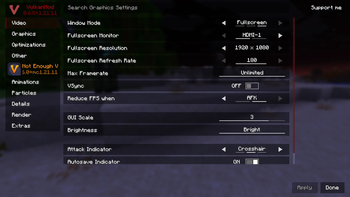
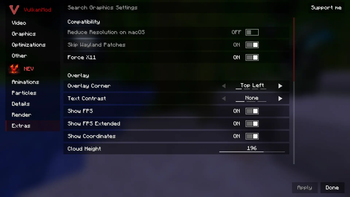

Über diese Mod
What is Not Enough Vulkan?
Not Enough Vulkan is a fork of Sodium Extra that aims to bring most of OptiFine's eye-candy options to VulkanMod which is another optimization mod like Sodium.
Features
Here is a basic rundown of what this mod does.
- Animations Settings (Control fire, water, lava, block animations and etc...)
- Particles Settings (Control all types of particles, including ones from other mods)
- Details Settings (Control sky, stars, sun/moon, weather, and much more)
- Render Settings (Control fog, static entities, and other miscellaneous renderings)
- Extra Settings (Display FPS, coordinates, toast notifications, clouds, and much more)
Other than all the above settings, Not Enough Vulkan also brings compatibility patches to help some mods work better alongside VulkanMod.
Improves Compatibility With VulkanMod:
- Includes Patches for Bobby
- Includes Patches for Linux Wayland (Optional)
- Adds a monitor selector for use with multiple monitors
Modpack Permissions
This is a free and open-source project; you can include it in your mod pack as long as you provide attribution!
Common Questions
- Do I need VulkanMod installed for this mod to work? Yes, You will need to download VulkanMod for this mod to work.
- Can I re-host/upload this mod somewhere else? Yes, as long as you provide the mod source code.
- Will you add x features to this mod? No, unless It's added to Sodium Extra first.
- I have more questions! Join our Discord!
Special Thanks to Sodium Extra
Verfügbare Versionen
Not Enough Vulkan auf deinem Client installieren
Mod-Loader lokal installieren
Installiere fabric für deine lokale Minecraft-Version.
Passende Datei herunterladen
Wähle die Not Enough Vulkan-Datei für fabric und Minecraft 26.1.2.
Mod installieren
Lege die .jar-Datei in deinem lokalen .minecraft/mods-Ordner ab und starte Minecraft neu. Eine Installation auf dem Server ist nicht nötig.
Kompatibilität
Mod-Loader
Minecraft-Versionen
26.1.2, 26.1.1, 26.1 (+3 weitere)
Server-seitig
✗ Nicht unterstütztEmpfohlener RAM
4 GB(min. 3 GB)Häufige Fragen
Muss Not Enough Vulkan auf dem Minecraft Server installiert werden?
Nein. Modrinth kennzeichnet Not Enough Vulkan serverseitig als nicht unterstützt. Installiere die Mod nur im lokalen Minecraft-Mods-Ordner. Dein Server kann unverändert bleiben, sofern die Mod-Seite keine zusätzliche Abhängigkeit nennt.
Welche Version und welchen Loader braucht Not Enough Vulkan?
Nutze eine Datei für fabric und exakt deine Minecraft-Version. Unterstützte Versionen sind unter anderem 26.1.2, 26.1.1, 26.1. Loader-Dateien sind nicht untereinander austauschbar.
Not Enough Vulkan funktioniert nicht – was kann ich prüfen?
Prüfe zuerst Minecraft-Version, Loader-Version und erforderliche Abhängigkeiten. Lege die .jar-Datei im lokalen .minecraft/mods-Ordner ab und entferne ältere Duplikate. Da die Mod clientseitig ist, löst mehr Server-RAM dieses Problem nicht.
Ähnliche Mods




![[ETF] Entity Texture Features](https://cdn.modrinth.com/data/BVzZfTc1/af683d206d50b05258d865b0d6e4aa2f2cee12f2_96.webp)

Minecraft Server für deine Gruppe
Not Enough Vulkan bleibt auf deinem Client. Hoste dazu eine kompatible Welt für deine Mitspieler.
Details
- Lizenz
- GNU Lesser General Public License v3.0 only
- Server-seitig
- Nicht unterstützt