
Not Enough Vulkan
Not Enough Vulkan is a fork of Sodium Extra that is focused on improving VulkanMod
Screenshots
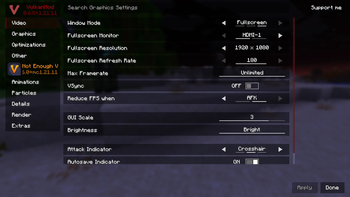
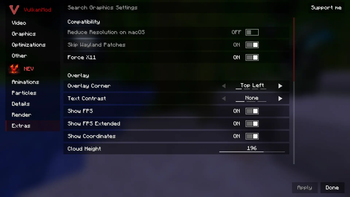

About this Mod
What is Not Enough Vulkan?
Not Enough Vulkan is a fork of Sodium Extra that aims to bring most of OptiFine's eye-candy options to VulkanMod which is another optimization mod like Sodium.
Features
Here is a basic rundown of what this mod does.
- Animations Settings (Control fire, water, lava, block animations and etc...)
- Particles Settings (Control all types of particles, including ones from other mods)
- Details Settings (Control sky, stars, sun/moon, weather, and much more)
- Render Settings (Control fog, static entities, and other miscellaneous renderings)
- Extra Settings (Display FPS, coordinates, toast notifications, clouds, and much more)
Other than all the above settings, Not Enough Vulkan also brings compatibility patches to help some mods work better alongside VulkanMod.
Improves Compatibility With VulkanMod:
- Includes Patches for Bobby
- Includes Patches for Linux Wayland (Optional)
- Adds a monitor selector for use with multiple monitors
Modpack Permissions
This is a free and open-source project; you can include it in your mod pack as long as you provide attribution!
Common Questions
- Do I need VulkanMod installed for this mod to work? Yes, You will need to download VulkanMod for this mod to work.
- Can I re-host/upload this mod somewhere else? Yes, as long as you provide the mod source code.
- Will you add x features to this mod? No, unless It's added to Sodium Extra first.
- I have more questions! Join our Discord!
Special Thanks to Sodium Extra
Available Versions
How to Install Not Enough Vulkan on Your Client
Install the Mod Loader Locally
Install fabric for your local Minecraft version.
Download the Matching File
Choose the Not Enough Vulkan file for fabric and Minecraft 26.1.2.
Install Mod
Place the .jar file in your local .minecraft/mods folder and restart Minecraft. No server-side installation is required.
Compatibility
Mod Loaders
Minecraft Versions
26.1.2, 26.1.1, 26.1 (+3 more)
Server-side
✗ UnsupportedRecommended RAM
4 GB(min. 3 GB)Frequently Asked Questions
Does Not Enough Vulkan need to be installed on the Minecraft server?
No. Modrinth marks Not Enough Vulkan as unsupported on the server side. Install it only in your local Minecraft mods folder. Your server can remain unchanged unless the mod page lists an additional dependency.
Which version and loader does Not Enough Vulkan require?
Use a file for fabric and your exact Minecraft version. Supported versions include 26.1.2, 26.1.1, 26.1. Files for different loaders are not interchangeable.
Not Enough Vulkan is not working – what should I check?
First check the Minecraft version, loader version and required dependencies. Put the .jar file in your local .minecraft/mods folder and remove older duplicates. Because this mod is client-side, adding server RAM will not fix it.
Similar Mods




![[ETF] Entity Texture Features](https://cdn.modrinth.com/data/BVzZfTc1/af683d206d50b05258d865b0d6e4aa2f2cee12f2_96.webp)

Minecraft Server for Your Group
Not Enough Vulkan stays on your client. Host a compatible world for your group.