
NutritionZ
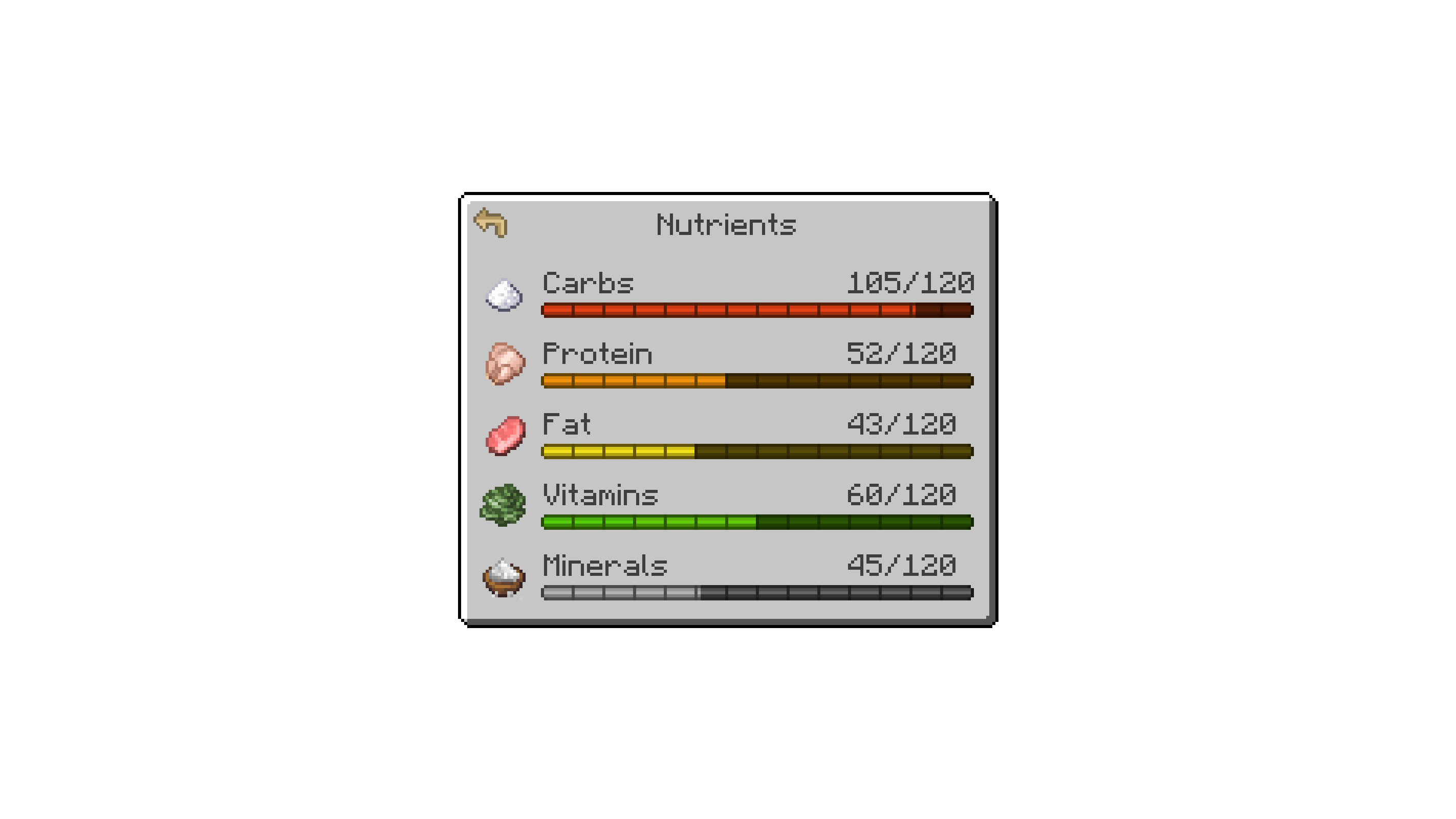
Nutrition system which has 5 nutrients to challenge your diet
Screenshots
Über diese Mod

NutritionZ adds a nutrition system to enhance the gameplay.
Installation
NutritionZ is a mod built for the Fabric Loader. It requires Fabric API and Cloth Config API to be installed separately; all other dependencies are installed with the mod.
Incompatible
Adjustments
Default Datapacks & Mod Compat
NutritionZ provides some default datapacks for other mods. You can disable/enable them via config.
You can add other mod compats via datapack. Just follow the structure data/somemod/nutrition/somename.json.
Here's an example from the default vanilla datapack:
{
    "minecraft:cooked_cod": { // The default datapacks provide 5 points for half saturation
        "carbohydrates": 0,
        "protein": 16,
        "fat": 3,
        "vitamins": 0,
        "minerals": 6
    }
}
Nutrition Manager
You can tweak the default manager via datapack as well. data/somemod/nutrition_manager/somename.json
With this you can replace the positive effects & attributes from all 5 nutrients, as well as the negatives.
Example:
{
    "minerals": {
        "replace": true,
        "positive": {
            "generic.armor_toughness": { // attribute
                "operation": "ADD_VALUE", // ADD_VALUE, ADD_MULTIPLIED_BASE , ADD_MULTIPLIED_TOTAL
                "value": 1.0 // gives +1 Armor Toughness per level -> e.g. +20 max level
            },
            "minecraft:haste": { // effect
                "duration": 319, // wouldn`t recommend to lower this on effects
                "amplifier": 0 // equals Haste I
            }
        },
        "negative": {
            "generic.armor_toughness": {
                "operation": "ADD_VALUE",
                "value": 1.0 // needs to be positive value -> will be negative automatically
            },
            "minecraft:mining_fatigue": {
                "duration": 319,
                "amplifier": 0
            }
        }
    }
}
Max Nutrition & thresholds can be set in the nutritionz.json5 config.
{
	"maxNutrition": 100, // Max nutrition for one nutrient
	"negativeNutrition": 10, // 0 - 10 = negative effects / attributes (negative threshold)
	"positiveNutrition": 90, // 90 - 100 = positive effects / attributes (positive threshold)
}
Credits





Verfügbare Versionen
NutritionZ auf dem Server installieren
Server bestellen
Bestelle einen Minecraft Java Server mit mindestens 3 GB RAM (4 GB empfohlen).
fabric Loader setzen
Wähle im Panel unter "Egg" den fabric-Loader und die passende Minecraft-Version (1.21.1).
Mod installieren
Öffne den Mod-Browser im Dashboard und suche nach "NutritionZ". Klicke "Installieren" – fertig! Alternativ: Lade die .jar via SFTP in den /mods Ordner.
Kompatibilität
Mod-Loader
Minecraft-Versionen
1.21.1, 1.20.1
Server-seitig
✓ ErforderlichEmpfohlener RAM
4 GB(min. 3 GB)Häufige Fragen
NutritionZ Server crasht beim Start – was tun?
Häufigste Ursache: falsche fabric-Version oder zu wenig RAM. Prüfe im Server-Log (latest.log), ob ein "OutOfMemoryError" oder "Mixin"-Fehler auftritt. Bei Mado Hosting: Stelle sicher, dass mindestens 3 GB RAM zugewiesen sind und der Loader zur Mod-Version passt (1.21.1). Über das Panel kannst du den Loader mit einem Klick wechseln.
Ist NutritionZ mit fabric kompatibel?
NutritionZ unterstützt offiziell fabric für Minecraft 1.21.1, 1.20.1. Im Mado Dashboard werden inkompatible Loader-Kombinationen automatisch erkannt.
Server laggt mit NutritionZ – wie optimiere ich die Performance?
Empfohlener RAM: 4 GB (+1 GB pro 8 Spieler). Prüfe mit /spark profiler, ob NutritionZ den meisten Tick-Time verbraucht. Häufige Fixes: Server-View-Distance auf 8-10 reduzieren, bei Forge "performant" oder "starlight" als Zusatz-Mod installieren. Bei Mado Hosting läuft dein Server auf NVMe-SSDs mit dedizierten CPU-Kernen für minimale Latenz.
Ähnliche Mods



Modded Server mieten
Installiere NutritionZ mit nur einem Klick auf deinem Server.