
Modrinth · Fabric, Forge, NeoForge, Quilt · Client-Mod
Optimized Block Entities [OBE]
Optimized Block Entities [OBE] ist eine clientseitige Mod. Du installierst sie auf deinem Rechner, auf dem Server ist sie nicht nötig.
A client-side optimization mod to make block entities render faster
- Downloads
- 2.4M
- Autor
- maDU59_
- Loader
- Fabric, Forge, NeoForge, Quilt
- Minecraft
- 1.20 – 26.3
- Aktualisiert
- –
Screenshots
So sieht Optimized Block Entities [OBE] aus


Bilder: Optimized Block Entities [OBE] auf Modrinth, vom Projektteam veröffentlicht.
Einrichtung
Optimized Block Entities [OBE] auf deinem Client installieren
Clientseitige Mods laufen nur auf deinem Rechner. Mehr Server-RAM ändert an ihrer Leistung nichts.
- 01
Loader lokal installieren
Installiere Fabric oder Forge oder NeoForge oder Quilt für deine Minecraft-Version in deinem Launcher.
- 02
Datei herunterladen
Lade die Optimized Block Entities [OBE]-Datei für deinen Loader und exakt deine Minecraft-Version herunter, zum Beispiel 26.3-snapshot-7.
- 03
In den Mods-Ordner legen
Lege die .jar-Datei in den lokalen Ordner .minecraft/mods und entferne ältere Duplikate.
- 04
Starten
Starte Minecraft mit dem Loader-Profil. Auf dem Server musst du nichts ändern.
- Auf dem Server
- Nicht nötig
- Auf dem Client
- Erforderlich
- Loader
- Fabric, Forge, NeoForge, Quilt
- Minecraft
- 26.3-snapshot-7, 26.3-snapshot-6, 26.3-snapshot-5 +20 weitere
- Lizenz
- GNU Lesser General Public License v3.0 or later
Versionen
Veröffentlichte Versionen
Nimm die Datei, die zu Loader und Minecraft-Version deines Servers passt. Server und Spieler brauchen dieselbe Version.
Optimized Block Entities [OBE] · Modrinth- Optimized Block Entities 1.2.1320. November 2026Minecraft 1.20.1 · Forge, NeoForge
- Optimized Block Entities 1.2.1319. November 2026Minecraft 1.20, 1.20.1 · Fabric, Quilt
- Optimized Block Entities 1.2.1319. November 2026Minecraft 1.21, 1.21.1 · NeoForge
- Optimized Block Entities 1.2.1319. November 2026Minecraft 1.21, 1.21.1 · Fabric, Quilt
- Optimized Block Entities 1.2.1319. November 2026Minecraft 1.21.2, 1.21.3 · Fabric, Quilt
Originalbeschreibung des Projektautors
Optimized Block Entities (OBE)
OBE is a fully client side mod that significantly improves the rendering speed of block entities but not just that!
You won't lose animations, this mod keeps the animations of animated block entities likes chest and shulker boxes, it also supports EMF and ETF, which means it is compatible with FA: Objects!
You should also check out Better Block Entities, it was the first mod to optimize block entities on 1.21+ and did that very well. Both mods do not work in the same way, but he gave me some inspiration and 1 or 2 clever tricks.
How it works
This mod renders supported block entities just like any other block, this means they are meshed into the terrain and rendering terrain is much faster than rendering entities so it gives a HUGE performances boost. To keep animations, they are only rendered through the terrain when they are static, otherwise it goes through the vanilla renderer.
Features
- Improved FPS : Huge performance boost that scales with the number of block entities visible.
- Better lighting on block entities : they now support smooth lighting and ambient occlusion.
- Better render distance : block entities can be seen from a lot further away
- Config : Every block entity optimization can be toggled, same for the ambient occlusion.
- Improved LODs: LODs from Distant Horizons and Voxy will render block entities more accurately.
Performances
 |
 |
 |
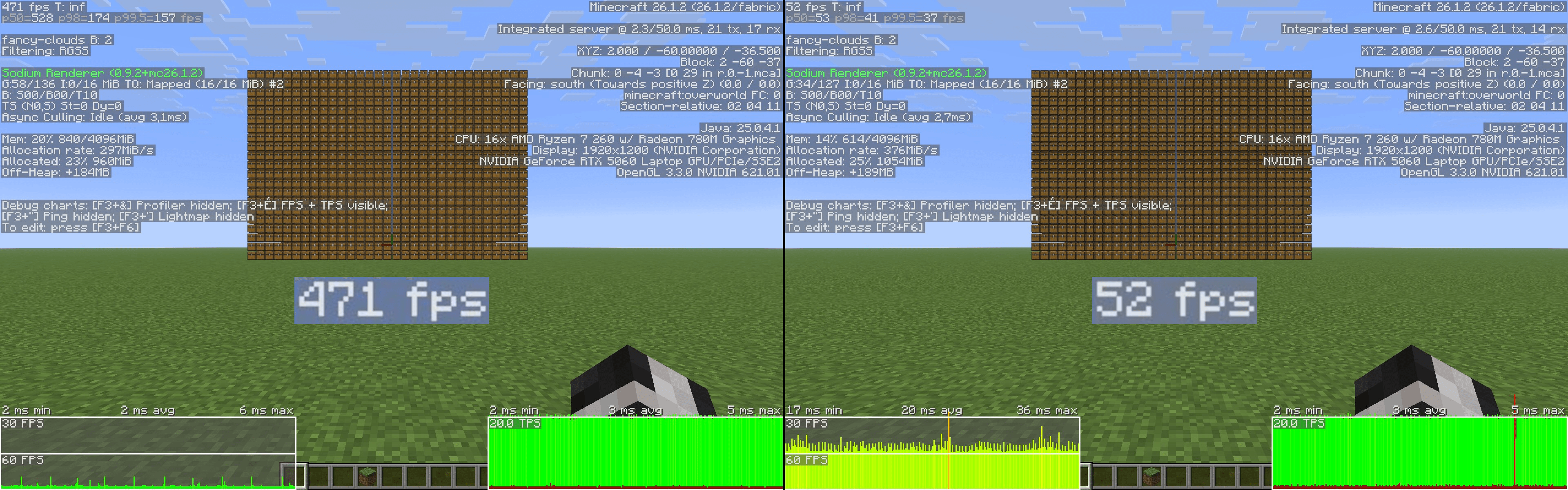
Performance tests ran on Minecraft 26.1.2 with OBE 1.2.6, BBE 1.3.6 and Sodium 0.9.2 in FHD on a RTX 5060 laptop, an AMD Ryzen 7 260 w and 16Go of DDR5 RAM. 18000 chests.
Modded block entities compatibility
OBE also optimizes block entities from the following mods:
- Quark
- Lootr
- Carved Wood
- Iron chests
- More Chest variants
- Mods using Blueprint (Woodworks and more)
- Mods using BCLIB (BetterEnd and BetterNether)
- Every Compat
- Pipez
- Framed Blocks
- The Twilight Forest
- Vanilla Backport
- Oh The Biomes We've Gone
Why
Mods like this already exists like:
- BBE, but it requires Sodium to run, isn't available on Neoforge (at least not at the time of OBE development) and heavily modifies Minecraft's block entity rendering pipeling
- EBE, but it is sadly not updated anymore and isn't available on Neoforge
Both are awesome, the developers did great work but I wanted to make one that:
- Is updated and available on most modern Minecraft versions
- Is less intrusive, which means better compatibility with other mods
- Is available on Neoforge as well as Fabric
- Includes a way to support modded block entities
List of all optimized block entities
Optimized block entities
- Chests
- Shulker boxes
- Signs
- Decorated pots (with no pattern)
- Skulls (with no custom texture¹)
- Beds
- Copper golems
- Bells
- Banners (only the wooden post, not the flag as that would prevent the animation)
- Beacons
- Lecterns
- Campfires
- Shelves
- Brushable blocks
- Spawners
- Vaults
¹: Some skulls with custom textures from Hypixel's Skyblock can also be optimized by using this resource pack
Trouble shooting
Invisible or duplicate block entities:
Only vanilla, Indigo, Sodium (Embeddium on forge 1.20.1), Nvidium and VulkanMod rendering pipelines are fully supported, issues may happen with other ones like Optifine, Embeddium, Optifabric etc... in that case it is recommended to disable the OBE optimizations causing the issues using OBE's config screen.
Modpacks
Feel free to include this mod in any of your modpacks, telling me would be nice but is not mandatory.
Muss Optimized Block Entities [OBE] auf dem Minecraft Server installiert werden?
Nein. Modrinth kennzeichnet Optimized Block Entities [OBE] serverseitig als nicht unterstützt. Installiere die Mod nur im lokalen Mods-Ordner. Dein Server kann unverändert bleiben, sofern die Projektseite keine zusätzliche Abhängigkeit nennt.
Welche Version und welchen Loader braucht Optimized Block Entities [OBE]?
Nutze eine Datei für Fabric, Forge, NeoForge, Quilt und exakt deine Minecraft-Version. Unterstützt werden unter anderem 26.3-snapshot-7, 26.3-snapshot-6, 26.3-snapshot-5. Dateien für verschiedene Loader sind nicht austauschbar.
Optimized Block Entities [OBE] funktioniert nicht – was kann ich prüfen?
Prüfe zuerst Minecraft-Version, Loader-Version und erforderliche Abhängigkeiten. Da die Mod clientseitig ist, löst mehr Server-RAM das Problem nicht.
Ähnliche Mods
Beliebte Mods aus derselben Kategorie
 Nur Client

Sodium
von jellysquid3
A high-performance rendering engine replacement for Minecraft, which greatly improves frame rates and reduces micro-stutter.
 Nur Client

Iris Shaders
von coderbot
A modern shader pack loader for Minecraft intended to be compatible with existing OptiFine shader packs
 Nur Client

Entity Culling
von tr7zw
Using async path-tracing to hide Block-/Entities that are not visible
 Server-fähig

FerriteCore
von malte0811
Memory usage optimizations
Mods für deinen eigenen Server gesucht?
Im Katalog findest du Mods, die auf Minecraft Servern laufen.