
Ok Boomer
A no-nonsense zoom mod for cool kids that want to look really close at explosions
Screenshots
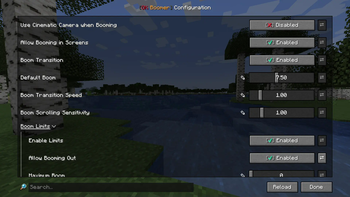
Über diese Mod
Ok Boomer is just what it says on the tin - a no-nonsense zoom mod (or, as we call it around here boom mod). Press the boom keybind (C by default) to zoom into your game and scroll to adjust the level of booming.
But then again this is not just your ordinary boom mod - open any screen, like your inventory, press ctrl + shift and your boom keybind at the same time and watch as everything you see enlarges. Yes you got that right, booming into screens is the secondary feature Ok Boomer offers. We were quite close to saying you can "boom everywhere", but then again you can't boom into the loading screen (yet?).
Features
- Smooth, adjustable in-game zoom
- The (probably?) world's first in-screen zoom
- Impeccable humor
- High customizability where it matters - including the option to disable all limits, in either direction
- At least two extra, somewhat hidden features for you to discover
Credits
- chyzman for inspiring screen booming and the two easter-egg features
- Ennui for her incredible work on Ok Zoomer, which quite unsurprisingly inspired the name of this mod
- The Twemoji Project for making their emoji freely available - from which the icon of this mod has been assembled
Verfügbare Versionen
Ok Boomer auf deinem Client installieren
Mod-Loader lokal installieren
Installiere fabric für deine lokale Minecraft-Version.
Passende Datei herunterladen
Wähle die Ok Boomer-Datei für fabric und Minecraft 1.21.11.
Mod installieren
Lege die .jar-Datei in deinem lokalen .minecraft/mods-Ordner ab und starte Minecraft neu. Eine Installation auf dem Server ist nicht nötig.
Kompatibilität
Mod-Loader
Minecraft-Versionen
1.21.11, 1.21.10, 1.21.9 (+17 weitere)
Server-seitig
✗ Nicht unterstütztEmpfohlener RAM
4 GB(min. 3 GB)Häufige Fragen
Muss Ok Boomer auf dem Minecraft Server installiert werden?
Nein. Modrinth kennzeichnet Ok Boomer serverseitig als nicht unterstützt. Installiere die Mod nur im lokalen Minecraft-Mods-Ordner. Dein Server kann unverändert bleiben, sofern die Mod-Seite keine zusätzliche Abhängigkeit nennt.
Welche Version und welchen Loader braucht Ok Boomer?
Nutze eine Datei für fabric, quilt und exakt deine Minecraft-Version. Unterstützte Versionen sind unter anderem 1.21.11, 1.21.10, 1.21.9. Loader-Dateien sind nicht untereinander austauschbar.
Ok Boomer funktioniert nicht – was kann ich prüfen?
Prüfe zuerst Minecraft-Version, Loader-Version und erforderliche Abhängigkeiten. Lege die .jar-Datei im lokalen .minecraft/mods-Ordner ab und entferne ältere Duplikate. Da die Mod clientseitig ist, löst mehr Server-RAM dieses Problem nicht.
Ähnliche Mods





Minecraft Server für deine Gruppe
Ok Boomer bleibt auf deinem Client. Hoste dazu eine kompatible Welt für deine Mitspieler.