
Open Soundboard
A feature-rich soundboard for Simple Voice Chat and Plasmo Voice.
Screenshots
Über diese Mod

OpenSoundboard
A feature-rich soundboard mod for Simple Voice Chat and Plasmo Voice.
Play MP3s directly through voice chat — with per-sound controls, keybinds, and a built-in downloader.



Features
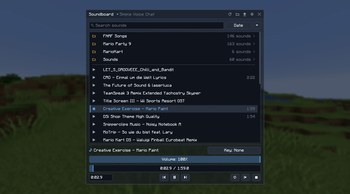
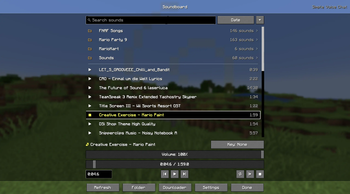
Soundboard UI — Press U (configurable) to open a full-featured soundboard screen.
- Browse, search, and favorite your sounds
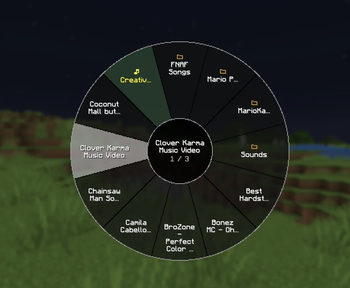
- Organize sounds in folders of any depth, with clickable breadcrumbs
- Play / pause / stop with playback controls
- Timeline seeking and skip forward/back
- Set custom starting points for any sound
- Loop individual sounds or all sounds
- Double-click a sound to play instantly
Per-Sound Controls
- Independent local volume (what you hear) and player volume (what others hear)
- Optional synced volume mode for simpler control
- Global volume multiplier for both channels
- Custom keybinds — bind any key combo to instantly play a sound
Built-in Downloader
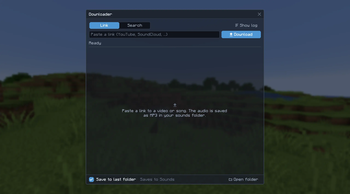
- Paste a link, or search YouTube and pick a result (thumbnail, title, channel, length, views)
- Downloads keep running in the background; the yt-dlp log is available on demand
- Extracts audio automatically as MP3
- Automatically downloads yt-dlp and ffmpeg on first use
Configuration
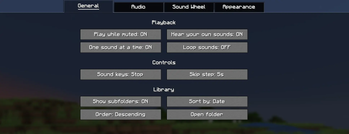
- Play while muted
- Play sounds locally (hear your own sounds)
- Single song at a time mode
- Sync per-sound and global volume controls
- All settings accessible via Mod Menu or the in-game config button
Supported Versions
| Minecraft | Status |
|---|---|
| 26.3 | ✅ Supported (latest) |
| 26.2 | ✅ Supported |
| 26.1, 26.1.1, 26.1.2 | ✅ Supported |
| 1.21.11 | ✅ Supported |
| 1.21, 1.21.1 | ✅ Supported |
| 1.21.10, 1.21.8, 1.21.5, 1.21.4 | ⚠️ Deprecated |
Deprecated versions were supported under the previous per-version build and no longer receive updates. New releases target the supported versions above.
Dependencies
| Mod | Required |
|---|---|
| Fabric API | Yes |
| Simple Voice Chat or Plasmo Voice | Optional — needed to play sounds to other players; without one, sounds play locally |
| Mod Menu | Optional |
Getting Started
- Install the mod and all required dependencies
- Join a server (or singleplayer world) with Simple Voice Chat or Plasmo Voice — or skip voice chat to just play sounds for yourself
- Drop
.mp3files into.minecraft/opensoundboard/(subfolders are fine) — or use the built-in downloader - Press U to open the soundboard and start playing
Credits
Thanks KamiKMB for creating the amazing Logo for the Mod.
License
Verfügbare Versionen
Open Soundboard auf deinem Client installieren
Mod-Loader lokal installieren
Installiere fabric für deine lokale Minecraft-Version.
Passende Datei herunterladen
Wähle die Open Soundboard-Datei für fabric und Minecraft 26.3.
Mod installieren
Lege die .jar-Datei in deinem lokalen .minecraft/mods-Ordner ab und starte Minecraft neu. Eine Installation auf dem Server ist nicht nötig.
Kompatibilität
Mod-Loader
Minecraft-Versionen
26.3, 26.2, 26.1.2 (+9 weitere)
Server-seitig
✗ Nicht unterstütztEmpfohlener RAM
4 GB(min. 3 GB)Häufige Fragen
Muss Open Soundboard auf dem Minecraft Server installiert werden?
Nein. Modrinth kennzeichnet Open Soundboard serverseitig als nicht unterstützt. Installiere die Mod nur im lokalen Minecraft-Mods-Ordner. Dein Server kann unverändert bleiben, sofern die Mod-Seite keine zusätzliche Abhängigkeit nennt.
Welche Version und welchen Loader braucht Open Soundboard?
Nutze eine Datei für fabric und exakt deine Minecraft-Version. Unterstützte Versionen sind unter anderem 26.3, 26.2, 26.1.2. Loader-Dateien sind nicht untereinander austauschbar.
Open Soundboard funktioniert nicht – was kann ich prüfen?
Prüfe zuerst Minecraft-Version, Loader-Version und erforderliche Abhängigkeiten. Lege die .jar-Datei im lokalen .minecraft/mods-Ordner ab und entferne ältere Duplikate. Da die Mod clientseitig ist, löst mehr Server-RAM dieses Problem nicht.
Ähnliche Mods






Minecraft Server für deine Gruppe
Open Soundboard bleibt auf deinem Client. Hoste dazu eine kompatible Welt für deine Mitspieler.