
philter
The Philter mod gives you a filter super-hopper that works with vanilla Minecraft or any mod. Any kind of items can be diverted into a different output container, using multiple ways to set up what's filtered!
Screenshots
Über diese Mod
The Philter mod gives you a filter super-hopper that works with vanilla Minecraft or any mod. Any kind of items can be diverted into a different output container. Otherwise, it just passes them along like any other hopper.
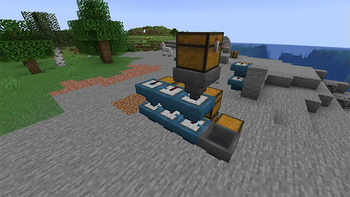
Here's what it looks like in action:
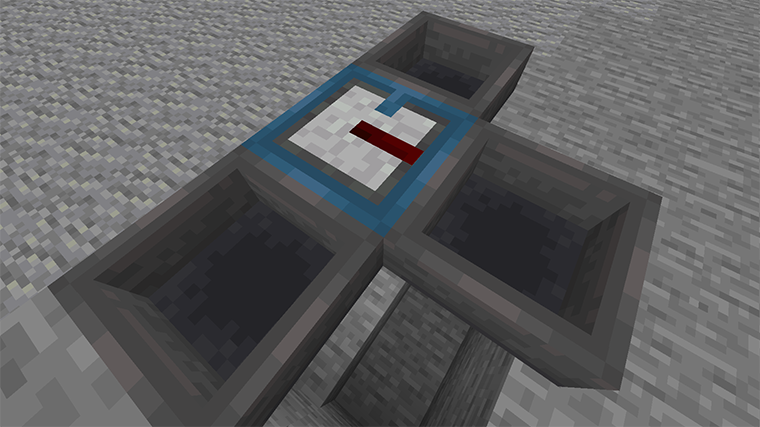
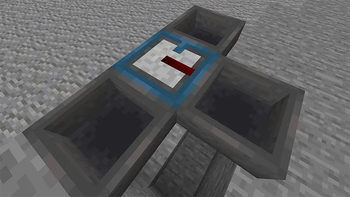
Overall the filter is a steel-blue hopper, and it has a redstone insert that does the filtering. The blue tab on the filter's top shows where normal items are directed. The redstone stripe flashes when an item is instead filtered to the hopper on the right.
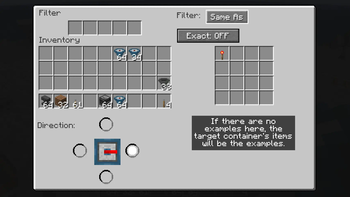
You can set up the filter using its UI:
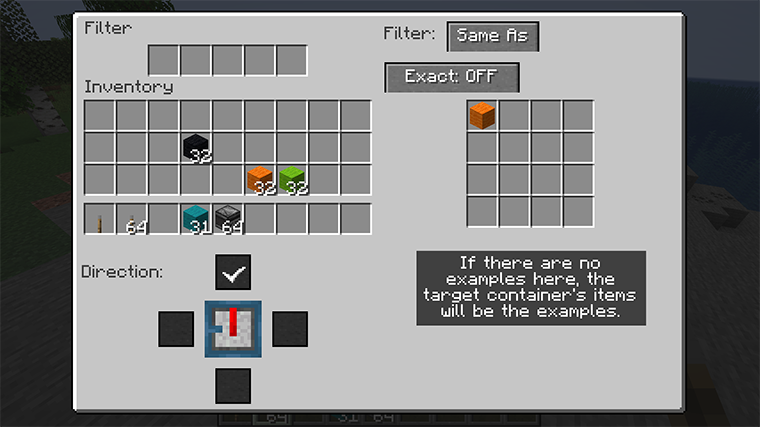
The area in the upper left is the basic hopper UI, and works just the same. On the right is the filter configuration. Here it is in "Same As" mode, which means it will only put items into the filter that match examples. These examples can be set by putting objects in the filter itself. Or the items already in the object container can be used as the examples instead. So if the filter has planks of every type, or if it has nothing and the target container has them, then planks will be diverted, and other items will continue onward.
The "Exact" button is off, so modifications will be ignored. If the examples included iron chestplate, this would allow damaged or enchanted iron chestplates to also be put in the target. If "Exact" were on, only chestplate that had the same damage and enchantment would be diverted.
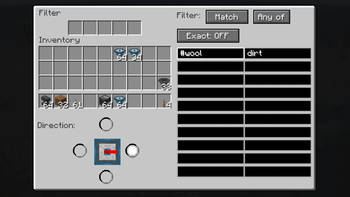
The other primary mode is "Match", where you specify tags and regular expressions to tell the
filter what to do:
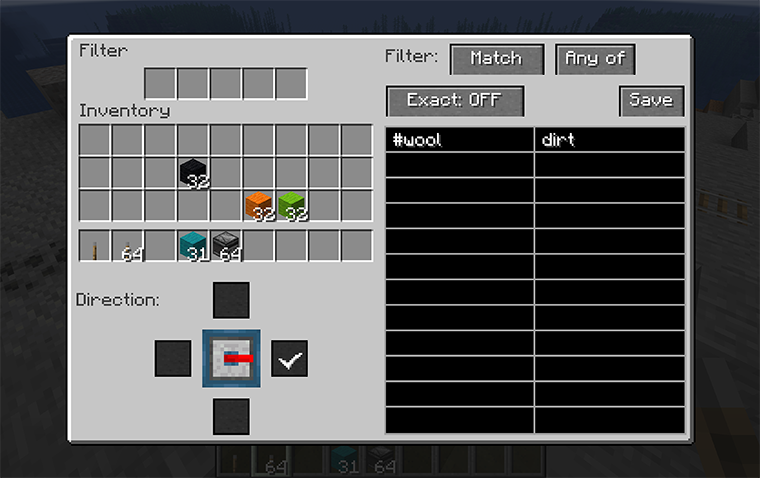
Here we've told the filter to match blocks that are covered by the tag "#wool" (all kinds of wool) plus anything that has "dirt" in the name. "Any of" can be switched to "All of", which would mean the item would have to both match "#wool" and have "dirt" in the name (which nothing does, so ...).
In "Match" mode, "Exact" means that NBT value will be included when string matching. So you could match any item that was enchanted with the pattern ".*Enchantments.*" because that string appears in the NBT of enchanted items.
The list of standard tags will probably be helpful. As for regular expressions, there are many tutorials on the web. Generally, text matches the same text except for special symbols. The most important are:
.matches any single character, so "d.rt" matches both "dirt" and "dart".*means "zero or more repetitions", so ".*" means "zero or more of any characters".^matches the start of the text, so you could say "anything whose name starts with blue" with the pattern "^blue.*", which would not match light blue things.$matches the end of the text.
The filter finds a match anywhere in the string unless you anchor it to the start and/or end of
the text. It also ignores
the case of the text, so "enchantments" would match both "enchantments" and "Enchantments".
Finally, the mode "None" just turns off the filtering entirely.
The third part of the UI, the part below your inventory, allows you to change the direction of the filter. Like a hopper, a filter can point in any direction but up, but also it cannot point in the same direction as the regular hopper output. When you place a filter, the filtered output is defined by how you're pointing, but you can change it afterwards using this part of the UI.
Verfügbare Versionen
philter auf dem Server installieren
Server bestellen
Bestelle einen Minecraft Java Server mit mindestens 3 GB RAM (4 GB empfohlen).
fabric Loader setzen
Wähle im Panel unter "Egg" den fabric-Loader und die passende Minecraft-Version (26.1).
Mod installieren
Öffne den Mod-Browser im Dashboard und suche nach "philter". Klicke "Installieren" – fertig! Alternativ: Lade die .jar via SFTP in den /mods Ordner.
Kompatibilität
Mod-Loader
Minecraft-Versionen
26.1, 1.21, 1.20.6 (+6 weitere)
Server-seitig
✓ ErforderlichEmpfohlener RAM
4 GB(min. 3 GB)Häufige Fragen
philter Server crasht beim Start – was tun?
Häufigste Ursache: falsche fabric-Version oder zu wenig RAM. Prüfe im Server-Log (latest.log), ob ein "OutOfMemoryError" oder "Mixin"-Fehler auftritt. Bei Mado Hosting: Stelle sicher, dass mindestens 3 GB RAM zugewiesen sind und der Loader zur Mod-Version passt (26.1). Über das Panel kannst du den Loader mit einem Klick wechseln.
Ist philter mit fabric kompatibel?
philter unterstützt offiziell fabric für Minecraft 26.1, 1.21, 1.20.6. Im Mado Dashboard werden inkompatible Loader-Kombinationen automatisch erkannt.
Server laggt mit philter – wie optimiere ich die Performance?
Empfohlener RAM: 4 GB (+1 GB pro 8 Spieler). Prüfe mit /spark profiler, ob philter den meisten Tick-Time verbraucht. Häufige Fixes: Server-View-Distance auf 8-10 reduzieren, bei Forge "performant" oder "starlight" als Zusatz-Mod installieren. Bei Mado Hosting läuft dein Server auf NVMe-SSDs mit dedizierten CPU-Kernen für minimale Latenz.
Ähnliche Mods


Modded Server mieten
Installiere philter mit nur einem Klick auf deinem Server.
Details
- Lizenz
- Creative Commons Attribution 4.0 International
- Server-seitig
- Erforderlich