
Photonics: A raytracing engine
A ray-traced voxel engine with a focus on performance and crisp shadows
Screenshots
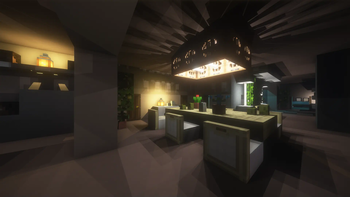
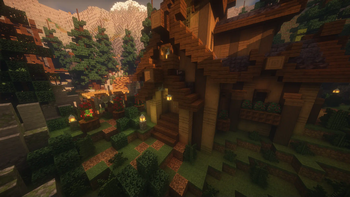
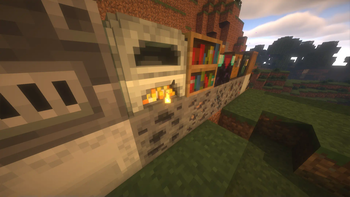
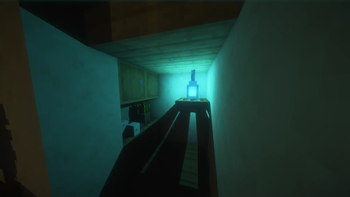
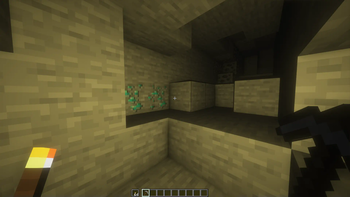
Über diese Mod
Photonics: A Raytracing Mod
An Iris extension that adds voxel based raytracing to Minecraft.
With a focus on performance, Photonics is able to deliver performance comparable to that of hardware raytracing.
Shaders that support Photonics:
- Euphoria Patches (requires 1.9.0+ and Photonics v0.3.4+)
- Photon (requires latest from Github & Photonics v0.3.4+)
- Eclipse (requires latest version from Github & Photonics v0.3.4)
- Shrimple (requires latest from GIthub & Photonics v0.3.4+)
Support patched in by the photonics mod:
- BSL (Photonics v0.3.0+ requires 10.1+, v0.2.9 or below requires 8.2.9)
Features
By using it's custom voxel raytracing, Photonics adds many visually stunning effects:
Soft Shadows
Every block casts beautiful soft shadows from block lights!
Global Illumination
Tired of how dull the world is in shadow? Worry not! Photonics adds accurate Global Illumination to shadows.
3D Blocks
Using its voxel raytracing, Photonics can render 16x16x16 block models directly!
Custom Models can also be implemented using MagicaVoxel.
Colored Glass Lighting
Photonics can tint the color of light that passes through glass, casting colored shadows over objects.
Up to 20 lights per chunk
By default, traces 20 lights per chunk, with shader settings allowing you to increase that number to 100!
Notice
- Photonics doesn't utilise Hardware Raytracing, and because Minecraft is built on OpenGL, building in Hardware Raytracing is unfortunately not possible
- This mod is still in Alpha, bugs and compatibility issues are to be expected
- Any mod that modifies Minecraft Rendering/Chunk loading will affect compatibility
- MacOS is not supported!
Development
Updates on the Development can be seen on its Discord server: Photonics Official
Verfügbare Versionen
Photonics: A raytracing engine auf deinem Client installieren
Mod-Loader lokal installieren
Installiere fabric für deine lokale Minecraft-Version.
Passende Datei herunterladen
Wähle die Photonics: A raytracing engine-Datei für fabric und Minecraft 1.21.11.
Mod installieren
Lege die .jar-Datei in deinem lokalen .minecraft/mods-Ordner ab und starte Minecraft neu. Eine Installation auf dem Server ist nicht nötig.
Kompatibilität
Mod-Loader
Minecraft-Versionen
1.21.11, 1.21.10, 1.21.8 (+5 weitere)
Server-seitig
✗ Nicht unterstütztEmpfohlener RAM
4 GB(min. 3 GB)Häufige Fragen
Muss Photonics: A raytracing engine auf dem Minecraft Server installiert werden?
Nein. Modrinth kennzeichnet Photonics: A raytracing engine serverseitig als nicht unterstützt. Installiere die Mod nur im lokalen Minecraft-Mods-Ordner. Dein Server kann unverändert bleiben, sofern die Mod-Seite keine zusätzliche Abhängigkeit nennt.
Welche Version und welchen Loader braucht Photonics: A raytracing engine?
Nutze eine Datei für fabric und exakt deine Minecraft-Version. Unterstützte Versionen sind unter anderem 1.21.11, 1.21.10, 1.21.8. Loader-Dateien sind nicht untereinander austauschbar.
Photonics: A raytracing engine funktioniert nicht – was kann ich prüfen?
Prüfe zuerst Minecraft-Version, Loader-Version und erforderliche Abhängigkeiten. Lege die .jar-Datei im lokalen .minecraft/mods-Ordner ab und entferne ältere Duplikate. Da die Mod clientseitig ist, löst mehr Server-RAM dieses Problem nicht.
Ähnliche Mods




Minecraft Server für deine Gruppe
Photonics: A raytracing engine bleibt auf deinem Client. Hoste dazu eine kompatible Welt für deine Mitspieler.