
Player Locator Plus
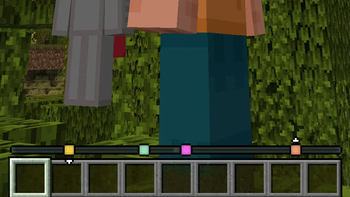
Track other players' locations on your experience bar like a compass! (Replaces/augments vanilla Locator Bar)
Screenshots
Über diese Mod
Player Locator Plus
Track other players' locations on your experience bar like a compass!


Marker colors
By default, each player's color is determined randomly by their UUID. There are other options in the config (see below).
Distance fade
When a player is very far away, their marker starts to fade:

Disappearing
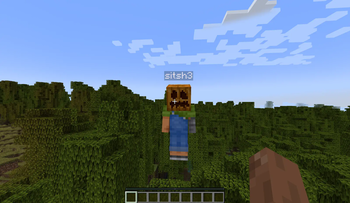
There are three ways to hide from the player locator:
- Crouching
- Wearing a carved pumpkin
- Having the invisibility effect

Configuration
The config is available at config/player-locator-plus.toml.
You can also access the configuration screen with Mod Menu.
Server parameters:
enabled: Is the mod enabled server-side at all. Note that the bar will still be visible ifvisibleis true. Default:truesendServerConfig: Whether the server will try to force its config on the client. This will only have effect if the clients haveacceptServerConfigset to true. Default:truesendDistance: Whether to send distance information along with the direction information.
There's basically no point in settings this tofalse, as players can still easily
triangulate the exact location of others even without knowing the distance.
However, it is harder with this option on, especially if you consider that other players
move.
Default:truemaxDistance: The maximum distance at which other players are visible on the compass.
Default:0(unlimited)directionPrecision: The amount of segments the direction vector is split into. Decreasing this value significantly will make tracking way more inaccurate but be helpful in preventing triangulation. Default:300ticksBetweenUpdates: How many ticks apart are the compass updates.
The less, the smoother the movements of faraway players are.
Close players (inside the entity render distance) do not depend on this parameter as much.
Default:5(four times per second)sneakingHides: Whether sneaking hides players from the locator. Default:truepumpkinHides: Whether wearing a pumpkin (or any othergaze_disguise_equipment) hides
players from the locator.
Default:truemobHeadsHide: Whether wearing a mob/player head hides players from the locator. The exact list can be edited with a datapack by changingdata/player-locator-plus/tags/item/hiding_equipment.json(see default here). Default:trueinvisibilityHides: Whether being invisible hides players from the locator. Default:truecolorMode: How to determine the color of the markers. Vanilla waypoints always override this setting. Available modes:UUID(default): Assign a random color based on the UUID of the player.TEAM_COLOR: Use the color of the player's team (or white)CUSTOM: Allow every player to assign a color with the/plp colorcommand. Defaults toUUIDcolorsCONSTANT: Everyone has the same color from theconstantColoroption
constantColor: Color used whencolorModeisCONSTANT. Default:0xFFFFFF(white)allowVanillaLocatorBar: Allow sending waypoint to vanilla players without the mod. Default:true
Client parameters:
visible: Show the player locator. Default:truevisibleEmpty: Show the player locator even there are no players online and no markers in sight. Default:falseacceptServerConfig: Whether to override the client-side config with the server-side one. The server config will also be able set client parameters. Default:truefadeMarkers: Fade markers of faraway players. Default:falsefadeStart: At what distance the markers start to fade. Default:100fadeEnd: At what distance the markers stop fading and settle atfadeEndOpacity. Default:1000shrinkMarkers: Shrink markers of faraway players like the vanilla locator bar. Default:trueshrinkStart: At what distance the markers start start to shrink. Note that this option might not work as you expect: theshrinkStart-shrinkEndinterval is divided into 6 sections, where the first section does not shrink. So with the default 70-500 distances, the marker will actually start to shrink at ~152 blocks. Default:70shrinkEnd: At what distance the markers stop to shrink. Default:500fadeEndOpacity: The final opacity when/afterfadeEndis reached. Default:0.3showHeight: Show little arrows above/below a marker if the height difference is significant.
Default:truealwaysShowHeads: Always show player heads, regardless of whether Tab is pressed. Default:falseshowHeadsOnTab: Show player heads when Tab is pressed. Default:trueshowNamesOnTab: Show player names when Tab is pressed. Default:trueshowVanillaWaypoints: Show custom waypoints created by adding thewaypoint_transmit_rangeattribute. Default:true
Acknowledgements
Originally introduced in Minecraft: Bedrock Edition Preview
here,
covered by Phoenix SC.
Known issues
- Major versions (1.x.x and 2.x.x) are NOT compatible! At least the major version must match between the server and the client.
License
Player Locator Plus is licensed under the GNU General Public License Version 3 or later.
Verfügbare Versionen
Player Locator Plus auf dem Server installieren
Server bestellen
Bestelle einen Minecraft Java Server mit mindestens 3 GB RAM (4 GB empfohlen).
fabric Loader setzen
Wähle im Panel unter "Egg" den fabric-Loader und die passende Minecraft-Version (26.2).
Mod installieren
Öffne den Mod-Browser im Dashboard und suche nach "Player Locator Plus". Klicke "Installieren" – fertig! Alternativ: Lade die .jar via SFTP in den /mods Ordner.
Kompatibilität
Mod-Loader
Minecraft-Versionen
26.2, 26.1.2, 26.1.1 (+20 weitere)
Server-seitig
✓ ErforderlichEmpfohlener RAM
4 GB(min. 3 GB)Häufige Fragen
Player Locator Plus Server crasht beim Start – was tun?
Häufigste Ursache: falsche fabric-Version oder zu wenig RAM. Prüfe im Server-Log (latest.log), ob ein "OutOfMemoryError" oder "Mixin"-Fehler auftritt. Bei Mado Hosting: Stelle sicher, dass mindestens 3 GB RAM zugewiesen sind und der Loader zur Mod-Version passt (26.2). Über das Panel kannst du den Loader mit einem Klick wechseln.
Ist Player Locator Plus mit fabric kompatibel?
Player Locator Plus unterstützt offiziell fabric für Minecraft 26.2, 26.1.2, 26.1.1. Im Mado Dashboard werden inkompatible Loader-Kombinationen automatisch erkannt.
Server laggt mit Player Locator Plus – wie optimiere ich die Performance?
Empfohlener RAM: 4 GB (+1 GB pro 8 Spieler). Prüfe mit /spark profiler, ob Player Locator Plus den meisten Tick-Time verbraucht. Häufige Fixes: Server-View-Distance auf 8-10 reduzieren, bei Forge "performant" oder "starlight" als Zusatz-Mod installieren. Bei Mado Hosting läuft dein Server auf NVMe-SSDs mit dedizierten CPU-Kernen für minimale Latenz.
Ähnliche Mods






Modded Server mieten
Installiere Player Locator Plus mit nur einem Klick auf deinem Server.