
Pool and Billiards
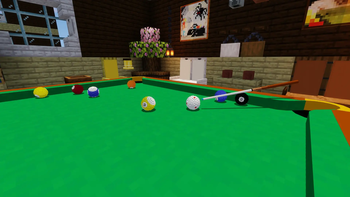
记得安装资源包!Remember to install the resource pack! One of the most advanced open-source pool and billiards games for Minecraft Java Edition, featuring realistic physics, snooker, eight-ball, nine-ball, multiplayer, and AI opponents.
Screenshots


Über diese Mod
Pool and Billiards Datapack by YMS2001
It got a website for all info you need!
About
This datapack is designed for Minecraft players who enjoy cue sports.
Here, pool broadly refers to cue sports including Snooker, 8-Ball, 9-Ball, and related variants.
The datapack supports single-player, play-with-bot, and two-player gameplay in Minecraft Java Edition 1.16+. It also fully supports players without OP permission or in survival mode.
Supported game modes:
- Snooker
- UK 8-Ball
- Generic 8-Ball
- 9-Ball
- Rule-free practice mode
Dependencies
This datapack depends on the following component:
- Required — Pool and Billiards Resource Pack
When installing from Modrinth, the compatible resource pack should be installed automatically.
Please use matching versions of the datapack and resource pack whenever possible. If an exact matching resource-pack version is not available, this means the datapack was updated without requiring a resource-pack update; in that case, use the closest earlier compatible resource-pack version.
Make sure the required resource pack is installed and enabled before use.
Detailed README (GitHub)
中文版使用说明(GitHub)
Summary of Recent Changes
近期改动总结
Mod Version
Starting from v1.2.0, the datapack is also available as a mod version.
The mod version automatically loads the datapack, so you do not need to place it into each world’s datapacks folder manually. The regular datapack version is still fully supported.
Installation
1. Download the following for the correct game version
- Pool Datapack
- Pool and Billiards Resource Pack (Please check that the resourcepack has a matching minor version to ensure compatibility, i.e., v1.3.x datapack should use v1.3.x resourcepack)
2. Locate your Minecraft directory
On Windows this is usually:
C:/Users/YourUserName/AppData/Roaming/.minecraft
3. Install the resource pack
Move Pool Resource Pack into:
.minecraft/resourcepacks
4. Install the datapacks
Open the world folder where you want to install the datapacks:
.minecraft/saves/<your world>/datapacks
Move the file into this folder:
- Pool Datapack
Each world requires its own copy of the datapacks.
Alternative mod version, available since v1.2.0
You can download the mod version and place it into .minecraft/mods
The mod version automatically loads the datapack, so you do not need to place it into each world's datapacks folder every time.
5. Start Minecraft and open the world
6. Enable the resource pack
Esc -> Options -> Resource Packs
Move Pool Resource Pack to the enabled side.
7. Run the following command
/reload
8. Enjoy
Here are a few helpful commands.
- Open command window directly without clicking any buttons in chat.
/function app:help/pool/commandwindow
or/trigger swPool__trigger set 1if without permission - Run the loading function, in case you want to troubleshoot / check missing settings and don't want to run
reload.
/function pool:classes/main/load - Terminate a game without using command window.
/function pool:classes/lobby/terminate_helper - Remove a table without using command window.
/function pool:classes/table/clear
Included Mechanics
This datapack includes the following systems:
- Simplified Newtonian physics simulation for pool balls
- Neural network-based rack simulation during the break
- Simplified match setup and game rules
- Chat-based GUI for convenient interaction; most actions are done with the mouse
- Support for English and 简体中文
For performance and clarity, the simulation omits some real-world effects such as friction between pockets and balls, cushion deformation, and other minor physical complexities.
Additional Information
Full documentation, installation and usage guides, and source code are available here:
https://github.com/MingshiYangUIUC/Pool-Minecraft-Squid-Workshop-Project
Compatibility Note
For Minecraft versions before 1.21, you may need to edit pack.mcmeta to remove the compatibility warning.
The datapack content is mostly identical across supported versions, so adjusting this single file is usually easier than maintaining multiple nearly identical copies.
Please refer to the Pack Format documentation and update pack.mcmeta according to your Minecraft version:
Verfügbare Versionen
Pool and Billiards auf dem Server installieren
Server bestellen
Bestelle einen Minecraft Java Server mit mindestens 3 GB RAM (4 GB empfohlen).
datapack Loader setzen
Wähle im Panel unter "Egg" den datapack-Loader und die passende Minecraft-Version (26.3).
Mod installieren
Öffne den Mod-Browser im Dashboard und suche nach "Pool and Billiards". Klicke "Installieren" – fertig! Alternativ: Lade die .jar via SFTP in den /mods Ordner.
Kompatibilität
Mod-Loader
Minecraft-Versionen
26.3, 26.2, 26.1.2 (+50 weitere)
Server-seitig
✓ ErforderlichEmpfohlener RAM
4 GB(min. 3 GB)Häufige Fragen
Pool and Billiards Server crasht beim Start – was tun?
Häufigste Ursache: falsche datapack-Version oder zu wenig RAM. Prüfe im Server-Log (latest.log), ob ein "OutOfMemoryError" oder "Mixin"-Fehler auftritt. Bei Mado Hosting: Stelle sicher, dass mindestens 3 GB RAM zugewiesen sind und der Loader zur Mod-Version passt (26.3). Über das Panel kannst du den Loader mit einem Klick wechseln.
Ist Pool and Billiards mit datapack und fabric und forge und neoforge und quilt kompatibel?
Pool and Billiards unterstützt offiziell datapack, fabric, forge, neoforge, quilt für Minecraft 26.3, 26.2, 26.1.2. Achtung: Forge- und Fabric-Mods sind NICHT untereinander kompatibel – wähle einen Loader und bleibe dabei. Im Mado Dashboard werden inkompatible Loader-Kombinationen automatisch erkannt.
Server laggt mit Pool and Billiards – wie optimiere ich die Performance?
Empfohlener RAM: 4 GB (+1 GB pro 8 Spieler). Prüfe mit /spark profiler, ob Pool and Billiards den meisten Tick-Time verbraucht. Häufige Fixes: Server-View-Distance auf 8-10 reduzieren, bei Forge "performant" oder "starlight" als Zusatz-Mod installieren. Bei Mado Hosting läuft dein Server auf NVMe-SSDs mit dedizierten CPU-Kernen für minimale Latenz.
Ähnliche Mods

![[ETF] Entity Texture Features](https://cdn.modrinth.com/data/BVzZfTc1/af683d206d50b05258d865b0d6e4aa2f2cee12f2_96.webp)
![[EMF] Entity Model Features](https://cdn.modrinth.com/data/4I1XuqiY/6e5bbd0d06b1741bfdab6c0cfab6de8fdaf0064c_96.webp)



Modded Server mieten
Installiere Pool and Billiards mit nur einem Klick auf deinem Server.