
Potioncraft
Makes cauldrons do what they should! You can brew and mix your potions in a cauldron, like a real witch/wizard/alchemist.
Screenshots
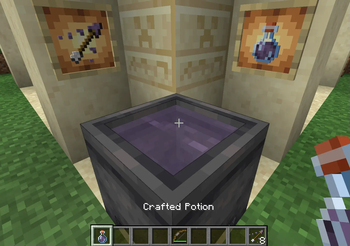
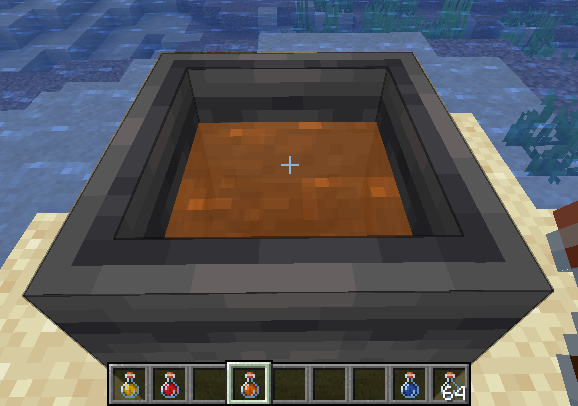
Über diese Mod
This mod is in development, many features are planned and bugs are to be expected.
Please report bugs, I will fix them ASAP.
Mixing
Mixing is a core component of this mod, it involves taking several potions and combining their effects in cauldron. To begin mixing, add any potion to a cauldron! The cauldron behaves the same as vanilla with the 3 levels.
While mixing, the cauldron cannot be used for other vanilla purposes (and cannot be moved with pistons).
Additionally, the mixture will appear translucent.
To revert to vanilla behavior, empty the cauldron or dilute with water until there is no remaining effect.
Additionally using a milk bucket will remove all effects.
Balancing
Potioncraft uses dilution to balance potions, adding two potions will result in two potions that have both effects but with half duration and amplification.
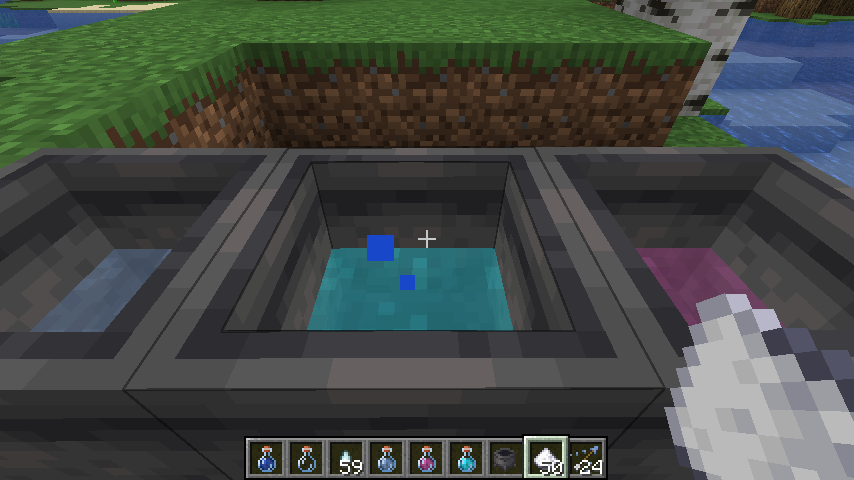
Adding a water bottle to a mixture will increase the cauldron level, but dilutes the mixture.
Another balancing mechanic is "potency". This limits the amount of ingredients you can add to a single mixture, the default max is 5 but this can be changed or disabled in the config. Mixing a potion with max potency into an existing mixture will cause that mixture to have max potency! Potency is indicated by the potion cauldron splashing and making bubble noises.
Brewing
Brewing using only a cauldron requires no blaze powder, but more ingredients are needed for 3 potions.
All the vanilla recipes can be used to create effects.
This mod uses data packs to determine recipes, so you can change everything to how you like!
View the README on the GitHub for more info on data packs!
Verfügbare Versionen
Potioncraft auf dem Server installieren
Server bestellen
Bestelle einen Minecraft Java Server mit mindestens 3 GB RAM (4 GB empfohlen).
fabric Loader setzen
Wähle im Panel unter "Egg" den fabric-Loader und die passende Minecraft-Version (1.21.6).
Mod installieren
Öffne den Mod-Browser im Dashboard und suche nach "Potioncraft". Klicke "Installieren" – fertig! Alternativ: Lade die .jar via SFTP in den /mods Ordner.
Kompatibilität
Mod-Loader
Minecraft-Versionen
1.21.6, 1.20.4, 1.20.1 (+1 weitere)
Server-seitig
✓ ErforderlichEmpfohlener RAM
4 GB(min. 3 GB)Häufige Fragen
Potioncraft Server crasht beim Start – was tun?
Häufigste Ursache: falsche fabric-Version oder zu wenig RAM. Prüfe im Server-Log (latest.log), ob ein "OutOfMemoryError" oder "Mixin"-Fehler auftritt. Bei Mado Hosting: Stelle sicher, dass mindestens 3 GB RAM zugewiesen sind und der Loader zur Mod-Version passt (1.21.6). Über das Panel kannst du den Loader mit einem Klick wechseln.
Ist Potioncraft mit fabric kompatibel?
Potioncraft unterstützt offiziell fabric für Minecraft 1.21.6, 1.20.4, 1.20.1. Im Mado Dashboard werden inkompatible Loader-Kombinationen automatisch erkannt.
Server laggt mit Potioncraft – wie optimiere ich die Performance?
Empfohlener RAM: 4 GB (+1 GB pro 8 Spieler). Prüfe mit /spark profiler, ob Potioncraft den meisten Tick-Time verbraucht. Häufige Fixes: Server-View-Distance auf 8-10 reduzieren, bei Forge "performant" oder "starlight" als Zusatz-Mod installieren. Bei Mado Hosting läuft dein Server auf NVMe-SSDs mit dedizierten CPU-Kernen für minimale Latenz.
Ähnliche Mods

![[ETF] Entity Texture Features](https://cdn.modrinth.com/data/BVzZfTc1/af683d206d50b05258d865b0d6e4aa2f2cee12f2_96.webp)
![[EMF] Entity Model Features](https://cdn.modrinth.com/data/4I1XuqiY/6e5bbd0d06b1741bfdab6c0cfab6de8fdaf0064c_96.webp)



Modded Server mieten
Installiere Potioncraft mit nur einem Klick auf deinem Server.