QED
a mod that fixes entity attributes contaminated with NaN after taking extreme damage.
Über diese Mod
📌 Dependencies
This mod does not depend on any other mod.
📑 Introduction
This is a mod that fixes entity data being contaminated with NaN due to extreme damage — or, more broadly speaking, "fake death".
When an entity takes infinite or NaN damage, some of its attributes, such as absorption and health, become NaN after calculation.
Normally, an entity hit by infinite damage is supposed to die outright, and the NaN-contaminated data would be cleaned up or reset.
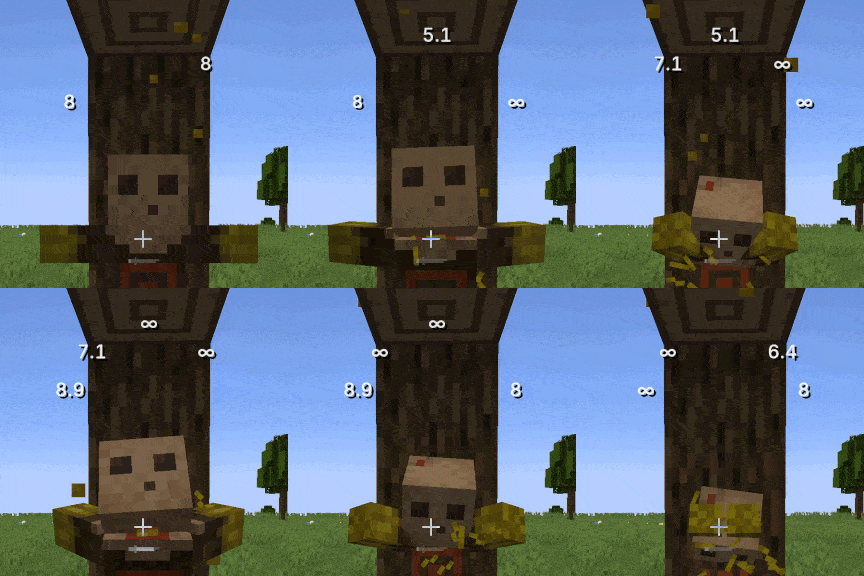
However, some entities with special mechanics survive infinite damage or keep performing other operations — for example, the dummy entity from Target Dummy. The rest of this description is based on the characteristics of that entity.
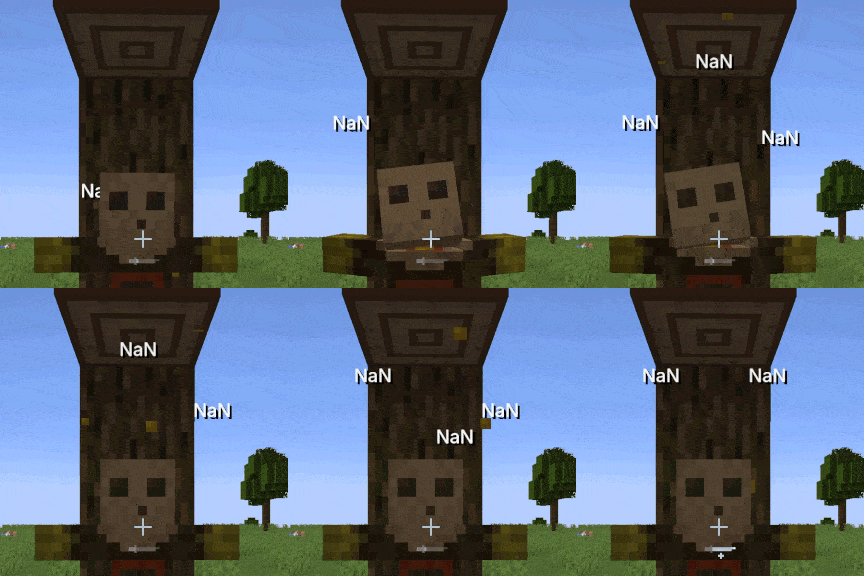
🫣 What is NaN
NaN stands for "Not a Number" — a value that has no meaning and cannot participate in calculations. In programming, any comparison between NaN and any number is False, and any operation involving NaN results in NaN, which makes NaN contagious.
👌 How it occurs and how it's fixed
When calculating damage effects, if the damage value is infinite, the program computes damage before absorption - damage after absorption to derive the absorption reduction while applying damage absorption. However, infinity operated on with any finite value always yields infinity, so both the minuend and the subtrahend are infinity, and infinity - infinity results in NaN — the absorption attribute thus becomes NaN.
As mentioned above, NaN is contagious: any subsequent damage calculated with NaN also becomes NaN, which is why you'll see the dummy displaying dealt damage as NaN.
This mod does not try to clean up entities; instead, it fixes the mathematical root cause — mathematically, damage before absorption - damage after absorption is equivalent to min(damage before absorption, current absorption). The latter removes the unnecessary subtraction, so infinity - infinity no longer occurs, eliminating the possibility of NaN.
💭 FAQ
Q: Does this mod need to be installed on the client?
A: Yes if you're playing singleplayer; otherwise, installing it on the server only is enough.
Q: Does this mod only apply to Target Dummy?
A: No. Any entity that can take damage and has health is covered by the fix.
Q: Other Minecraft versions?
A: Other mainstream versions will be updated over time, with Minecraft 1.20.1 as the main focus. Third-party ports are welcome.
Q: NeoForge / Quilt versions?
A: NeoForge will be supported separately; Quilt will not be supported separately, but third-party ports are welcome.
ℹ️ Misc
The mod also includes compatibility handling for infinite armor values and infinite armor toughness, whose behavior can be configured via the config file named qed.json5.
The mod abbreviation "QED" stands for "Quite Enough Damage", but can also stand for "Quod Erat Demonstrandum", meaning "that which was to be demonstrated".
Verfügbare Versionen
QED auf dem Server installieren
Server bestellen
Bestelle einen Minecraft Java Server mit mindestens 3 GB RAM (4 GB empfohlen).
fabric Loader setzen
Wähle im Panel unter "Egg" den fabric-Loader und die passende Minecraft-Version (1.21.11).
Mod installieren
Öffne den Mod-Browser im Dashboard und suche nach "QED". Klicke "Installieren" – fertig! Alternativ: Lade die .jar via SFTP in den /mods Ordner.
Kompatibilität
Mod-Loader
Minecraft-Versionen
1.21.11, 1.21.8, 1.21.1 (+1 weitere)
Server-seitig
✓ ErforderlichEmpfohlener RAM
4 GB(min. 3 GB)Häufige Fragen
QED Server crasht beim Start – was tun?
Häufigste Ursache: falsche fabric-Version oder zu wenig RAM. Prüfe im Server-Log (latest.log), ob ein "OutOfMemoryError" oder "Mixin"-Fehler auftritt. Bei Mado Hosting: Stelle sicher, dass mindestens 3 GB RAM zugewiesen sind und der Loader zur Mod-Version passt (1.21.11). Über das Panel kannst du den Loader mit einem Klick wechseln.
Ist QED mit fabric und forge und neoforge kompatibel?
QED unterstützt offiziell fabric, forge, neoforge für Minecraft 1.21.11, 1.21.8, 1.21.1. Achtung: Forge- und Fabric-Mods sind NICHT untereinander kompatibel – wähle einen Loader und bleibe dabei. Im Mado Dashboard werden inkompatible Loader-Kombinationen automatisch erkannt.
Server laggt mit QED – wie optimiere ich die Performance?
Empfohlener RAM: 4 GB (+1 GB pro 8 Spieler). Prüfe mit /spark profiler, ob QED den meisten Tick-Time verbraucht. Häufige Fixes: Server-View-Distance auf 8-10 reduzieren, bei Forge "performant" oder "starlight" als Zusatz-Mod installieren. Bei Mado Hosting läuft dein Server auf NVMe-SSDs mit dedizierten CPU-Kernen für minimale Latenz.
Ähnliche Mods




![[ETF] Entity Texture Features](https://cdn.modrinth.com/data/BVzZfTc1/af683d206d50b05258d865b0d6e4aa2f2cee12f2_96.webp)

Modded Server mieten
Installiere QED mit nur einem Klick auf deinem Server.