
QED
a mod that fixes entity attributes contaminated with NaN after taking extreme damage.
About this Mod
📌 Dependencies
This mod does not depend on any other mod.
📑 Introduction
This is a mod that fixes entity data being contaminated with NaN due to extreme damage — or, more broadly speaking, "fake death".
When an entity takes infinite or NaN damage, some of its attributes, such as absorption and health, become NaN after calculation.
Normally, an entity hit by infinite damage is supposed to die outright, and the NaN-contaminated data would be cleaned up or reset.
However, some entities with special mechanics survive infinite damage or keep performing other operations — for example, the dummy entity from Target Dummy. The rest of this description is based on the characteristics of that entity.
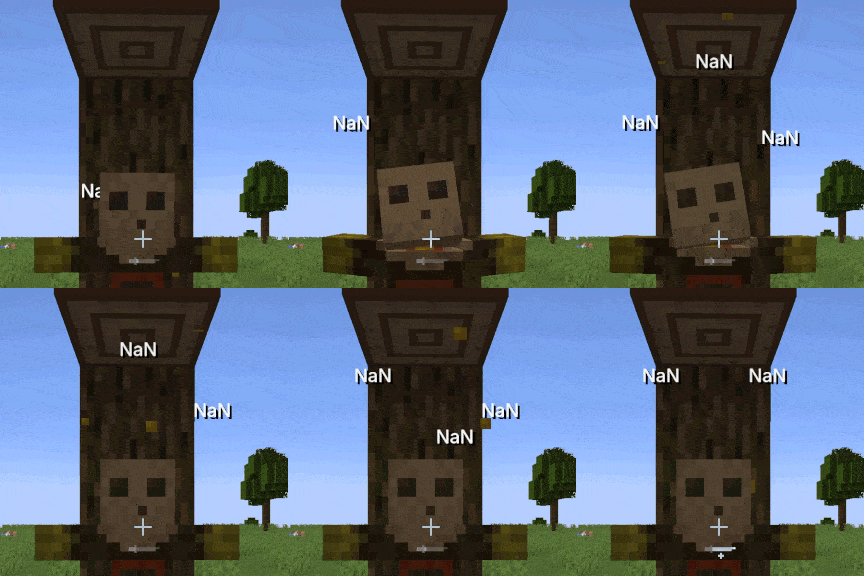
🫣 What is NaN
NaN stands for "Not a Number" — a value that has no meaning and cannot participate in calculations. In programming, any comparison between NaN and any number is False, and any operation involving NaN results in NaN, which makes NaN contagious.
👌 How it occurs and how it's fixed
When calculating damage effects, if the damage value is infinite, the program computes damage before absorption - damage after absorption to derive the absorption reduction while applying damage absorption. However, infinity operated on with any finite value always yields infinity, so both the minuend and the subtrahend are infinity, and infinity - infinity results in NaN — the absorption attribute thus becomes NaN.
As mentioned above, NaN is contagious: any subsequent damage calculated with NaN also becomes NaN, which is why you'll see the dummy displaying dealt damage as NaN.
This mod does not try to clean up entities; instead, it fixes the mathematical root cause — mathematically, damage before absorption - damage after absorption is equivalent to min(damage before absorption, current absorption). The latter removes the unnecessary subtraction, so infinity - infinity no longer occurs, eliminating the possibility of NaN.
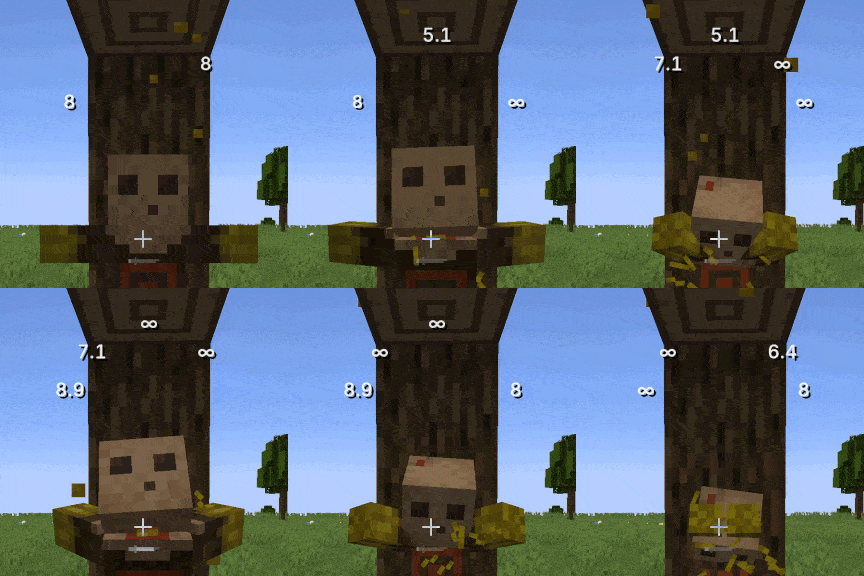
💭 FAQ
Q: Does this mod need to be installed on the client?
A: Yes if you're playing singleplayer; otherwise, installing it on the server only is enough.
Q: Does this mod only apply to Target Dummy?
A: No. Any entity that can take damage and has health is covered by the fix.
Q: Other Minecraft versions?
A: Other mainstream versions will be updated over time, with Minecraft 1.20.1 as the main focus. Third-party ports are welcome.
Q: NeoForge / Quilt versions?
A: NeoForge will be supported separately; Quilt will not be supported separately, but third-party ports are welcome.
ℹ️ Misc
The mod also includes compatibility handling for infinite armor values and infinite armor toughness, whose behavior can be configured via the config file named qed.json5.
The mod abbreviation "QED" stands for "Quite Enough Damage", but can also stand for "Quod Erat Demonstrandum", meaning "that which was to be demonstrated".
Available Versions
How to Install QED on Your Server
Order Server
Order a Minecraft Java server with at least 3 GB RAM (4 GB recommended).
Set fabric Loader
In the panel under "Egg", select the fabric loader and matching Minecraft version (1.21.11).
Install Mod
Open the mod browser in the dashboard and search for "QED". Click "Install" – done! Alternatively, upload the .jar via SFTP to the /mods folder.
Compatibility
Mod Loaders
Minecraft Versions
1.21.11, 1.21.8, 1.21.1 (+1 more)
Server-side
✓ RequiredRecommended RAM
4 GB(min. 3 GB)Frequently Asked Questions
QED server crashes on startup – what to do?
Most common cause: wrong fabric version or insufficient RAM. Check the server log (latest.log) for "OutOfMemoryError" or "Mixin" errors. With Mado Hosting: ensure at least 3 GB RAM is allocated and the loader matches the mod version (1.21.11). You can switch loaders with one click in the panel.
Is QED compatible with fabric and forge and neoforge?
QED officially supports fabric, forge, neoforge for Minecraft 1.21.11, 1.21.8, 1.21.1. Note: Forge and Fabric mods are NOT cross-compatible – pick one loader and stick with it. The Mado dashboard automatically detects incompatible loader combinations.
Server lagging with QED – how to optimize performance?
Recommended RAM: 4 GB (per 8 players). Use /spark profiler to check if QED consumes the most tick time. Common fixes: reduce server view-distance to 8-10, install "performant" or "starlight" as supplementary mods on Forge. With Mado Hosting, your server runs on NVMe SSDs with dedicated CPU cores for minimal latency.
Similar Mods




![[ETF] Entity Texture Features](https://cdn.modrinth.com/data/BVzZfTc1/af683d206d50b05258d865b0d6e4aa2f2cee12f2_96.webp)

Rent Modded Server
Install QED with just one click on your server.