
QuickHarvest
Right-click to harvest and instantly replant fully grown crops with a built-in, vanilla-balanced seed tax.
Screenshots

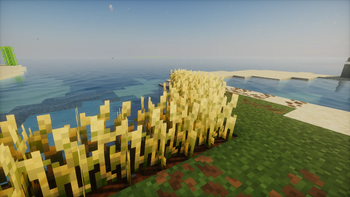
Über diese Mod
🌾 QuickHarvest
The smart, lag-free, and vanilla-balanced right-click harvesting solution for Minecraft.
QuickHarvest is a lightweight, server-friendly quality-of-life datapack that completely redefines how you farm. Instead of the tedious cycle of breaking mature crops and manually replanting them, simply right-click to harvest!
Unlike basic harvesting mods that give you "free" replants, QuickHarvest keeps your survival experience authentic by implementing a strict, automated seed tax directly from your dropped loot.
✨ Features
- ⚡ Effortless Farming: Right-click any fully grown crop to harvest its yields and instantly replant a fresh one in a single click.
- ⚖️ Vanilla-Balanced (Seed Tax): The datapack intercepts the dropped loot in mid-air and deducts exactly one seed/crop as the cost for replanting. If a crop drops only a single seed, it is completely consumed, preventing any item duplication!
- 👥 Multiplayer & Co-op Ready: The seed deduction logic is bound to the dropped item entity at the exact block coordinates. This guarantees that the correct crop pays the "tax," even if multiple players are farming side-by-side.
🥕 Supported Crops
| Crop | Mature State | Replant Cost (Deducted from Loot) |
|---|---|---|
| Wheat | age=7 |
🌾 1 Wheat Seed |
| Carrots | age=7 |
🥕 1 Carrot |
| Potatoes | age=7 |
🥔 1 Potato |
| Beetroots | age=3 |
🫚 1 Beetroot Seed |
📦 Installation & Setup
- Download the
QuickHarvestdatapack. - Drop it directly into your world's datapacks directory:
.minecraft/saves/YOUR_WORLD/datapacks/ - Launch your world or type
/reloadin the chat.
Verfügbare Versionen
QuickHarvest auf dem Server installieren
Server bestellen
Bestelle einen Minecraft Java Server mit mindestens 3 GB RAM (4 GB empfohlen).
datapack Loader setzen
Wähle im Panel unter "Egg" den datapack-Loader und die passende Minecraft-Version (26.2).
Mod installieren
Öffne den Mod-Browser im Dashboard und suche nach "QuickHarvest". Klicke "Installieren" – fertig! Alternativ: Lade die .jar via SFTP in den /mods Ordner.
Kompatibilität
Mod-Loader
Minecraft-Versionen
26.2, 26.1.2, 26.1.1 (+15 weitere)
Server-seitig
✓ ErforderlichEmpfohlener RAM
4 GB(min. 3 GB)Häufige Fragen
QuickHarvest Server crasht beim Start – was tun?
Häufigste Ursache: falsche datapack-Version oder zu wenig RAM. Prüfe im Server-Log (latest.log), ob ein "OutOfMemoryError" oder "Mixin"-Fehler auftritt. Bei Mado Hosting: Stelle sicher, dass mindestens 3 GB RAM zugewiesen sind und der Loader zur Mod-Version passt (26.2). Über das Panel kannst du den Loader mit einem Klick wechseln.
Ist QuickHarvest mit datapack und fabric und forge und neoforge und quilt kompatibel?
QuickHarvest unterstützt offiziell datapack, fabric, forge, neoforge, quilt für Minecraft 26.2, 26.1.2, 26.1.1. Achtung: Forge- und Fabric-Mods sind NICHT untereinander kompatibel – wähle einen Loader und bleibe dabei. Im Mado Dashboard werden inkompatible Loader-Kombinationen automatisch erkannt.
Server laggt mit QuickHarvest – wie optimiere ich die Performance?
Empfohlener RAM: 4 GB (+1 GB pro 8 Spieler). Prüfe mit /spark profiler, ob QuickHarvest den meisten Tick-Time verbraucht. Häufige Fixes: Server-View-Distance auf 8-10 reduzieren, bei Forge "performant" oder "starlight" als Zusatz-Mod installieren. Bei Mado Hosting läuft dein Server auf NVMe-SSDs mit dedizierten CPU-Kernen für minimale Latenz.
Ähnliche Mods



Modded Server mieten
Installiere QuickHarvest mit nur einem Klick auf deinem Server.