
Create: Rainbow Compound
This mod re-added the new recipe of Chromatic in Create and added a more advanced Compound.
Screenshots
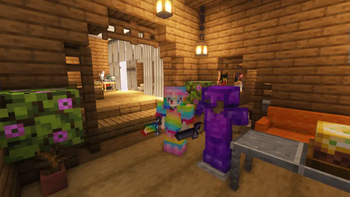
Über diese Mod
Chromatic Return And New Compound Added
Added a new and more complicated way to synthesize Chromatic in Create. And added another more advanced Compound.
Now you can get Chromatic Compound, Refined Radiance an Shadow Steel in the 1.18.2 or higher game. Recipe is more complex than that before Createv0.4, but it won't break the balance too much.
This mod adds less content, and does not add recipes for synthesizing items that can only be obtained under creative.
The following is a list of added content:
- Recipe of Chromatic Compound。
- A set of Shadow Steel tools.
- Obsidianite and its tools and armors.
- Rainbow Compound and its tools and armors.
- A method to obtain enchanted golden apples: need Nether Star and many Chromatic Compound.
- Refined Radiance Neon come from Create Stuff & Additions, because I think it's beautiful, but it's not in the 1.18.2 or higher game.
- Refined Radiance Scythes: Attacks cause weakness, longer attack distance, and SCRAPE Shield like an axe.
- Linkage with farmer's delight: including four knives and five new foods that are somewhat expensive.
- Some useful props and technological products, such as magic mirrors that return to the spawn point last set, and elytra that can provide power on their own
...
It may be designed to use the items in the game content when the author of the integration package modifies the game content. I welcome you to use mods like CraftTweaker to create your own composite tables or other content.
You can visit my github to browse the mod code:
https://github.com/LunaGlaze/rainbowcompound
There is a sad story about me being troubled by how to fix some problems in my code, and then facing even busier academic and work schedules. If you are willing to provide assistance, you can contact me.
My Twitter account(@lunashiqi) (But I don't watch Twitter very often)
My email([email protected])
Verfügbare Versionen
Create: Rainbow Compound auf dem Server installieren
Server bestellen
Bestelle einen Minecraft Java Server mit mindestens 4 GB RAM (6 GB empfohlen).
forge Loader setzen
Wähle im Panel unter "Egg" den forge-Loader und die passende Minecraft-Version (1.21.11).
Mod installieren
Öffne den Mod-Browser im Dashboard und suche nach "Create: Rainbow Compound". Klicke "Installieren" – fertig! Alternativ: Lade die .jar via SFTP in den /mods Ordner.
Kompatibilität
Mod-Loader
Minecraft-Versionen
1.21.11, 1.21.10, 1.21.9 (+19 weitere)
Server-seitig
✓ ErforderlichEmpfohlener RAM
6 GB(min. 4 GB)Häufige Fragen
Create: Rainbow Compound Server crasht beim Start – was tun?
Häufigste Ursache: falsche forge-Version oder zu wenig RAM. Prüfe im Server-Log (latest.log), ob ein "OutOfMemoryError" oder "Mixin"-Fehler auftritt. Bei Mado Hosting: Stelle sicher, dass mindestens 4 GB RAM zugewiesen sind und der Loader zur Mod-Version passt (1.21.11). Über das Panel kannst du den Loader mit einem Klick wechseln.
Ist Create: Rainbow Compound mit forge und neoforge kompatibel?
Create: Rainbow Compound unterstützt offiziell forge, neoforge für Minecraft 1.21.11, 1.21.10, 1.21.9. Im Mado Dashboard werden inkompatible Loader-Kombinationen automatisch erkannt.
Server laggt mit Create: Rainbow Compound – wie optimiere ich die Performance?
Empfohlener RAM: 6 GB (+1 GB pro 5 Spieler). Prüfe mit /spark profiler, ob Create: Rainbow Compound den meisten Tick-Time verbraucht. Häufige Fixes: Server-View-Distance auf 8-10 reduzieren, bei Forge "performant" oder "starlight" als Zusatz-Mod installieren. Bei Mado Hosting läuft dein Server auf NVMe-SSDs mit dedizierten CPU-Kernen für minimale Latenz.
Ähnliche Mods



![[TaCZ] Timeless and Classics Zero](https://cdn.modrinth.com/data/SzzJttH8/fd27766d2bb8390d284696b1dbd358f87e081439_96.webp)


Modded Server mieten
Installiere Create: Rainbow Compound mit nur einem Klick auf deinem Server.