
Modrinth · Forge, NeoForge
Create: Rainbow Compound on your Minecraft server
Create: Rainbow Compound runs on Minecraft servers with Forge or NeoForge. Order your server, set the loader in the panel and install the mod with one click in the mod browser.
This mod re-added the new recipe of Chromatic in Create and added a more advanced Compound.
- Downloads
- 568.6K
- Author
- LunaGlaze
- Loader
- Forge, NeoForge
- Minecraft
- 1.18.2 – 1.21.9
- Updated
- –
Screenshots
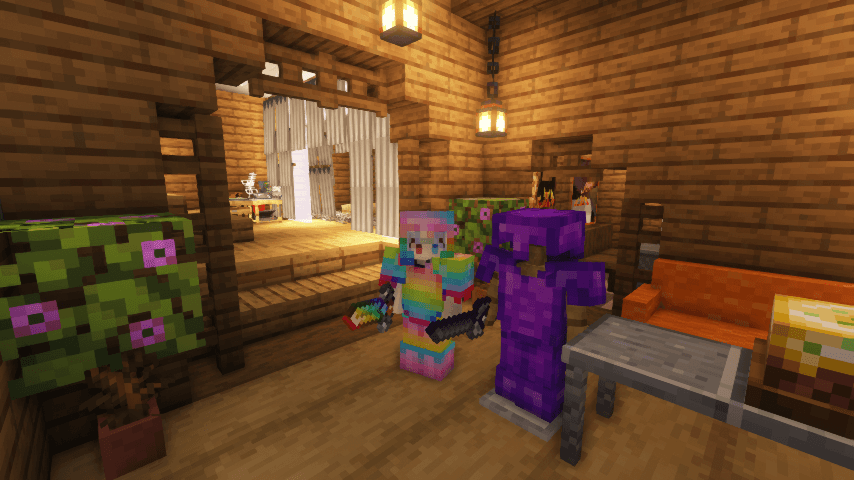
What Create: Rainbow Compound looks like

Images: Create: Rainbow Compound on Modrinth, published by the project team.
Setup
Install Create: Rainbow Compound on your server
The server and players need the same loader and Minecraft version. Back up the world before adding or updating mods.
- 01
Configure
6 GB of RAM is preselected. You choose the term and add-ons and pay by credit card or PayPal.
- 02
Set the loader
In the panel, set the server software to Forge or NeoForge and choose the matching Minecraft version, for example 1.21.9.
- 03
Install the mod
Search the mod browser for “Create: Rainbow Compound” and install the release for your loader. Alternatively, upload the .jar to the mods folder via SFTP. Required dependencies are listed on the project page.
- 04
Connect
Every player installs the same Create: Rainbow Compound release locally and connects using the server address from the panel.
- On the server
- Required
- On the client
- Required
- Loader
- Forge, NeoForge
- Minecraft
- 1.21.9, 1.21.8, 1.21.7 +19 more
- License
- LicenseRef-All-Rights-Reserved
The panel
Install mods, find errors.
Real screenshots from the Mado panel. Both come with every Minecraft server.
Mod browser
Modrinth and CurseForge, right in the panel.
The browser filters by your Minecraft version. Install mods with one click, without uploading .jar files.

AI crash analysis
When a mod crashes, the analyzer reads the log.
Mods often fail on a wrong loader version, Java version or missing dependency. The analyzer names a likely cause and suggests a fix.

Releases
Published releases
Pick the file that matches your server’s loader and Minecraft version. The server and players need the same release.
Create: Rainbow Compound · Modrinth- RainbowCompound-neoforge-1.21.1-1.3.5.dJuly 11, 2026Minecraft 1.21, 1.21.1, 1.21.10, 1.21.11, 1.21.2, 1.21.3, 1.21.4, 1.21.5, 1.21.6, 1.21.7, 1.21.8, 1.21.9 · NeoForge
- RainbowCompound-forge-1.20.1-1.3.5.aJune 1, 2026Minecraft 1.20.1, 1.20.2, 1.20.3, 1.20.4, 1.20.5, 1.20.6 · Forge
- RainbowCompound-forge-1.19.2-1.3.5.aJune 1, 2026Minecraft 1.19.2, 1.19.3, 1.19.4 · Forge
- RainbowCompound-forge-1.18.2-1.3.5.aJune 1, 2026Minecraft 1.18.2 · Forge
Original description by the project author
Chromatic Return And New Compound Added
Added a new and more complicated way to synthesize Chromatic in Create. And added another more advanced Compound.
Now you can get Chromatic Compound, Refined Radiance an Shadow Steel in the 1.18.2 or higher game. Recipe is more complex than that before Createv0.4, but it won't break the balance too much.
This mod adds less content, and does not add recipes for synthesizing items that can only be obtained under creative.
The following is a list of added content:
- Recipe of Chromatic Compound。
- A set of Shadow Steel tools.
- Obsidianite and its tools and armors.
- Rainbow Compound and its tools and armors.
- A method to obtain enchanted golden apples: need Nether Star and many Chromatic Compound.
- Refined Radiance Neon come from Create Stuff & Additions, because I think it's beautiful, but it's not in the 1.18.2 or higher game.
- Refined Radiance Scythes: Attacks cause weakness, longer attack distance, and SCRAPE Shield like an axe.
- Linkage with farmer's delight: including four knives and five new foods that are somewhat expensive.
- Some useful props and technological products, such as magic mirrors that return to the spawn point last set, and elytra that can provide power on their own
...
It may be designed to use the items in the game content when the author of the integration package modifies the game content. I welcome you to use mods like CraftTweaker to create your own composite tables or other content.
You can visit my github to browse the mod code:
https://github.com/LunaGlaze/rainbowcompound
There is a sad story about me being troubled by how to fix some problems in my code, and then facing even busier academic and work schedules. If you are willing to provide assistance, you can contact me.
My Twitter account(@lunashiqi) (But I don't watch Twitter very often)
My email([email protected])
Create: Rainbow Compound server crashes on startup – what to do?
Common causes: the loader or Minecraft version does not match the mod file, a dependency is missing, or RAM is too low. Check the log (latest.log) for “OutOfMemoryError”, “Mixin” or missing mods. At Mado, the AI crash analysis reads the log and suggests a cause. You can change the loader and version in the panel.
Which loader does Create: Rainbow Compound run on?
According to Modrinth, Create: Rainbow Compound supports Forge, NeoForge for Minecraft 1.21.9, 1.21.8, 1.21.7.
How much RAM does a server with Create: Rainbow Compound need?
As guidance, 4–6 GB for a server with this mod. This is an estimate, not a measured minimum. More mods, many players and long view distances need more. The spark profiler shows whether a mod is costing tick time.
Similar mods
Popular mods in the same category
 Server-ready

VeinMiner
by Miraculixx
Mine the whole vein on mining a single ore/block. Make the tedious mining experience to something satisfying and fun! FTB Ultimine alternative
 Client only

VeinMiner Hotkey
by Miraculixx
Veinminer Addon - Use a hotkey to veinmine with a dynamic crosshair & block highlighting
 Server-ready

Curios API
by TheIllusiveC4
A flexible and expandable accessory/equipment API for users and developers.
 Server-ready

[TaCZ] Timeless and Classics Zero
by craneblock6666
The most Immersive and Customizable modern FPS experience in Minecraft - A complete Remaster of the TaC gun mod by the original team.
Ready for your server with Create: Rainbow Compound?
6 GB of RAM from €12.00 per month. 35% off your first month with MADO35.