
Reimagined World Menu
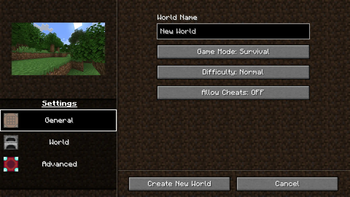
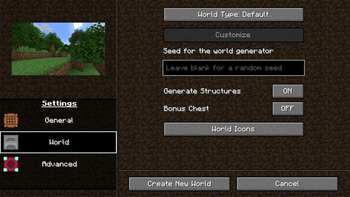
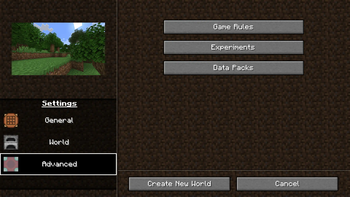
Completely re-design the Create World menu.
Screenshots
Über diese Mod
Reimagined World Menu
Completely Re-designs the Create World menu, as well as making some changes to the world list.
Features
Complete menu overhaul
Customizable image that represents each world type (default, flat, amplified, etc.)
Ability to add a custom icon to your world upon creation.
Increased resolution for world icons.
Translations for:
- Italian

- Spanish

- Japanese

- Portuguese

- Polish

- Russian

- German

- Serbian

- Bulgarian

- Czech

- Tatar

- Chinese

- Dutch

- Flemish
Resource packs
This mod allows you to customize two things with resource packs:
World type image
Tab icons
If you need exaples of what the pack should look like, then you can take a look in the source code's resource folder,
Everything here has been used in the mod's source.
World preset images
To add custom world preset images, you must first create a resource pack, and in the folder reimaginedmenus/textures/misc,
you must have an image with the name of the world preset identifier, for example,
an amplified world would need an image titled amplified.
Tab Icons
To add custom world preset images, in your resource pack, and in the folder reimaginedmenus/textures/misc,
create a json file titled tabicons.json, and in that file, put:
{
  "general_settings_icon": "modid:path/to/texture",
  "world_settings_icon": "modid:path/to/texture",
  "advanced_settings_icon": "modid:path/to/texture"
}
You can choose whatever texture you want, it can be vannila, modded, or a custom texture.
If you want a custom texture, then just the identifier should look like this: reimaginedmenus:path/to/texture,
then you just provide the textures in your resource pack.
Feedback
I'm entirely open to design changes and will consider adding your suggestion.
I'm also open to adding and/or editing translations for your language, you will have two options:
- Translate the text yourself

- Or have me use Google Translate (Which is prone to inaccuracy, but can be quicker)
Verfügbare Versionen
Reimagined World Menu auf deinem Client installieren
Mod-Loader lokal installieren
Installiere fabric für deine lokale Minecraft-Version.
Passende Datei herunterladen
Wähle die Reimagined World Menu-Datei für fabric und Minecraft 1.21.1.
Mod installieren
Lege die .jar-Datei in deinem lokalen .minecraft/mods-Ordner ab und starte Minecraft neu. Eine Installation auf dem Server ist nicht nötig.
Kompatibilität
Mod-Loader
Minecraft-Versionen
1.21.1, 1.21, 1.20.6 (+7 weitere)
Server-seitig
✗ Nicht unterstütztEmpfohlener RAM
4 GB(min. 3 GB)Häufige Fragen
Muss Reimagined World Menu auf dem Minecraft Server installiert werden?
Nein. Modrinth kennzeichnet Reimagined World Menu serverseitig als nicht unterstützt. Installiere die Mod nur im lokalen Minecraft-Mods-Ordner. Dein Server kann unverändert bleiben, sofern die Mod-Seite keine zusätzliche Abhängigkeit nennt.
Welche Version und welchen Loader braucht Reimagined World Menu?
Nutze eine Datei für fabric und exakt deine Minecraft-Version. Unterstützte Versionen sind unter anderem 1.21.1, 1.21, 1.20.6. Loader-Dateien sind nicht untereinander austauschbar.
Reimagined World Menu funktioniert nicht – was kann ich prüfen?
Prüfe zuerst Minecraft-Version, Loader-Version und erforderliche Abhängigkeiten. Lege die .jar-Datei im lokalen .minecraft/mods-Ordner ab und entferne ältere Duplikate. Da die Mod clientseitig ist, löst mehr Server-RAM dieses Problem nicht.
Ähnliche Mods

![[ETF] Entity Texture Features](https://cdn.modrinth.com/data/BVzZfTc1/af683d206d50b05258d865b0d6e4aa2f2cee12f2_96.webp)
![[EMF] Entity Model Features](https://cdn.modrinth.com/data/4I1XuqiY/6e5bbd0d06b1741bfdab6c0cfab6de8fdaf0064c_96.webp)



Minecraft Server für deine Gruppe
Reimagined World Menu bleibt auf deinem Client. Hoste dazu eine kompatible Welt für deine Mitspieler.