
Retro Damage Indicators
Remember these? They're back!
Screenshots
Über diese Mod

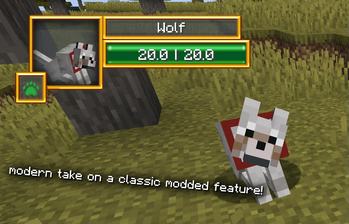
Retro Damage Indicators brings back the classic modded Damage Indicator look and feel to modern Minecraft.
This mod is highly configurable and the position, opacity, size, display and more of the Retro Damage Indicator on the screen can be adjusted. This mod is client side only and does not need to be installed on the server to be used.
Alongside a portrait of a mob and the health and name boxes is displayed the mob type. This includes arthropods, animals, illagers, undead, bosses and more. It is also compatible with creatures from other mods:
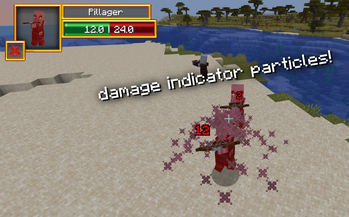
Alongside the damage indicator rendered on the player's HUD, injured mobs will produce a particle indicating how much damage they have taken when hurt, or how much they have regained when healed. This feature can also be toggled in the config.
This mod is made for modpacks in mind, so please feel free to use it in them!
Special Thanks & Credits:
-Ron0: texture rework and mob type icons
Verfügbare Versionen
Retro Damage Indicators auf deinem Client installieren
Mod-Loader lokal installieren
Installiere forge für deine lokale Minecraft-Version.
Passende Datei herunterladen
Wähle die Retro Damage Indicators-Datei für forge und Minecraft 1.20.1.
Mod installieren
Lege die .jar-Datei in deinem lokalen .minecraft/mods-Ordner ab und starte Minecraft neu. Eine Installation auf dem Server ist nicht nötig.
Kompatibilität
Mod-Loader
Minecraft-Versionen
1.20.1
Server-seitig
✗ Nicht unterstütztEmpfohlener RAM
4 GB(min. 3 GB)Häufige Fragen
Muss Retro Damage Indicators auf dem Minecraft Server installiert werden?
Nein. Modrinth kennzeichnet Retro Damage Indicators serverseitig als nicht unterstützt. Installiere die Mod nur im lokalen Minecraft-Mods-Ordner. Dein Server kann unverändert bleiben, sofern die Mod-Seite keine zusätzliche Abhängigkeit nennt.
Welche Version und welchen Loader braucht Retro Damage Indicators?
Nutze eine Datei für forge, neoforge und exakt deine Minecraft-Version. Unterstützte Versionen sind unter anderem 1.20.1. Loader-Dateien sind nicht untereinander austauschbar.
Retro Damage Indicators funktioniert nicht – was kann ich prüfen?
Prüfe zuerst Minecraft-Version, Loader-Version und erforderliche Abhängigkeiten. Lege die .jar-Datei im lokalen .minecraft/mods-Ordner ab und entferne ältere Duplikate. Da die Mod clientseitig ist, löst mehr Server-RAM dieses Problem nicht.
Ähnliche Mods






Minecraft Server für deine Gruppe
Retro Damage Indicators bleibt auf deinem Client. Hoste dazu eine kompatible Welt für deine Mitspieler.