
Saro´s Road Blocks
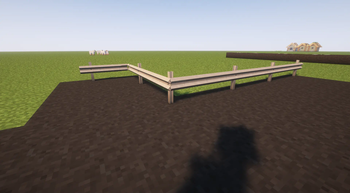
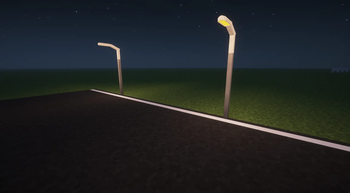
Adds asphalt with slope/stair variants, crash barriers, street lights, and road marking tools for building realistic roads, highways, and on-ramps.
Screenshots
Über diese Mod
!
Saro's Road Blocks Mod 🛣️
!
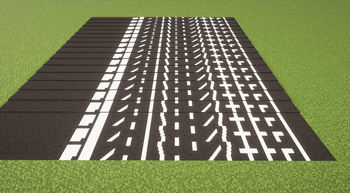
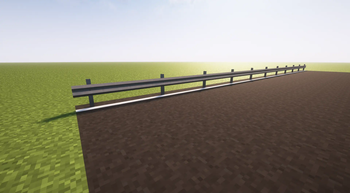
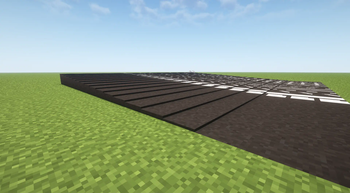
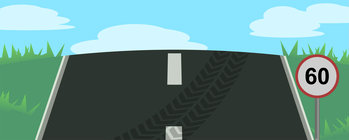
Saro's Road Blocks adds asphalt blocks with slope and stair variants — so you can build smooth hills, on-ramps, and bridges instead of stair-stepping — plus crash barriers, street lights, sidewalk blocks, and a dedicated set of road marking tools (brushes, planner, fill tool). Designed to pair with Saro's Road Signs. Supports Forge, Fabric, and NeoForge for Minecraft 1.19.4 through 1.21+
!
Asphalt Blocks and Slopes 🛤️
- Offers a comprehensive set of asphalt blocks, slopes, and road lines, perfect for detailed road construction.
Multiplayer and Survival Compatibility 🌐
- Designed to integrate seamlessly into multiplayer and survival gameplay environments.
Custom Content 🎨
- Includes unique sounds, models, and textures to create an authentic road-building experience.
Mod Compatibility 🔄
- Works well together with Saro's Road Signs to complete your road construction projects.
Content Packs 📦 (NEW in 5.0)
- Add your own custom road line textures by dropping a pack folder into
saros_road_blocks_mod/packs/in your game directory. - Each pack defines its lines via a simple
pack.jsonplus PNG textures (separate top/side/face textures supported). - Server syncs available pack metadata to clients automatically on join — clients only need the textures installed locally.
- An example pack is auto-generated on first launch so you can see the format.
- Available in: 1.20.1 (Forge / Fabric) and 1.21.1 (Forge / NeoForge / Fabric). Other versions keep the built-in line variants.
- Add your own custom road line textures by dropping a pack folder into
!
Currently Supported✅
- Forge/NeoForge/Fabric 26.1
- Forge 1.21.11
- Forge 1.21.10
- Forge 1.21.9
- Forge 1.21.8
- Forge 1.21.7
- Forge 1.21.6
- Forge 1.21.5
- Forge 1.21.3
- Forge/NeoForge/Fabric 1.21.1
- Forge 1.21
- Forge 1.20.6
- Forge 1.20.4
- Forge/NeoForge 1.20.1
- Forge 1.19.4
- Fabric 1.20.1
Partially Discontinued⚠️
- Forge 1.19.2
Discontinued❌
- Forge 1.18.2
- Forge 1.16.5
- Quilt
!
For requests, suggestions, or bug reports, join our Discord and become part of the Saro's Mod community. We look forward to your feedback!
Project Support & Usage
Hosting: For the best performance, I recommend using BisectHosting linked in the banner.
Modpacks: You are free to include my work in any modpack. Please ensure proper credit is given by providing a link to this project page.
Verfügbare Versionen
Saro´s Road Blocks auf dem Server installieren
Server bestellen
Bestelle einen Minecraft Java Server mit mindestens 3 GB RAM (4 GB empfohlen).
fabric Loader setzen
Wähle im Panel unter "Egg" den fabric-Loader und die passende Minecraft-Version (26.3).
Mod installieren
Öffne den Mod-Browser im Dashboard und suche nach "Saro´s Road Blocks". Klicke "Installieren" – fertig! Alternativ: Lade die .jar via SFTP in den /mods Ordner.
Kompatibilität
Mod-Loader
Minecraft-Versionen
26.3, 26.2, 26.1.2 (+21 weitere)
Server-seitig
✓ ErforderlichEmpfohlener RAM
4 GB(min. 3 GB)Häufige Fragen
Saro´s Road Blocks Server crasht beim Start – was tun?
Häufigste Ursache: falsche fabric-Version oder zu wenig RAM. Prüfe im Server-Log (latest.log), ob ein "OutOfMemoryError" oder "Mixin"-Fehler auftritt. Bei Mado Hosting: Stelle sicher, dass mindestens 3 GB RAM zugewiesen sind und der Loader zur Mod-Version passt (26.3). Über das Panel kannst du den Loader mit einem Klick wechseln.
Ist Saro´s Road Blocks mit fabric und forge und neoforge und quilt kompatibel?
Saro´s Road Blocks unterstützt offiziell fabric, forge, neoforge, quilt für Minecraft 26.3, 26.2, 26.1.2. Achtung: Forge- und Fabric-Mods sind NICHT untereinander kompatibel – wähle einen Loader und bleibe dabei. Im Mado Dashboard werden inkompatible Loader-Kombinationen automatisch erkannt.
Server laggt mit Saro´s Road Blocks – wie optimiere ich die Performance?
Empfohlener RAM: 4 GB (+1 GB pro 8 Spieler). Prüfe mit /spark profiler, ob Saro´s Road Blocks den meisten Tick-Time verbraucht. Häufige Fixes: Server-View-Distance auf 8-10 reduzieren, bei Forge "performant" oder "starlight" als Zusatz-Mod installieren. Bei Mado Hosting läuft dein Server auf NVMe-SSDs mit dedizierten CPU-Kernen für minimale Latenz.
Ähnliche Mods

![[ETF] Entity Texture Features](https://cdn.modrinth.com/data/BVzZfTc1/af683d206d50b05258d865b0d6e4aa2f2cee12f2_96.webp)
![[EMF] Entity Model Features](https://cdn.modrinth.com/data/4I1XuqiY/6e5bbd0d06b1741bfdab6c0cfab6de8fdaf0064c_96.webp)



Modded Server mieten
Installiere Saro´s Road Blocks mit nur einem Klick auf deinem Server.