
Shimmer Support Layer
Adds Shimmer support for any mod you want :)
Screenshots
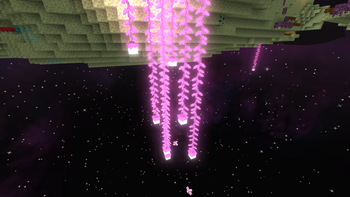
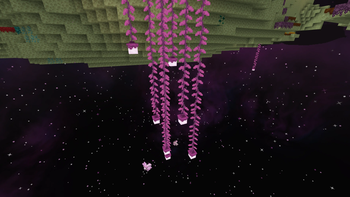
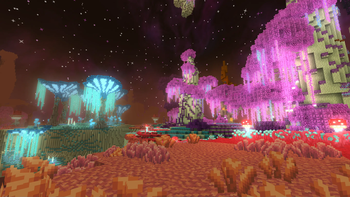
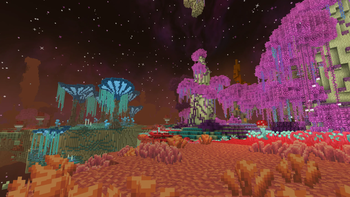
Über diese Mod
Shimmer Support Layer
ShimmerSupportLayer is a mod that add Shimmer compatibility to multiple mods.
And simplyfies the process for adding support for any given mod.
As of version 0.9.0 of SSL auto support for all mods can be generated using command /generateShimmerSupport
Run the command and restart the game
Mods with added compatibylity
(This mod needs to be installed alongside shimmer and other mods)
As of version 0.9.0 support is divided into 3 categories:
- Hand-made
(Every color has been hand-picked and tweaked to look as good as possible, every item and block has beed added, or some may have been removed)
- Semi-auto (Mods that have support generated automatically, but with some manual changes)
- automatic (Automatic basic support for most of the block and some items)
Currently there is none hand-made support for anything :(
List of mods with SemiAutomatic support:
| Name | Description | Platforms | Links | Authors |
|---|---|---|---|---|
| Vanilla Minecraft | The game we all love ;)(Some support is included in Shimmer, but not full) | All | web | Mojang |
| Another Furniture | Vanilla-styled furniture mod. | Fabric, Forge |   |
crispytwig, Synthestra |
| BetterEnd | End overhaul(Though technically with native support, it does not work)(Be carefull! Performance intensive!) | Fabric | |
quiqueck |
| BetterNether | Nether update 2.0 | Fabric | |
quiqueck |
How to quickly generate shimmer support for any mod using SSL?
- Run Minecraft with SSL and all the mods you want to add support for. After entering a world run command
/generateShimmerSupport. - DONE! Now restart the game and support should be added!
- If you want to improve the result and maybe help develop better support by sharing the support on the project's github you need to:
- Download Source code of SSL.
- Copy the content of
java_code.txtfile (located in '{game directory} > config > shimmer > compatitbility') toSemiAutomaticSupport"*JAVA class (located in 'src > client > java > io > github > mikip98 > automation > modSupport > SemiAutomaticSupport.java') - Change any values you want.
- Now if you want to share your support, create a pull request or an issue on our github :)
Roadmap:
- add support for cauldrons,
- fix vanilla Minecraft support not working (it is probably some issue of 'Shimmer' itself because 1 in 1000 restarts it works properly),
- improve item source, coloured lights,
- write better colour bias function,
- add config for additional customization and applying fixes,
- improve automatic bloom (auto create a resource pack with texture masks)\
- automatic resourcepack generation (for vanilla MC)
- add an option to unseparate color reference from block (somehow fixes some mods)
Special thanks to:
- Tanehu98
- ob (obsj)
Verfügbare Versionen
Shimmer Support Layer auf deinem Client installieren
Mod-Loader lokal installieren
Installiere fabric für deine lokale Minecraft-Version.
Passende Datei herunterladen
Wähle die Shimmer Support Layer-Datei für fabric und Minecraft 1.20.6.
Mod installieren
Lege die .jar-Datei in deinem lokalen .minecraft/mods-Ordner ab und starte Minecraft neu. Eine Installation auf dem Server ist nicht nötig.
Kompatibilität
Mod-Loader
Minecraft-Versionen
1.20.6, 1.20.5, 1.20.4 (+3 weitere)
Server-seitig
✗ Nicht unterstütztEmpfohlener RAM
4 GB(min. 3 GB)Häufige Fragen
Muss Shimmer Support Layer auf dem Minecraft Server installiert werden?
Nein. Modrinth kennzeichnet Shimmer Support Layer serverseitig als nicht unterstützt. Installiere die Mod nur im lokalen Minecraft-Mods-Ordner. Dein Server kann unverändert bleiben, sofern die Mod-Seite keine zusätzliche Abhängigkeit nennt.
Welche Version und welchen Loader braucht Shimmer Support Layer?
Nutze eine Datei für fabric und exakt deine Minecraft-Version. Unterstützte Versionen sind unter anderem 1.20.6, 1.20.5, 1.20.4. Loader-Dateien sind nicht untereinander austauschbar.
Shimmer Support Layer funktioniert nicht – was kann ich prüfen?
Prüfe zuerst Minecraft-Version, Loader-Version und erforderliche Abhängigkeiten. Lege die .jar-Datei im lokalen .minecraft/mods-Ordner ab und entferne ältere Duplikate. Da die Mod clientseitig ist, löst mehr Server-RAM dieses Problem nicht.
Ähnliche Mods

![[ETF] Entity Texture Features](https://cdn.modrinth.com/data/BVzZfTc1/af683d206d50b05258d865b0d6e4aa2f2cee12f2_96.webp)
![[EMF] Entity Model Features](https://cdn.modrinth.com/data/4I1XuqiY/6e5bbd0d06b1741bfdab6c0cfab6de8fdaf0064c_96.webp)



Minecraft Server für deine Gruppe
Shimmer Support Layer bleibt auf deinem Client. Hoste dazu eine kompatible Welt für deine Mitspieler.