
Sign Edit Lite
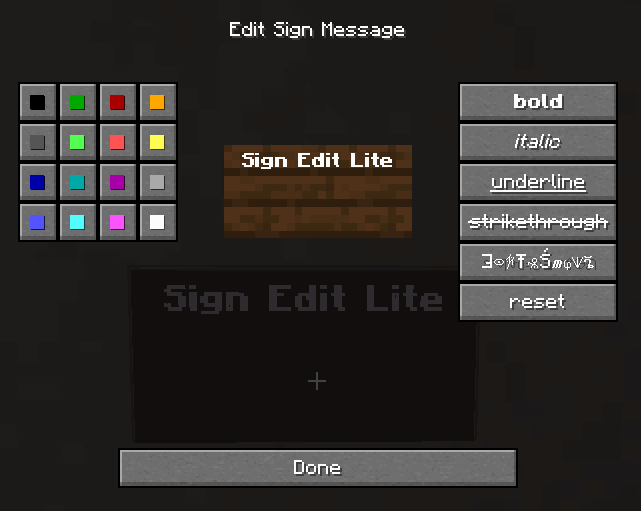
Add color and formatting options to signs.
Screenshots
Über diese Mod
Sign Edit Lite (Fabric and NeoForge)
Add color and formatting options to signs.

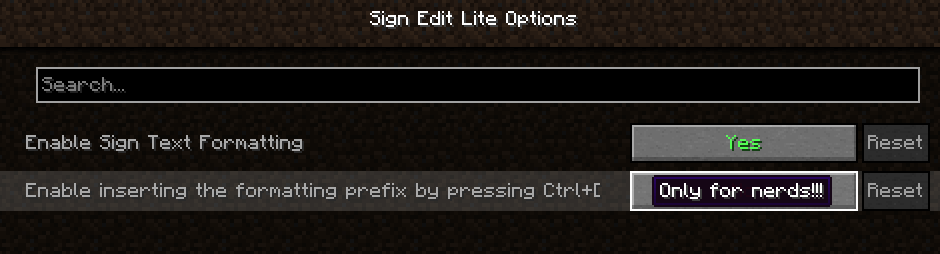
The mod comes with usual Mod Menu integration.

An additional extra for nerds, who prefer typing raw formatting codes, is the option to enable the insertion of the formatting character '§' by pressing Ctrl+[.
Requires (Fabric)
- Fabric API
- Cloth Config API
- Optional, but recommended Mod Menu
License
Standard MIT license. Feel free to learn from it and incorporate it in your own projects.
Some parts of the code are based on the source code of Text Utilities, which is LGPL-3 licensed.
Source code
Available on GitLab or on GitHub.
The source code has lots of comments to help learning Minecraft modding.
Related projects
- Text Utilities adds color and formatting options to signs, book and anvils, but unfortunately it has not been updated to Minecraft 1.21.5 version at the time of writing, and it is a Fabric only mod.
- Iron Signs adds vibrant, high contrast, painted signs, which can be colored and formatted similarily. It also enables coloring and formatting Vanilla wooden signs exactly tha same way as this mod. I wonder who wrote that mod.
Thanks
Thanks to Chaws for making available the source code of Text Utilities.
See also
My other mods on Modrinth and on CurseForge.
Verfügbare Versionen
Sign Edit Lite auf dem Server installieren
Server bestellen
Bestelle einen Minecraft Java Server mit mindestens 3 GB RAM (4 GB empfohlen).
fabric Loader setzen
Wähle im Panel unter "Egg" den fabric-Loader und die passende Minecraft-Version (26.2).
Mod installieren
Öffne den Mod-Browser im Dashboard und suche nach "Sign Edit Lite". Klicke "Installieren" – fertig! Alternativ: Lade die .jar via SFTP in den /mods Ordner.
Kompatibilität
Mod-Loader
Minecraft-Versionen
26.2, 26.1.2, 26.1.1 (+18 weitere)
Server-seitig
✓ ErforderlichEmpfohlener RAM
4 GB(min. 3 GB)Häufige Fragen
Sign Edit Lite Server crasht beim Start – was tun?
Häufigste Ursache: falsche fabric-Version oder zu wenig RAM. Prüfe im Server-Log (latest.log), ob ein "OutOfMemoryError" oder "Mixin"-Fehler auftritt. Bei Mado Hosting: Stelle sicher, dass mindestens 3 GB RAM zugewiesen sind und der Loader zur Mod-Version passt (26.2). Über das Panel kannst du den Loader mit einem Klick wechseln.
Ist Sign Edit Lite mit fabric und neoforge kompatibel?
Sign Edit Lite unterstützt offiziell fabric, neoforge für Minecraft 26.2, 26.1.2, 26.1.1. Im Mado Dashboard werden inkompatible Loader-Kombinationen automatisch erkannt.
Server laggt mit Sign Edit Lite – wie optimiere ich die Performance?
Empfohlener RAM: 4 GB (+1 GB pro 8 Spieler). Prüfe mit /spark profiler, ob Sign Edit Lite den meisten Tick-Time verbraucht. Häufige Fixes: Server-View-Distance auf 8-10 reduzieren, bei Forge "performant" oder "starlight" als Zusatz-Mod installieren. Bei Mado Hosting läuft dein Server auf NVMe-SSDs mit dedizierten CPU-Kernen für minimale Latenz.
Ähnliche Mods

![[ETF] Entity Texture Features](https://cdn.modrinth.com/data/BVzZfTc1/af683d206d50b05258d865b0d6e4aa2f2cee12f2_96.webp)
![[EMF] Entity Model Features](https://cdn.modrinth.com/data/4I1XuqiY/6e5bbd0d06b1741bfdab6c0cfab6de8fdaf0064c_96.webp)



Modded Server mieten
Installiere Sign Edit Lite mit nur einem Klick auf deinem Server.