
Sky Artifacts (Change Weather & Time)
Change Time, Freeze Time, Stop and Start Rain & Thunder with powerful Artifacts!
Screenshots
Über diese Mod

Sky Artifacts adds powerful Artifacts that will allow you and your Friends to change Weather & Time!
💧Rainstone
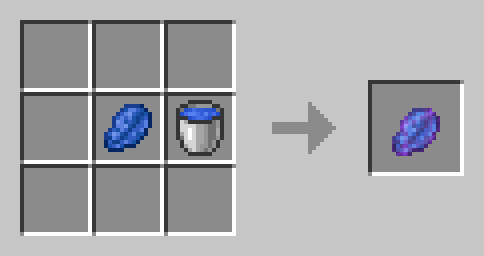
The Rainstone is crafted with Lapis Lazuli and a Water Bucket:
It can be used to Toggle the rain. Use it to stop the Rain if its Raining, or to make it rain for 5 Minutes when its not Raining. It will be consumed upon use. Perfect for building in clear Weather or powering up your Trident with Rain!
⚡Thunderstone
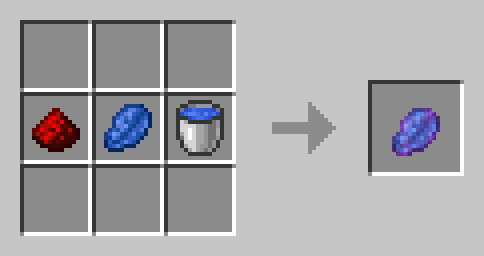
A Thunderstone is a Rainstone that has been infused with the Energy of Redstone. It has the same Functionality as the Rainstone, but instead of starting Rain it will start Thunder!
🧊Frozen Clock
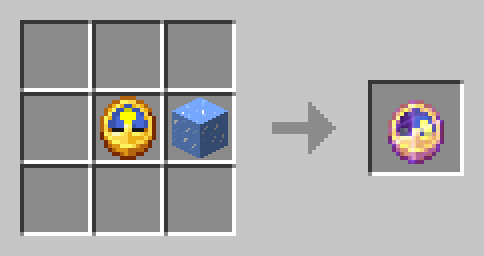
Craft the Frozen Clock with a Clock and an Ice Block:
Use the Frozen Watch to Stop the passage of Time (The Day and Night cycle) for 10 minutes (it will be consumed). You can use this to extend the Night or to take Screenshots in the same Setting.
⌛Timestones
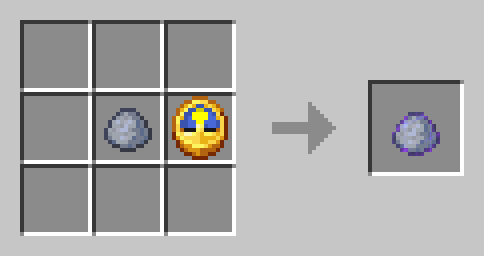
An empty Timestone is crafted with a Clock and a piece of Clay:
Use an Empty Timestone to funnel time Energy into it. It will save the exact current time and turn from an Gray, Empty Timestone into a colored one. Rightclick a colored Timestone to set the time to the time of the right click. Meaning, if you use a Empty Timestone at Night and then use the resulting Timestone at day, the time will be set to the time of Night when you funneled Energy into it and the Timestone will be consumed. The color of a Timestone indicates which Time it has saved:
- Purple = Early Sunrise
- Lightblue = Morning
- Yellow = Day
- Orange = Early Sunset
- Red = Sunset
- Black = Night
How to copy Timestones
To copy a Timestone, put it in your Offhand. Use an Empty Timestone and it will become an exact copy of the Timestone you are holding in your Offhand.
🛠️Installation
Datapack Installation Guide
Copy the .zip archive into the ".minecraft/saves/yourworldname/datapacks" folder, where yourworldname is the name of your world.
Mod installation Guide
Copy the .jar archive into the folder your Mod Loader of choice provides.
⚙️Compatibility
Do not use an "Unlock all achievements" datapack after having installed this datapack!
❕Issues & Suggestions
If you encounter any Issues with this Datapack/Mod, please report them on my Discord
Verfügbare Versionen
Sky Artifacts (Change Weather & Time) auf dem Server installieren
Server bestellen
Bestelle einen Minecraft Java Server mit mindestens 3 GB RAM (4 GB empfohlen).
datapack Loader setzen
Wähle im Panel unter "Egg" den datapack-Loader und die passende Minecraft-Version (1.21.1).
Mod installieren
Öffne den Mod-Browser im Dashboard und suche nach "Sky Artifacts (Change Weather & Time)". Klicke "Installieren" – fertig! Alternativ: Lade die .jar via SFTP in den /mods Ordner.
Kompatibilität
Mod-Loader
Minecraft-Versionen
1.21.1, 1.21, 1.20.6 (+1 weitere)
Server-seitig
✓ ErforderlichEmpfohlener RAM
4 GB(min. 3 GB)Häufige Fragen
Sky Artifacts (Change Weather & Time) Server crasht beim Start – was tun?
Häufigste Ursache: falsche datapack-Version oder zu wenig RAM. Prüfe im Server-Log (latest.log), ob ein "OutOfMemoryError" oder "Mixin"-Fehler auftritt. Bei Mado Hosting: Stelle sicher, dass mindestens 3 GB RAM zugewiesen sind und der Loader zur Mod-Version passt (1.21.1). Über das Panel kannst du den Loader mit einem Klick wechseln.
Ist Sky Artifacts (Change Weather & Time) mit datapack und fabric und forge und quilt kompatibel?
Sky Artifacts (Change Weather & Time) unterstützt offiziell datapack, fabric, forge, quilt für Minecraft 1.21.1, 1.21, 1.20.6. Achtung: Forge- und Fabric-Mods sind NICHT untereinander kompatibel – wähle einen Loader und bleibe dabei. Im Mado Dashboard werden inkompatible Loader-Kombinationen automatisch erkannt.
Server laggt mit Sky Artifacts (Change Weather & Time) – wie optimiere ich die Performance?
Empfohlener RAM: 4 GB (+1 GB pro 8 Spieler). Prüfe mit /spark profiler, ob Sky Artifacts (Change Weather & Time) den meisten Tick-Time verbraucht. Häufige Fixes: Server-View-Distance auf 8-10 reduzieren, bei Forge "performant" oder "starlight" als Zusatz-Mod installieren. Bei Mado Hosting läuft dein Server auf NVMe-SSDs mit dedizierten CPU-Kernen für minimale Latenz.
Ähnliche Mods






Modded Server mieten
Installiere Sky Artifacts (Change Weather & Time) mit nur einem Klick auf deinem Server.