
Sky Artifacts (Change Weather & Time)
Change Time, Freeze Time, Stop and Start Rain & Thunder with powerful Artifacts!
Screenshots
About this Mod

Sky Artifacts adds powerful Artifacts that will allow you and your Friends to change Weather & Time!
💧Rainstone
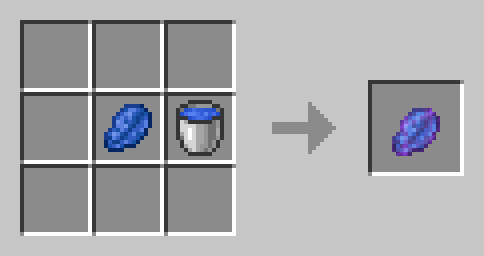
The Rainstone is crafted with Lapis Lazuli and a Water Bucket:
It can be used to Toggle the rain. Use it to stop the Rain if its Raining, or to make it rain for 5 Minutes when its not Raining. It will be consumed upon use. Perfect for building in clear Weather or powering up your Trident with Rain!
⚡Thunderstone
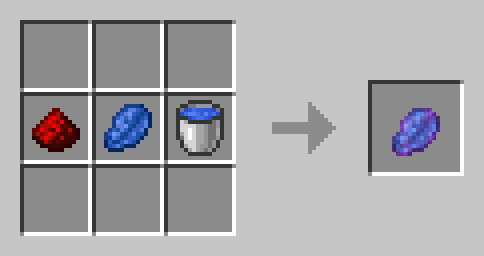
A Thunderstone is a Rainstone that has been infused with the Energy of Redstone. It has the same Functionality as the Rainstone, but instead of starting Rain it will start Thunder!
🧊Frozen Clock
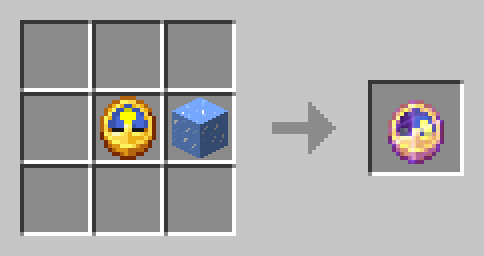
Craft the Frozen Clock with a Clock and an Ice Block:
Use the Frozen Watch to Stop the passage of Time (The Day and Night cycle) for 10 minutes (it will be consumed). You can use this to extend the Night or to take Screenshots in the same Setting.
⌛Timestones
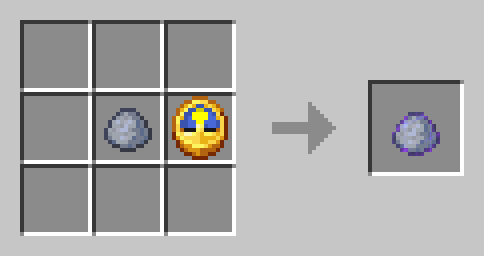
An empty Timestone is crafted with a Clock and a piece of Clay:
Use an Empty Timestone to funnel time Energy into it. It will save the exact current time and turn from an Gray, Empty Timestone into a colored one. Rightclick a colored Timestone to set the time to the time of the right click. Meaning, if you use a Empty Timestone at Night and then use the resulting Timestone at day, the time will be set to the time of Night when you funneled Energy into it and the Timestone will be consumed. The color of a Timestone indicates which Time it has saved:
- Purple = Early Sunrise
- Lightblue = Morning
- Yellow = Day
- Orange = Early Sunset
- Red = Sunset
- Black = Night
How to copy Timestones
To copy a Timestone, put it in your Offhand. Use an Empty Timestone and it will become an exact copy of the Timestone you are holding in your Offhand.
🛠️Installation
Datapack Installation Guide
Copy the .zip archive into the ".minecraft/saves/yourworldname/datapacks" folder, where yourworldname is the name of your world.
Mod installation Guide
Copy the .jar archive into the folder your Mod Loader of choice provides.
⚙️Compatibility
Do not use an "Unlock all achievements" datapack after having installed this datapack!
❕Issues & Suggestions
If you encounter any Issues with this Datapack/Mod, please report them on my Discord
Available Versions
How to Install Sky Artifacts (Change Weather & Time) on Your Server
Order Server
Order a Minecraft Java server with at least 3 GB RAM (4 GB recommended).
Set datapack Loader
In the panel under "Egg", select the datapack loader and matching Minecraft version (1.21.1).
Install Mod
Open the mod browser in the dashboard and search for "Sky Artifacts (Change Weather & Time)". Click "Install" – done! Alternatively, upload the .jar via SFTP to the /mods folder.
Compatibility
Mod Loaders
Minecraft Versions
1.21.1, 1.21, 1.20.6 (+1 more)
Server-side
✓ RequiredRecommended RAM
4 GB(min. 3 GB)Frequently Asked Questions
Sky Artifacts (Change Weather & Time) server crashes on startup – what to do?
Most common cause: wrong datapack version or insufficient RAM. Check the server log (latest.log) for "OutOfMemoryError" or "Mixin" errors. With Mado Hosting: ensure at least 3 GB RAM is allocated and the loader matches the mod version (1.21.1). You can switch loaders with one click in the panel.
Is Sky Artifacts (Change Weather & Time) compatible with datapack and fabric and forge and quilt?
Sky Artifacts (Change Weather & Time) officially supports datapack, fabric, forge, quilt for Minecraft 1.21.1, 1.21, 1.20.6. Note: Forge and Fabric mods are NOT cross-compatible – pick one loader and stick with it. The Mado dashboard automatically detects incompatible loader combinations.
Server lagging with Sky Artifacts (Change Weather & Time) – how to optimize performance?
Recommended RAM: 4 GB (per 8 players). Use /spark profiler to check if Sky Artifacts (Change Weather & Time) consumes the most tick time. Common fixes: reduce server view-distance to 8-10, install "performant" or "starlight" as supplementary mods on Forge. With Mado Hosting, your server runs on NVMe SSDs with dedicated CPU cores for minimal latency.
Similar Mods






Rent Modded Server
Install Sky Artifacts (Change Weather & Time) with just one click on your server.