
Smart Sorter
Lightweight Auto-Sorter and Storage Network for 500+ chests. Features automated smelting, XP collection, and smart routing for Fabric 1.21.1+.
Screenshots


Über diese Mod

🧠 Smart Sorter: Industrial Logistics & XP Hub
Transform your messy storage into an intelligent, automated network!
Smart Sorter brings modular, data-driven sorting to Minecraft with a sleek, intuitive design. Whether you are managing a small survival base or an industrial complex with 500+ chests, Smart Sorter handles routing, smelting, and XP collection with zero TPS lag.
📖 SmartSorter Player Tutorial
A complete guide on how to use SmartSorter to automate your storage!
🎮 Getting Started - The Basics
Smart Sorter automatically moves and sorts items from chests into organized storage - like hoppers but WAY smarter!
The 5 Main Blocks:
- 🟦 Intake Block – Pulls items FROM chests or farm hoppers.
- 🟨 Output Probe – Pushes items INTO specific chests.
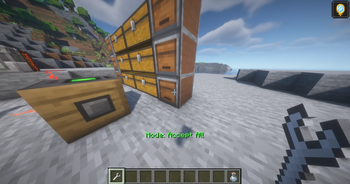
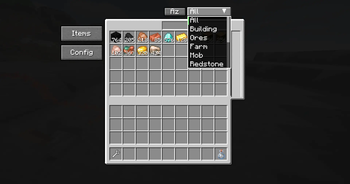
- 🟥 Storage Controller – The "brain" that manages the network, search GUI, and XP bank.
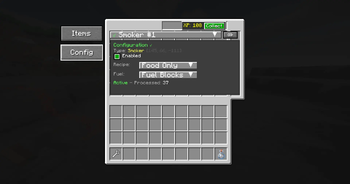
- 🟩 Process Probe – Controls furnaces/machines with Redstone logic.
- 🔧 Linking Tool – Connects all components together.
🎯 What Makes It Unique?
🚀 Industrial Scale (500+ Chests)
Built for efficiency, Smart Sorter handles 500+ connected inventories with ease. It is the perfect performance-friendly choice for technical mega-bases and massive modpacks.
💎 The XP Reservoir
The Storage Controller automatically accumulates all XP generated by your connected furnaces. Collect your entire base’s XP bank with a single button press in the Controller GUI.
🔥 Redstone-Powered Automation
Using the Process Probe, you can build advanced factory lines:
- The Connection: Place a Process Probe on your furnace/machine and link it to the Controller.
- The Power: Apply a Redstone signal (Redstone Dust + a Lever) to activate the probe.
- The Result: It automatically pulls fuel and raw materials from your storage and returns the finished products to your prioritized chests.
🛠️ Quick Start Guide
1. Simple 2-Chest Sorter (No Controller Needed)
- Place blocks:
[Input Chest] ← [Intake] ... [Output Probe] → [Target Chest] - Link: Right-click the Intake with the Linking Tool, then right-click the Output Probe.
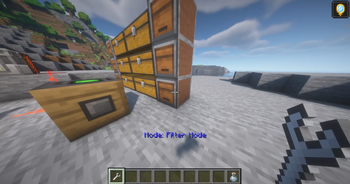
- Filters: Right-click the Probe to set specific items.
2. Advanced Setup: Using a Storage Controller
- The Hub: Place your Storage Controller.
- Connect: Shift-click the Controller with the Linking Tool, then click your Intakes and Probes.
- Smart Routing: Use the Controller to search your entire network and set chest priorities. Items seek out dedicated chests with the highest priority first.
🔌 Mod Compatibility
Smart Sorter is fully compatible with:
- ✅ Vanilla Chests, Barrels, Shulker Boxes
- ✅ Iron Chests (All Tiers)
- ✅ Sophisticated Storage (All Variants)
- ✅ Storage Drawers & Controller Blocks
- ✅ Any Inventory from Modded Containers
🐛 Support & Feedback
- Found a Bug? Report it on GitHub
- Feature Suggestion? Submit a suggestion
- Support Development: Support on Ko-fi
🙏 Credits
Developer: SlimShaddii
Special Thanks:
- Tom’s Simple Storage — inspiration for early system design.
- Fabric Community — for ongoing support and tooling.
- Intuistic — for testing and helping out with js files.
- Fizzy — for block designs.
Automation made simple. Storage made smart.
✨ Download now and let your items sort themselves! 🚀
Smart Sorter auf dem Server installieren
Server bestellen
Bestelle einen Minecraft Java Server mit mindestens 3 GB RAM (4 GB empfohlen).
fabric Loader setzen
Wähle im Panel unter "Egg" den fabric-Loader und die passende Minecraft-Version (1.21.11).
Mod installieren
Öffne den Mod-Browser im Dashboard und suche nach "Smart Sorter". Klicke "Installieren" – fertig! Alternativ: Lade die .jar via SFTP in den /mods Ordner.
Kompatibilität
Mod-Loader
Minecraft-Versionen
1.21.11, 1.21.10, 1.21.9 (+2 weitere)
Server-seitig
✓ ErforderlichEmpfohlener RAM
4 GB(min. 3 GB)Häufige Fragen
Smart Sorter Server crasht beim Start – was tun?
Häufigste Ursache: falsche fabric-Version oder zu wenig RAM. Prüfe im Server-Log (latest.log), ob ein "OutOfMemoryError" oder "Mixin"-Fehler auftritt. Bei Mado Hosting: Stelle sicher, dass mindestens 3 GB RAM zugewiesen sind und der Loader zur Mod-Version passt (1.21.11). Über das Panel kannst du den Loader mit einem Klick wechseln.
Ist Smart Sorter mit fabric kompatibel?
Smart Sorter unterstützt offiziell fabric für Minecraft 1.21.11, 1.21.10, 1.21.9. Im Mado Dashboard werden inkompatible Loader-Kombinationen automatisch erkannt.
Server laggt mit Smart Sorter – wie optimiere ich die Performance?
Empfohlener RAM: 4 GB (+1 GB pro 8 Spieler). Prüfe mit /spark profiler, ob Smart Sorter den meisten Tick-Time verbraucht. Häufige Fixes: Server-View-Distance auf 8-10 reduzieren, bei Forge "performant" oder "starlight" als Zusatz-Mod installieren. Bei Mado Hosting läuft dein Server auf NVMe-SSDs mit dedizierten CPU-Kernen für minimale Latenz.
Ähnliche Mods


Modded Server mieten
Installiere Smart Sorter mit nur einem Klick auf deinem Server.