
Spyglass of Curios
Now spyglass has a slot of curios, which can be used with a key press. Also, changing magnification by mouse scrolling and rendering spyglass model is available!
Screenshots
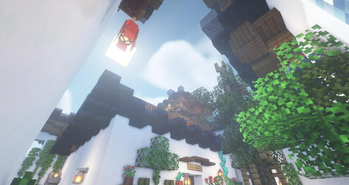

Über diese Mod

Overview
This mod adds a Curios slot for spyglass. Now, you can friendly use spyglass in the spyglass slot with a key press. You can also adjust the magnification of the spyglass with the mouse scroll. In addition, each spyglass individually saves magnification information, which is displayed in the tooltip.

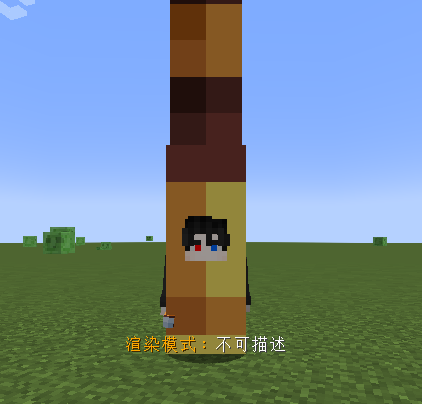
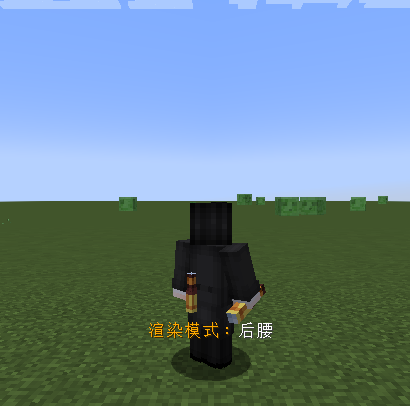
You can press shift+left-click to switch the render type of spyglass curio on player model, there are three types of renders can be selected.
This mod aims to serve as a functional alternative to some mods with inherent magnification features, in order to balance the acquisition of magnification and achieve a more immersive gaming experience.
Configuration
There are many rich configurations for you to choose from, such as whether to render the spyglass model, setting the maximum and minimum magnification of the spyglass, disabling information display, and so on.
It’s worth mentioning that you can enable the OPTIFINE-like cinematic camera in the configuration when the spyglass is activated.
Compatibility
This mod strives to be as compatible as possible with most mainstream mods, so that it can work normally in most mod packs. Therefore, if you find some compatibility issues with other mods, or someplace where uses awkwardly, please tell me in the issues, and I will try my best to correct it to a satisfactory state~
Verfügbare Versionen
Spyglass of Curios auf dem Server installieren
Server bestellen
Bestelle einen Minecraft Java Server mit mindestens 3 GB RAM (4 GB empfohlen).
forge Loader setzen
Wähle im Panel unter "Egg" den forge-Loader und die passende Minecraft-Version (1.20.1).
Mod installieren
Öffne den Mod-Browser im Dashboard und suche nach "Spyglass of Curios". Klicke "Installieren" – fertig! Alternativ: Lade die .jar via SFTP in den /mods Ordner.
Kompatibilität
Mod-Loader
Minecraft-Versionen
1.20.1, 1.19.2, 1.18.2
Server-seitig
✓ ErforderlichEmpfohlener RAM
4 GB(min. 3 GB)Häufige Fragen
Spyglass of Curios Server crasht beim Start – was tun?
Häufigste Ursache: falsche forge-Version oder zu wenig RAM. Prüfe im Server-Log (latest.log), ob ein "OutOfMemoryError" oder "Mixin"-Fehler auftritt. Bei Mado Hosting: Stelle sicher, dass mindestens 3 GB RAM zugewiesen sind und der Loader zur Mod-Version passt (1.20.1). Über das Panel kannst du den Loader mit einem Klick wechseln.
Ist Spyglass of Curios mit forge kompatibel?
Spyglass of Curios unterstützt offiziell forge für Minecraft 1.20.1, 1.19.2, 1.18.2. Im Mado Dashboard werden inkompatible Loader-Kombinationen automatisch erkannt.
Server laggt mit Spyglass of Curios – wie optimiere ich die Performance?
Empfohlener RAM: 4 GB (+1 GB pro 8 Spieler). Prüfe mit /spark profiler, ob Spyglass of Curios den meisten Tick-Time verbraucht. Häufige Fixes: Server-View-Distance auf 8-10 reduzieren, bei Forge "performant" oder "starlight" als Zusatz-Mod installieren. Bei Mado Hosting läuft dein Server auf NVMe-SSDs mit dedizierten CPU-Kernen für minimale Latenz.
Ähnliche Mods

![[ETF] Entity Texture Features](https://cdn.modrinth.com/data/BVzZfTc1/af683d206d50b05258d865b0d6e4aa2f2cee12f2_96.webp)
![[EMF] Entity Model Features](https://cdn.modrinth.com/data/4I1XuqiY/6e5bbd0d06b1741bfdab6c0cfab6de8fdaf0064c_96.webp)



Modded Server mieten
Installiere Spyglass of Curios mit nur einem Klick auf deinem Server.