Stackable
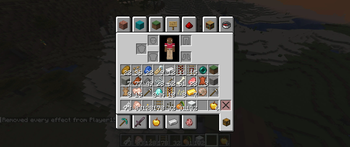
Stackable is a mod that increases all block stacking limits to any value less than 127 for Minecraft 1.20.4-1.19.2 and 2.147B for versions after 1.20.6
Screenshots

Über diese Mod
Stackable
Stackable is a mod that increases all block stacking limits to any value less than 127 for Minecraft 1.19.2-1.20.4 and 2.147B in 1.20.6+.
Why 127?
Effectively, I'm lazy, but in reality, Minecraft stores all items with a single signed byte which for our purposes only can be between -128 to 127, since negative values are invalid that leaves a maximum stack size of 127. Moreover, this mod is intended to be compatible with other mods which may also use signed bytes to store items.
Why make this mod
I don't know, other mods already exist that allow for stack sizes above 127. This was more for experimentation with creating mixins and understanding Minecrafts code a little better.
Will you update to X?
Maybe.
Will you backport to X?
Eh, not really.
There's a bug here?
I might fix bugs that are Vanilla specific, but mod compatibility is gonna be kinda hard to do
Mod support?
This mod should be compatible with most other mods, I've tested this mod in all of Fabric Orion, and it generally works, some blocks will limit their storage size to 64 but shouldn't crash. Most of my mixins to the code surround editing the interface that all inventory mods should implement to begin with, so if they call the stack size from that interface they should receive the appropriate value.
Verfügbare Versionen
Stackable auf dem Server installieren
Server bestellen
Bestelle einen Minecraft Java Server mit mindestens 3 GB RAM (4 GB empfohlen).
fabric Loader setzen
Wähle im Panel unter "Egg" den fabric-Loader und die passende Minecraft-Version (26.3).
Mod installieren
Öffne den Mod-Browser im Dashboard und suche nach "Stackable". Klicke "Installieren" – fertig! Alternativ: Lade die .jar via SFTP in den /mods Ordner.
Kompatibilität
Mod-Loader
Minecraft-Versionen
26.3, 26.2, 26.1.2 (+26 weitere)
Server-seitig
✓ ErforderlichEmpfohlener RAM
4 GB(min. 3 GB)Häufige Fragen
Stackable Server crasht beim Start – was tun?
Häufigste Ursache: falsche fabric-Version oder zu wenig RAM. Prüfe im Server-Log (latest.log), ob ein "OutOfMemoryError" oder "Mixin"-Fehler auftritt. Bei Mado Hosting: Stelle sicher, dass mindestens 3 GB RAM zugewiesen sind und der Loader zur Mod-Version passt (26.3). Über das Panel kannst du den Loader mit einem Klick wechseln.
Ist Stackable mit fabric und forge und neoforge kompatibel?
Stackable unterstützt offiziell fabric, forge, neoforge für Minecraft 26.3, 26.2, 26.1.2. Achtung: Forge- und Fabric-Mods sind NICHT untereinander kompatibel – wähle einen Loader und bleibe dabei. Im Mado Dashboard werden inkompatible Loader-Kombinationen automatisch erkannt.
Server laggt mit Stackable – wie optimiere ich die Performance?
Empfohlener RAM: 4 GB (+1 GB pro 8 Spieler). Prüfe mit /spark profiler, ob Stackable den meisten Tick-Time verbraucht. Häufige Fixes: Server-View-Distance auf 8-10 reduzieren, bei Forge "performant" oder "starlight" als Zusatz-Mod installieren. Bei Mado Hosting läuft dein Server auf NVMe-SSDs mit dedizierten CPU-Kernen für minimale Latenz.
Ähnliche Mods





Modded Server mieten
Installiere Stackable mit nur einem Klick auf deinem Server.