
Status Effect Timer
Overlay a timer on the Vanilla status effect HUD icons
Screenshots
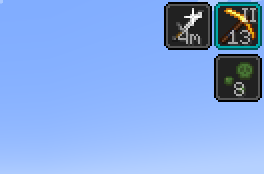

Über diese Mod
Status Effect Timer
This is a Minecraft mod for Fabric that overlays a timer on the Vanilla status effect HUD icons.
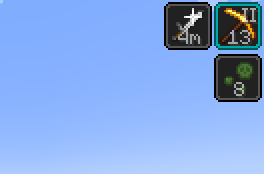
This mod overlays the time left of the status effect on the vanilla indicator. If the effect has an amplifier (as in "Haste II"), the amplifier is also overlaid. That's it. This is a very minimalistic mod. No settings are required nor provided.
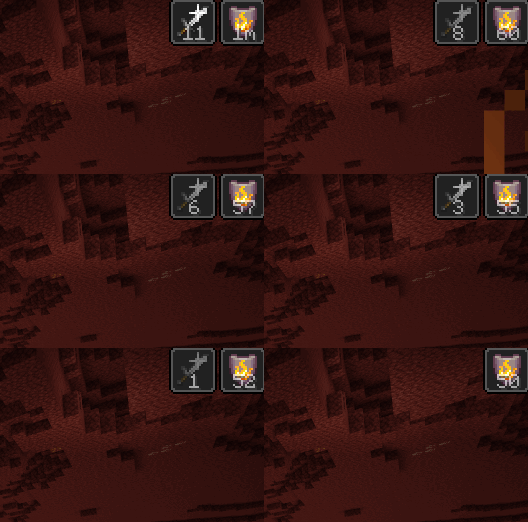
The time is presented as seconds remaining. Durations longer than 60 seconds are presented as minutes remaining (followed by "m"), and durations longer than 60 minutes are presented as hours remaining (followed by "h").
Prior to 1.19.4, status effects longer than 32147 ticks (roughly 25 minutes) where considered "infinite", and are marked as "**" in the mod. Starting with 1.19.4, status effects can be properly infinite, which is marked by a "∞" symbol, and the 32147 tick limit has been removed.
I created this since the vanilla user experience of going into the inventory, and closing the recipe book, to check the remaining time of status effects was .. not ideal. There are some other mods that tried to achieve this, but most are bloated replacement for large parts of vanilla code, and the remaining still did not keep the vanilla basics.
Screenshot
This is what it looks like when you are using the mod.
Download
You can download the mod from any of these sites:
Installation
Install this as you would any other Fabric mod. (I recommend using Prism Launcher as Minecraft launcher for modded Minecraft.)
Support
Do you have any problems with the mod? Please open an issue on Github.
Known Incompatibilities
This mod does not work if the mod 'Slight' Gui Modifications is installed and the configuration fluidStatusEffects is enabled.
This mod conflicts with Giselbaer's Durability Viewer, since that mod also draws a timer on the status effect icon. You need to disable the effect time feature in Durability Viewer to avoid clutter.
If you are using the Feather Client, you need to go to General > Vanilla Effect Overlay and select "Off" or "Bar".
Other Mods
Check out my other mods, which also supplies vanilla-style usability enhancements:
Mod Settings

Mod Settings is a Minecraft mod for Fabric that provides an easy to access configuration screen for all installed mods.
Elytra Indicators

Elytra Indicators is a Minecraft mod for Fabric that provides Vanilla-style "fly by instrument" support for elytra flight.
Verfügbare Versionen
Status Effect Timer auf deinem Client installieren
Mod-Loader lokal installieren
Installiere fabric für deine lokale Minecraft-Version.
Passende Datei herunterladen
Wähle die Status Effect Timer-Datei für fabric und Minecraft 26.3.
Mod installieren
Lege die .jar-Datei in deinem lokalen .minecraft/mods-Ordner ab und starte Minecraft neu. Eine Installation auf dem Server ist nicht nötig.
Kompatibilität
Mod-Loader
Minecraft-Versionen
26.3, 26.2, 26.1.2 (+32 weitere)
Server-seitig
✗ Nicht unterstütztEmpfohlener RAM
4 GB(min. 3 GB)Häufige Fragen
Muss Status Effect Timer auf dem Minecraft Server installiert werden?
Nein. Modrinth kennzeichnet Status Effect Timer serverseitig als nicht unterstützt. Installiere die Mod nur im lokalen Minecraft-Mods-Ordner. Dein Server kann unverändert bleiben, sofern die Mod-Seite keine zusätzliche Abhängigkeit nennt.
Welche Version und welchen Loader braucht Status Effect Timer?
Nutze eine Datei für fabric und exakt deine Minecraft-Version. Unterstützte Versionen sind unter anderem 26.3, 26.2, 26.1.2. Loader-Dateien sind nicht untereinander austauschbar.
Status Effect Timer funktioniert nicht – was kann ich prüfen?
Prüfe zuerst Minecraft-Version, Loader-Version und erforderliche Abhängigkeiten. Lege die .jar-Datei im lokalen .minecraft/mods-Ordner ab und entferne ältere Duplikate. Da die Mod clientseitig ist, löst mehr Server-RAM dieses Problem nicht.
Ähnliche Mods




![[ETF] Entity Texture Features](https://cdn.modrinth.com/data/BVzZfTc1/af683d206d50b05258d865b0d6e4aa2f2cee12f2_96.webp)

Minecraft Server für deine Gruppe
Status Effect Timer bleibt auf deinem Client. Hoste dazu eine kompatible Welt für deine Mitspieler.
Details
- Lizenz
- GNU Lesser General Public License v3.0 only
- Server-seitig
- Nicht unterstützt