
Status Effect Timer
Overlay a timer on the Vanilla status effect HUD icons
Screenshots

About this Mod
Status Effect Timer
This is a Minecraft mod for Fabric that overlays a timer on the Vanilla status effect HUD icons.
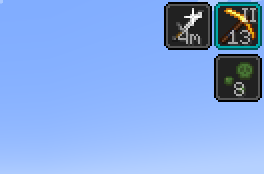
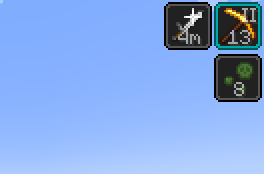
This mod overlays the time left of the status effect on the vanilla indicator. If the effect has an amplifier (as in "Haste II"), the amplifier is also overlaid. That's it. This is a very minimalistic mod. No settings are required nor provided.
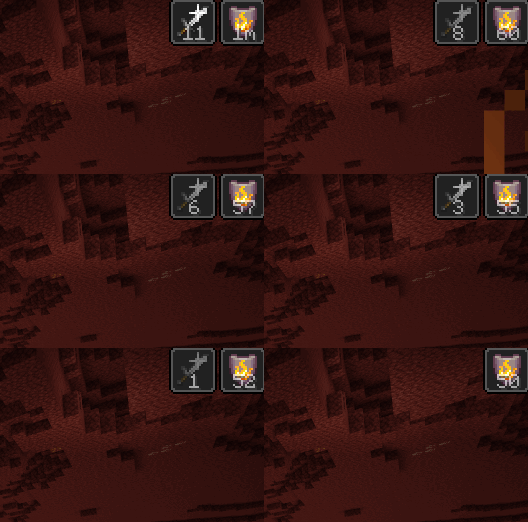
The time is presented as seconds remaining. Durations longer than 60 seconds are presented as minutes remaining (followed by "m"), and durations longer than 60 minutes are presented as hours remaining (followed by "h").
Prior to 1.19.4, status effects longer than 32147 ticks (roughly 25 minutes) where considered "infinite", and are marked as "**" in the mod. Starting with 1.19.4, status effects can be properly infinite, which is marked by a "∞" symbol, and the 32147 tick limit has been removed.
I created this since the vanilla user experience of going into the inventory, and closing the recipe book, to check the remaining time of status effects was .. not ideal. There are some other mods that tried to achieve this, but most are bloated replacement for large parts of vanilla code, and the remaining still did not keep the vanilla basics.
Screenshot
This is what it looks like when you are using the mod.
Download
You can download the mod from any of these sites:
Installation
Install this as you would any other Fabric mod. (I recommend using Prism Launcher as Minecraft launcher for modded Minecraft.)
Support
Do you have any problems with the mod? Please open an issue on Github.
Known Incompatibilities
This mod does not work if the mod 'Slight' Gui Modifications is installed and the configuration fluidStatusEffects is enabled.
This mod conflicts with Giselbaer's Durability Viewer, since that mod also draws a timer on the status effect icon. You need to disable the effect time feature in Durability Viewer to avoid clutter.
If you are using the Feather Client, you need to go to General > Vanilla Effect Overlay and select "Off" or "Bar".
Other Mods
Check out my other mods, which also supplies vanilla-style usability enhancements:
Mod Settings

Mod Settings is a Minecraft mod for Fabric that provides an easy to access configuration screen for all installed mods.
Elytra Indicators

Elytra Indicators is a Minecraft mod for Fabric that provides Vanilla-style "fly by instrument" support for elytra flight.
Available Versions
How to Install Status Effect Timer on Your Client
Install the Mod Loader Locally
Install fabric for your local Minecraft version.
Download the Matching File
Choose the Status Effect Timer file for fabric and Minecraft 26.3.
Install Mod
Place the .jar file in your local .minecraft/mods folder and restart Minecraft. No server-side installation is required.
Compatibility
Mod Loaders
Minecraft Versions
26.3, 26.2, 26.1.2 (+32 more)
Server-side
✗ UnsupportedRecommended RAM
4 GB(min. 3 GB)Frequently Asked Questions
Does Status Effect Timer need to be installed on the Minecraft server?
No. Modrinth marks Status Effect Timer as unsupported on the server side. Install it only in your local Minecraft mods folder. Your server can remain unchanged unless the mod page lists an additional dependency.
Which version and loader does Status Effect Timer require?
Use a file for fabric and your exact Minecraft version. Supported versions include 26.3, 26.2, 26.1.2. Files for different loaders are not interchangeable.
Status Effect Timer is not working – what should I check?
First check the Minecraft version, loader version and required dependencies. Put the .jar file in your local .minecraft/mods folder and remove older duplicates. Because this mod is client-side, adding server RAM will not fix it.
Similar Mods




![[ETF] Entity Texture Features](https://cdn.modrinth.com/data/BVzZfTc1/af683d206d50b05258d865b0d6e4aa2f2cee12f2_96.webp)

Minecraft Server for Your Group
Status Effect Timer stays on your client. Host a compatible world for your group.