
SwanSong Shaders
A shaders mod for 1.7.10 designed for maximum compatibility with other mods and modpacks.
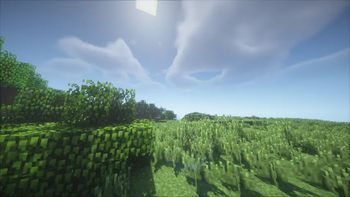
Screenshots
Über diese Mod
There's a swan song coming for you...
A breath of fresh air, a Right Proper shaders mod built from the ground up for Minecraft 1.7.10!
Designed with compatibility-first, around supporting modpacks old and new, tested against era-appropriate shaderpacks.
Compatibility
Compatible with most other popular client-side optimization and graphics mods, including but not limited to:
- FalseTweaks
- Beddium
- Right Proper Lighting Engine
- Right Proper MCPatcher
- HodgePodge
- FastCraft
- CoreTweaks
- ArchaicFix
- BugTorch
- NotFine
With expected incompatibilities with:
- OptiFine (any)
- Original ShadersMod
- MCPatcher: Forge (use Right Proper MCPatcher)
- Neodymium (use Beddium)
- Angelica (May work with certain modules)
- OptimizationsAndTweaks (O&T has very aggressive patches that break with most other graphics mods. Do not use it.)
Technical
SwanSong is a standalone replacement for ShadersMod, with initial support focused on shaders that already work with OptiFine 1.7.10_HD_U_E7.
It is not a backport of Iris, nor a direct descendant of ShadersMod or the GLSL Shaders mod. Outside of acting as an implementation of the specification pioneered by said mods.
A few other goodies such as threaded screenshots, OptiFine-like zooming, and a faster font rendering module are included as a bonus!
Licence
The mod was developed by Ven and FalsePattern, Copyright 2025, licensed under the Open Software License, version 3.0.
The mod logo was designed by Houstonruss, with some touchups by FalsePattern, Copyright 2025, All Rights Reserved.
For more information, see the LICENSE file. This readme section is not a replacement for the full license text.
Credits
Designed by Ven, written by FalsePattern
Initial testing done by, (alphabetic order):
- Bot
- Brandyn
- DarkShadow44
- Houstonruss
- Jss
- matt-159
- Rally
- UnicornBlood
Based on the work of:
- OG ShaderMod devs: (daxnitro, id_miner and karyonix)
Verfügbare Versionen
SwanSong Shaders auf deinem Client installieren
Mod-Loader lokal installieren
Installiere forge für deine lokale Minecraft-Version.
Passende Datei herunterladen
Wähle die SwanSong Shaders-Datei für forge und Minecraft 1.7.10.
Mod installieren
Lege die .jar-Datei in deinem lokalen .minecraft/mods-Ordner ab und starte Minecraft neu. Eine Installation auf dem Server ist nicht nötig.
Kompatibilität
Mod-Loader
Minecraft-Versionen
1.7.10
Server-seitig
✗ Nicht unterstütztEmpfohlener RAM
4 GB(min. 3 GB)Häufige Fragen
Muss SwanSong Shaders auf dem Minecraft Server installiert werden?
Nein. Modrinth kennzeichnet SwanSong Shaders serverseitig als nicht unterstützt. Installiere die Mod nur im lokalen Minecraft-Mods-Ordner. Dein Server kann unverändert bleiben, sofern die Mod-Seite keine zusätzliche Abhängigkeit nennt.
Welche Version und welchen Loader braucht SwanSong Shaders?
Nutze eine Datei für forge und exakt deine Minecraft-Version. Unterstützte Versionen sind unter anderem 1.7.10. Loader-Dateien sind nicht untereinander austauschbar.
SwanSong Shaders funktioniert nicht – was kann ich prüfen?
Prüfe zuerst Minecraft-Version, Loader-Version und erforderliche Abhängigkeiten. Lege die .jar-Datei im lokalen .minecraft/mods-Ordner ab und entferne ältere Duplikate. Da die Mod clientseitig ist, löst mehr Server-RAM dieses Problem nicht.
Ähnliche Mods

![[ETF] Entity Texture Features](https://cdn.modrinth.com/data/BVzZfTc1/af683d206d50b05258d865b0d6e4aa2f2cee12f2_96.webp)
![[EMF] Entity Model Features](https://cdn.modrinth.com/data/4I1XuqiY/6e5bbd0d06b1741bfdab6c0cfab6de8fdaf0064c_96.webp)



Minecraft Server für deine Gruppe
SwanSong Shaders bleibt auf deinem Client. Hoste dazu eine kompatible Welt für deine Mitspieler.