
Symbol Chat
A client side mod that adds a symbol/emoji menu as well as writing in different unicode fonts.
Screenshots
Über diese Mod
Symbol Chat



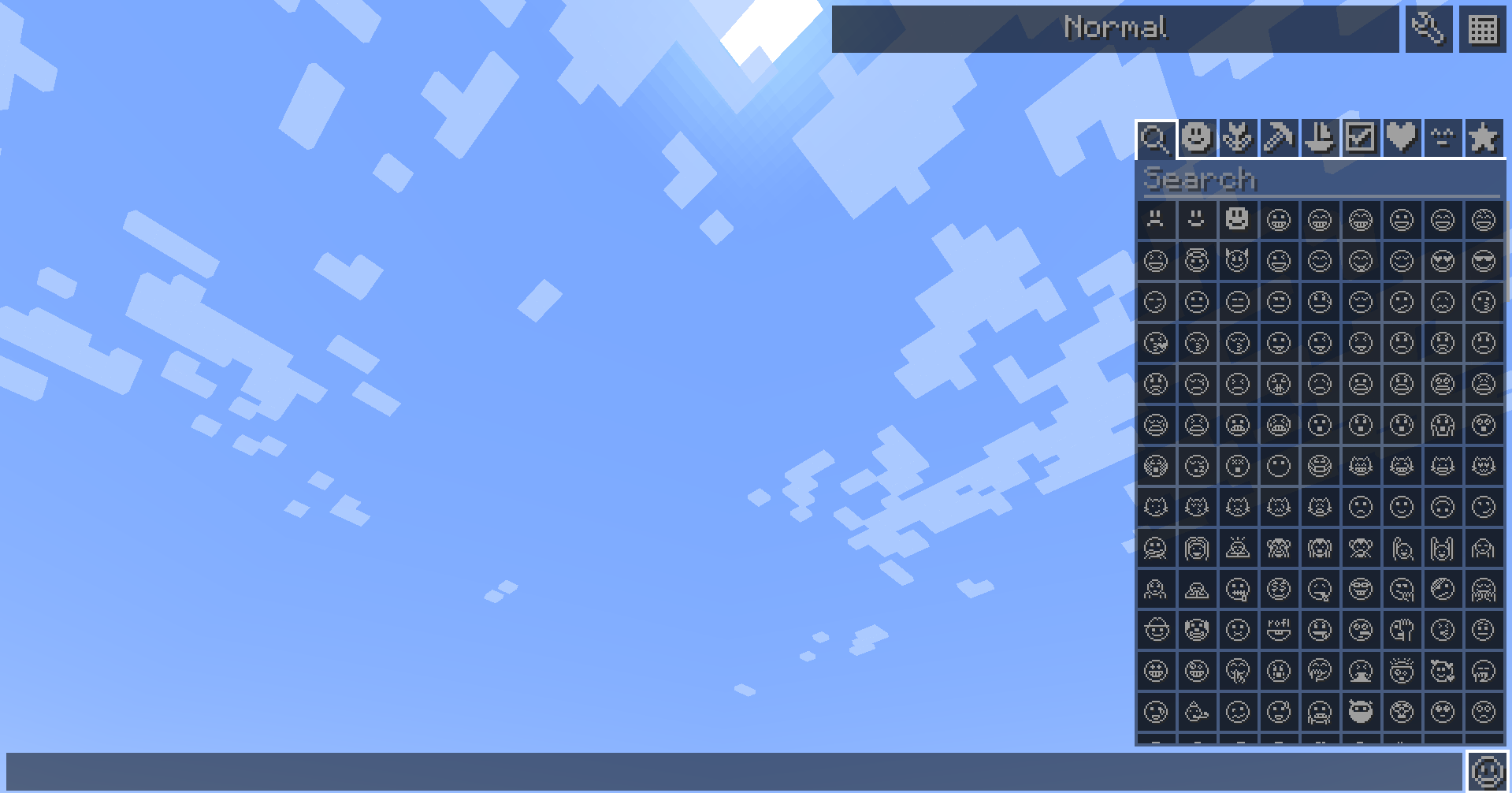
This client side mod allows you to paste special characters into the chat, on signs, books, and in the anvil text box.
It also has support for a customizable symbol and kaomoji list.
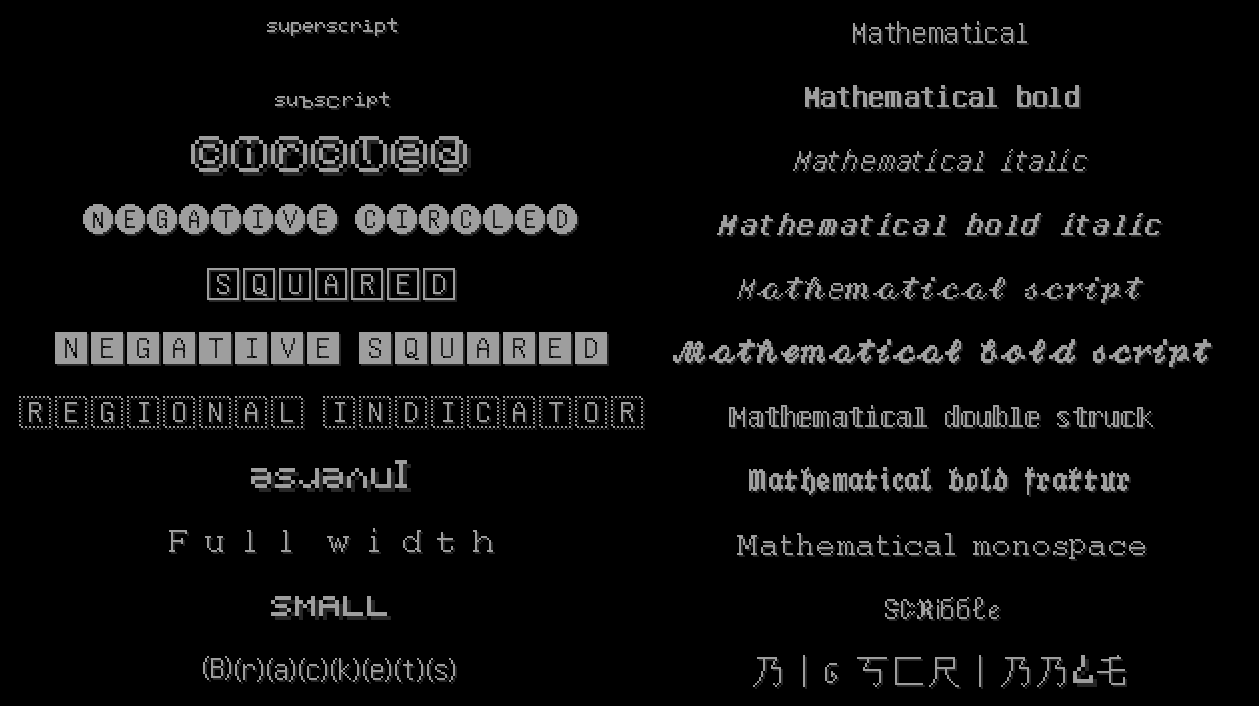
Additionally, you can select a unicode font that is supported by minecraft,
and your typed text will automatically get converted into the supported characters.
All symbols are unifont symbols supported by minecraft, meaning all other players can see them without needing the mod on their client or the server.
Basic usage
The symbol panel can be accessed by clicking the small button on the bottom left, available in several screens:
- Chat screen
- Anvil screen
- Sign edit screen
- Book editing screen

When opened, on the top there are multiple tabs in which all symbols are grouped.
Clicking on a symbol in a tab will paste it into your chat box.
The first tab shows all available symbols of the following tabs and additionally has a search bar for finding a specific symbol.

The next tabs group the symbols into various categories:
- Faces & People
- Nature & Food
- Things
- Activities, Transport & Places
- Symbols
- Shapes
The tab labeled ^-^ contains various kaomojis like ¯\_(ツ)_/¯.
The last tab is a favorites tab, which you can add favorite symbols too as well as adding custom symbols.
To favorite a symbol, just right click it in the symbol panel.
Symbols can be un-favorited by just right-clicking it again.
Symbol suggestions
For inserting symbols faster, you can use the symbol suggestion popup, which works similar to other chat platforms.
By typing a colon (:), a popup will open and show favorite symbols. If you then type something after the colon,
you can search for symbols that match with what you type.
For example, if you type :cro it will suggest a crown, crocodile, croissant, cross and crossed flags.
You can press ⇥ Tab to insert the first suggestion. If you press ↑, you can then select one
with the arrow keys ← and →.
To insert the selected symbol, press ⇥ Tab or ⏎ Enter.

If you just enter a colon without entering anything after, it will show the first couple favorited symbols for quick access.
Fonts
On the top right of supported screens, you can choose between many different fonts.
You can select a font on the dropdown on the top right.
This will change the text you type to that font.
Fonts make use of unicode characters to produce a more interesting looking text.
These are also supported on clients without symbol-chat and can be seen by everyone.

Config
Some aspects of this mod are configurable using the builtin configuration menu.
The configuration screen is accessible through the gear button on the top of the chat screen, as well as the ModMenu config button.
The config allows you to change the appearance and behavior of the symbol-chat HUD.
You can also add custom symbols not present in the tabs by adding them to the "Favorite symbols" text box.
There is also support for adding custom kaomojis.

Unicode table
As an advanced feature, you can access a unicode table through the ⣿⣿ button next to the config buton.
This allows you to browse all unicode pages with the minecraft font to find new symbols.
You can also search symbols and directly add them to your favorites or copy them to the clipboard.

Fully customizable
The symbol tabs and the symbol fonts can be fully customized and expanded using resource packs. For more information, visit the Wiki.
Compatible projects
- The Pixel Twemoji 9x and
Pixel Twemoji 18x resource packs can be used to get nicer looking
emojis than minecraft's. They also provide a symbol panel layout more suitable for these emojis.
Verfügbare Versionen
Symbol Chat auf deinem Client installieren
Mod-Loader lokal installieren
Installiere fabric für deine lokale Minecraft-Version.
Passende Datei herunterladen
Wähle die Symbol Chat-Datei für fabric und Minecraft 26.3.
Mod installieren
Lege die .jar-Datei in deinem lokalen .minecraft/mods-Ordner ab und starte Minecraft neu. Eine Installation auf dem Server ist nicht nötig.
Kompatibilität
Mod-Loader
Minecraft-Versionen
26.3, 26.2, 26.1.2 (+27 weitere)
Server-seitig
✗ Nicht unterstütztEmpfohlener RAM
4 GB(min. 3 GB)Häufige Fragen
Muss Symbol Chat auf dem Minecraft Server installiert werden?
Nein. Modrinth kennzeichnet Symbol Chat serverseitig als nicht unterstützt. Installiere die Mod nur im lokalen Minecraft-Mods-Ordner. Dein Server kann unverändert bleiben, sofern die Mod-Seite keine zusätzliche Abhängigkeit nennt.
Welche Version und welchen Loader braucht Symbol Chat?
Nutze eine Datei für fabric und exakt deine Minecraft-Version. Unterstützte Versionen sind unter anderem 26.3, 26.2, 26.1.2. Loader-Dateien sind nicht untereinander austauschbar.
Symbol Chat funktioniert nicht – was kann ich prüfen?
Prüfe zuerst Minecraft-Version, Loader-Version und erforderliche Abhängigkeiten. Lege die .jar-Datei im lokalen .minecraft/mods-Ordner ab und entferne ältere Duplikate. Da die Mod clientseitig ist, löst mehr Server-RAM dieses Problem nicht.
Ähnliche Mods






Minecraft Server für deine Gruppe
Symbol Chat bleibt auf deinem Client. Hoste dazu eine kompatible Welt für deine Mitspieler.