
Take Your Stream Chat
Live chat from Twitch, YouTube, Kick & TikTok — right inside your Minecraft world.
Screenshots
Über diese Mod
Take Your Stream Chat
Chat from Twitch, YouTube, Kick and TikTok - inside Minecraft, next to you.
No second monitor. No OBS overlay you keep forgetting to look at. Messages pop up as little cards in the world, or sit quietly in a screen corner. Read chat, pin a funny one, keep playing.

Two ways to show chat
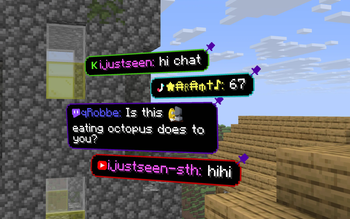
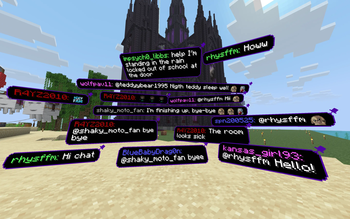
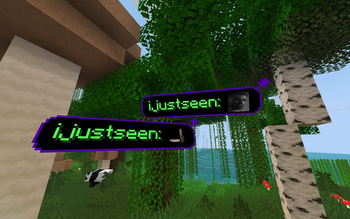
In the world. Bubbles spawn around you, or only in front of you (so they stay on camera). Look at a message and the timer pauses - handy when you want to read it out loud. Left-click to dismiss, right-click to pin. Pins stick around per world and dimension.
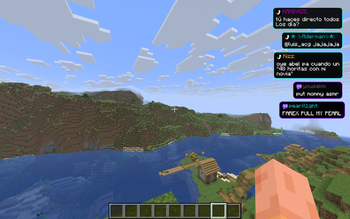
On the HUD. A stack in any screen corner. Still visible when you open your inventory. Nudge it with X/Y offsets so it doesn’t cover your hotbar.
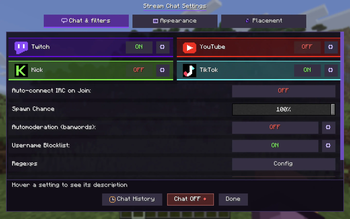
Pick In world or On HUD in settings → Appearance. Fine-tune where things sit in Placement.
What else you get
- Several platforms at once - turn on the ones you actually stream on
- Emotes as pictures - Twitch, 7TV, Kick, YouTube stickers, plus optional color emoji
- Role badges — host, mod, VIP, sub next to the name
- Your colors — panel fill and border (or let the border follow the platform color)
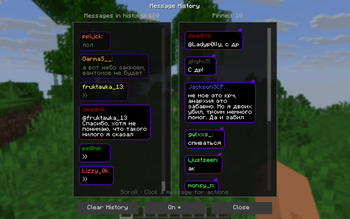
- History — scroll back, replay a message, pin it again, or block the nick
- Filters — banwords, regex, username blocklist, and per-platform role filters (subs / VIP / mods / followers)
- Per-platform mute — hide one source’s messages or its ping sound without disconnecting
- TikTok gifts and follows — optional, off by default
It’s client-side. Only you need the mod.
Setup (about two minutes)
- Install Fabric and Fabric API for your Minecraft version. Download the matching jar from this page.
- Drop the jar in
mods/and launch. - Press
]to open settings. - Turn on a platform, click the gear, paste your channel /
@username. - Hit Chat ON at the bottom (or press
[).
Turning a platform on does not connect by itself. That’s on purpose: you can set everything up, then go live with one click.
Mod Menu is optional. Fabric API is not.
Keys
| Key | What it does |
|---|---|
] |
Open settings |
[ |
Connect / disconnect all enabled chats |
In the world, empty hand:
- Left click — dismiss a message
- Right click — pin; click the pin (or hold) to unpin / drag
You can change the keys in Minecraft’s Controls menu.
Tips from streaming with it
- Chat too fast? Lower spawn chance so not every message becomes a bubble.
- Want a clean POV? Use HUD, or FOP only so 3D cards stay in your field of view.
- Noisy chat? Open the platform gear and turn off “show everyone”, then keep only subs / VIP / mods.
- Don’t want to press
[every session? Turn on auto-connect when you join a world. /streamchat test hellois the fastest way to see a bubble without going live.
Commands
You probably won’t need these — settings cover the same things. Main command is /streamchat (/minestream still works).
| Command | |
|---|---|
/streamchat test Hello! |
Spawn a test message |
/streamchat chat start / chat stop |
Same as [ |
/streamchat banword add word |
Add a filtered word |
/streamchat blockuser add SomeNick |
Block a username |
/streamchat help |
Full list |
Versions
Minecraft 1.21, 1.21.1, 1.21.4, 1.21.8, 1.21.10, 1.21.11, 26.1, 26.2. One jar per game version — pick yours on this page.
Needs Fabric Loader and Fabric API.
Coming from Take Your MineStream (1.x)
Same mod, new name. Settings and pinned messages migrate on first launch. Old jars were tyms-…, new ones are tysc-…. Don’t run both.
Something broken? Tell us me GitHub.
Verfügbare Versionen
Take Your Stream Chat auf deinem Client installieren
Mod-Loader lokal installieren
Installiere fabric für deine lokale Minecraft-Version.
Passende Datei herunterladen
Wähle die Take Your Stream Chat-Datei für fabric und Minecraft 26.3.
Mod installieren
Lege die .jar-Datei in deinem lokalen .minecraft/mods-Ordner ab und starte Minecraft neu. Eine Installation auf dem Server ist nicht nötig.
Kompatibilität
Mod-Loader
Minecraft-Versionen
26.3, 26.2, 26.1.2 (+12 weitere)
Server-seitig
✗ Nicht unterstütztEmpfohlener RAM
4 GB(min. 3 GB)Häufige Fragen
Muss Take Your Stream Chat auf dem Minecraft Server installiert werden?
Nein. Modrinth kennzeichnet Take Your Stream Chat serverseitig als nicht unterstützt. Installiere die Mod nur im lokalen Minecraft-Mods-Ordner. Dein Server kann unverändert bleiben, sofern die Mod-Seite keine zusätzliche Abhängigkeit nennt.
Welche Version und welchen Loader braucht Take Your Stream Chat?
Nutze eine Datei für fabric und exakt deine Minecraft-Version. Unterstützte Versionen sind unter anderem 26.3, 26.2, 26.1.2. Loader-Dateien sind nicht untereinander austauschbar.
Take Your Stream Chat funktioniert nicht – was kann ich prüfen?
Prüfe zuerst Minecraft-Version, Loader-Version und erforderliche Abhängigkeiten. Lege die .jar-Datei im lokalen .minecraft/mods-Ordner ab und entferne ältere Duplikate. Da die Mod clientseitig ist, löst mehr Server-RAM dieses Problem nicht.
Ähnliche Mods

![[ETF] Entity Texture Features](https://cdn.modrinth.com/data/BVzZfTc1/af683d206d50b05258d865b0d6e4aa2f2cee12f2_96.webp)
![[EMF] Entity Model Features](https://cdn.modrinth.com/data/4I1XuqiY/6e5bbd0d06b1741bfdab6c0cfab6de8fdaf0064c_96.webp)



Minecraft Server für deine Gruppe
Take Your Stream Chat bleibt auf deinem Client. Hoste dazu eine kompatible Welt für deine Mitspieler.