
The Block Box
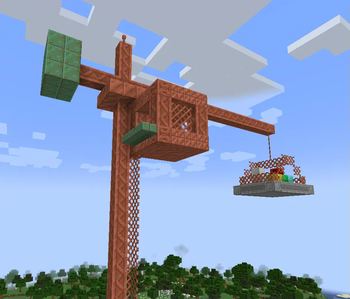
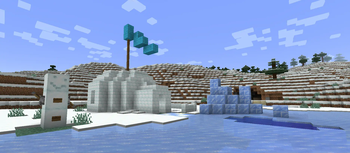
A collection of building blocks, furniture and decorations!
Screenshots
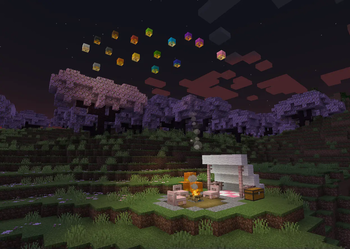
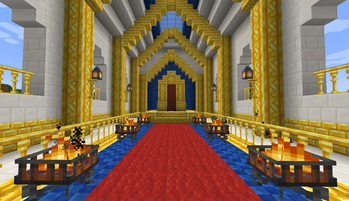
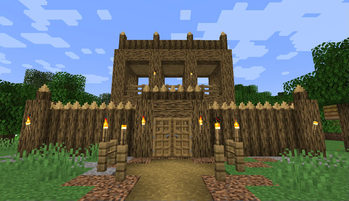
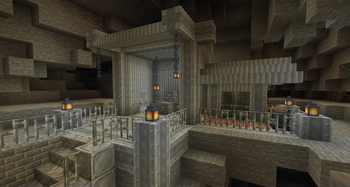
Über diese Mod

The Block Box is exactly what the name says - a box full of blocks!
Here you'll find a variety of block sets, decorations, light sources and furniture. Ever wanted to build an opulent mansion with gold? How about an industrial complex with iron and copper? Or maybe you just want to sit down in a chair and watch the sky lanterns fly? This mod has got you covered!
The Block Box aims to extend the block palette of Minecraft wherever it makes sense, adding blocks for themes and use cases that aren't well-covered by existing blocks.
Also, the mod does not generate anything in your world - you can just drop it in at any time!
Take a look around and see if anything fits your next build!
Frequently Asked Questions
Q. Can I use this mod into my modpack?
A. Yes! Feel free to feature The Block Box in your modpack, and customize it as you see fit for the experience you're crafting. Just keep in mind:
Make sure to credit, and don't claim The Block Box as your own creation;
Always read the changelogs! Minor and major versions can sometimes have breaking changes, which will be explained there.
Q. Which versions of Minecraft will you support?
A. Currently, The Block Box is only available for Minecraft 1.21.1, but I might backport it to 1.20.1 once I have time. No promises!
Q. Do you have a Patreon, or similar means of supporting your work?
A. Not currently, but thanks for your consideration! Although I am currently unemployed, the money I earn from my projects is enough to sustain me in the meantime.
Verfügbare Versionen
The Block Box auf dem Server installieren
Server bestellen
Bestelle einen Minecraft Java Server mit mindestens 3 GB RAM (4 GB empfohlen).
neoforge Loader setzen
Wähle im Panel unter "Egg" den neoforge-Loader und die passende Minecraft-Version (26.1.2).
Mod installieren
Öffne den Mod-Browser im Dashboard und suche nach "The Block Box". Klicke "Installieren" – fertig! Alternativ: Lade die .jar via SFTP in den /mods Ordner.
Kompatibilität
Mod-Loader
Minecraft-Versionen
26.1.2, 26.1.1, 26.1 (+1 weitere)
Server-seitig
✓ ErforderlichEmpfohlener RAM
4 GB(min. 3 GB)Häufige Fragen
The Block Box Server crasht beim Start – was tun?
Häufigste Ursache: falsche neoforge-Version oder zu wenig RAM. Prüfe im Server-Log (latest.log), ob ein "OutOfMemoryError" oder "Mixin"-Fehler auftritt. Bei Mado Hosting: Stelle sicher, dass mindestens 3 GB RAM zugewiesen sind und der Loader zur Mod-Version passt (26.1.2). Über das Panel kannst du den Loader mit einem Klick wechseln.
Ist The Block Box mit neoforge kompatibel?
The Block Box unterstützt offiziell neoforge für Minecraft 26.1.2, 26.1.1, 26.1. Im Mado Dashboard werden inkompatible Loader-Kombinationen automatisch erkannt.
Server laggt mit The Block Box – wie optimiere ich die Performance?
Empfohlener RAM: 4 GB (+1 GB pro 8 Spieler). Prüfe mit /spark profiler, ob The Block Box den meisten Tick-Time verbraucht. Häufige Fixes: Server-View-Distance auf 8-10 reduzieren, bei Forge "performant" oder "starlight" als Zusatz-Mod installieren. Bei Mado Hosting läuft dein Server auf NVMe-SSDs mit dedizierten CPU-Kernen für minimale Latenz.
Ähnliche Mods

![[ETF] Entity Texture Features](https://cdn.modrinth.com/data/BVzZfTc1/af683d206d50b05258d865b0d6e4aa2f2cee12f2_96.webp)
![[EMF] Entity Model Features](https://cdn.modrinth.com/data/4I1XuqiY/6e5bbd0d06b1741bfdab6c0cfab6de8fdaf0064c_96.webp)



Modded Server mieten
Installiere The Block Box mit nur einem Klick auf deinem Server.